Four Operations Rules That Make Inbox Management for Outreach Scale
Operations first playbook for inbox management in outreach. Fix deliverability, sender naming and rotation, ramping, ownership, plus managed AI SDR option.

Four Operations Rules That Make Inbox Management for Outreach Scale
Reliable inbox management for outreach comes down to four things working together: authenticated sending infrastructure, named senders instead of role-based addresses, automated follow-ups with a clear human handoff point, and one owner assigned to every open thread. Skip any one of these and the others start to fail. Build all four and cold outreach scales without torching your domain reputation.
TL;DR:
- Proper inbox management relies on four key systems: authenticated infrastructure, named senders, automated follow-ups with clear human handoff, and owned reply threads; skipping any undermines success.
- Using role-based addresses hampers open and reply rates, while individual, human-like sender names improve engagement and reduce spam flags.
- Authentic domain setup with SPF, DKIM, DMARC, and gradual ramping are essential to maintain deliverability and prevent domain reputation damage during outreach.
- Clear ownership rules, reply prioritization, and suppression management are critical for timely responses, avoiding collisions, and ensuring compliance with opt-out regulations.
- Automating mechanical tasks and leveraging managed platforms like Runleadpilot can save weeks of setup, ensuring scalable, compliant outreach with minimal manual intervention.
Table of Contents
- What Is Inbox Management for Outreach, Exactly?
- Core Inbox-Management Strategies for Outreach Teams
- Tools and Integrations That Keep Outreach in One Workflow
- Deliverability and Sending Infrastructure: Aliases, Domains, and Authentication
- Team Workflows and Ownership for Agencies and Internal Teams
- Measurement and Monitoring: What to Track and How to Act
- Implementation Checklist: Setting Up or Fixing Outreach Inboxes
- How a Managed AI SDR Workflow Simplifies Inbox Operations
- Handling Unsubscribes and Compliance With Email Regulations
- Security Best Practices to Prevent Inbox Compromise
- Inbox Organization Best Practices: Labels, Folders, and Filters
- Managing Response Prioritization and Triage Workflows
- Strategies for Personalizing Outreach Within Inbox Management
- The Real Priority Order Most Teams Get Backwards
- Let LeadPilot Handle the Infrastructure You’d Otherwise Build by Hand
- Sources
What Is Inbox Management for Outreach, Exactly?
Most sales teams think inbox management means “keeping the inbox tidy.” That is not what breaks outbound campaigns. The real discipline sits at the intersection of deliverability engineering and workflow design. It covers how you structure sending domains, name your senders, rotate mailboxes, automate follow-ups, and route replies so nothing dies in a shared inbox nobody owns.
Effective outreach management treats the inbox as infrastructure, not a mailbox. A domain with bad DKIM alignment can tank open rates for an entire team overnight, regardless of how good the copy is. A shared inbox with no ownership rules means three reps reply to the same lead, or nobody replies at all. Both problems have nothing to do with writing better emails. They are systems failures, and systems failures need systems fixes.
Core Inbox-Management Strategies for Outreach Teams
The teams that keep deliverability high and follow-up rates low waste do a handful of things consistently. None of them are complicated on their own. The failure mode is usually skipping one because it feels like overhead.
- Automate follow-ups and bumps, but set a hard stop. Sequences that auto-send a bump (“just floating this back up”) after 3 to 5 days outperform manual follow-up almost every time, simply because humans forget. But automation needs an exit rule: after two or three touches with no reply, the thread either pauses or routes to a human for a judgment call, never loops indefinitely.
- Ramp mailboxes deliberately with inbox rotation. Spreading volume across multiple mailboxes on a domain, and increasing send volume gradually, is a ramping strategy, not a workaround. New mailboxes need to earn trust with mailbox providers before they carry real volume.
- Use named local-parts, never role-based addresses.
sarah.chen@yourdomain.comwill out-performsales@yourdomain.comon opens and replies, and it reads as a human, not a blast. Named senders outperform role-based addresses in open and reply rates on both metrics, and mailbox providers are more likely to flag generic role addresses as bulk mail. - Pick shared inbox or unified inbox, and set collision rules before launch. A shared inbox model assigns a thread to one owner with a status field. A unified inbox pulls email, LinkedIn, and SMS into a single pane. Either works, but only if you decide upfront who touches what, so two reps don’t answer the same lead an hour apart.
- Keep templates modular, not identical. Build snippets you swap in and out (industry hook, recent trigger event, specific pain point) rather than one static template everyone copies verbatim. The structure stays consistent; the content doesn’t feel canned.
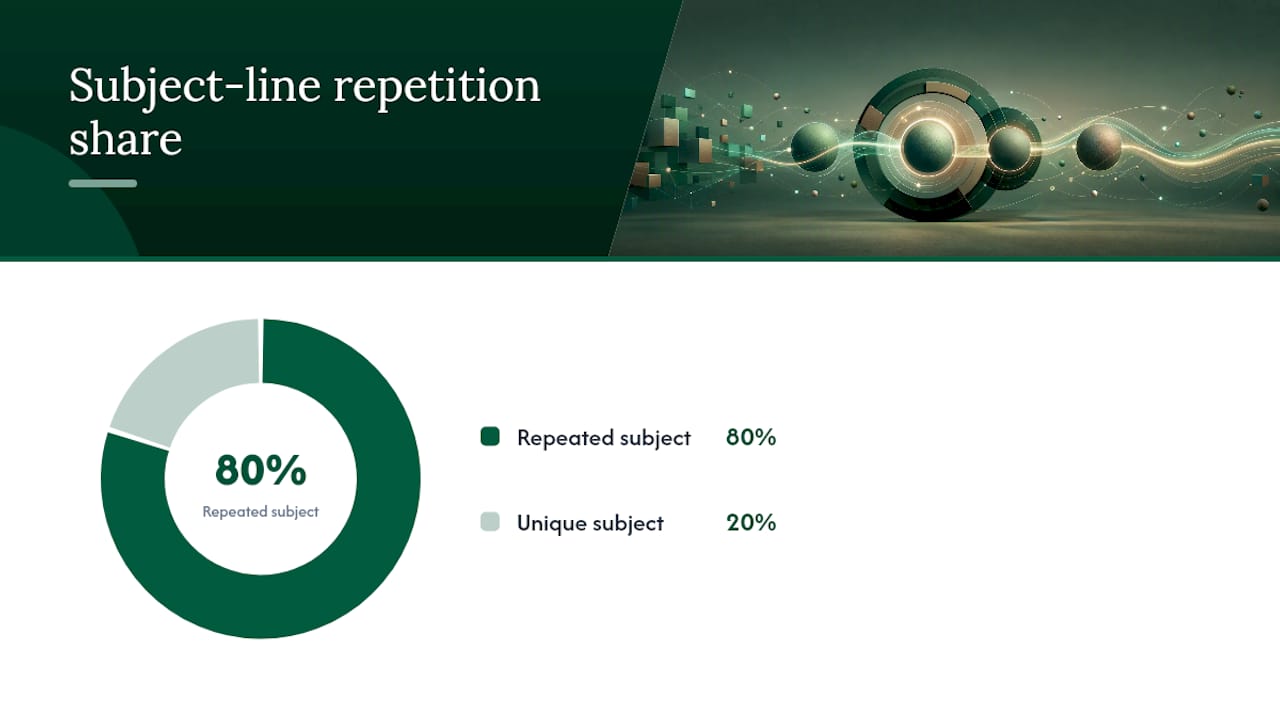
Pro Tip: Audit your last 100 sent emails for subject-line repetition before you touch copy. If 80 of them share the same subject line, that pattern alone is enough to get flagged as bulk mail, no matter how personalized the body text is.
Personalization tactics matter here too. A modular first-line strategy tends to beat generic openers, and sequence design that varies touch spacing avoids looking robotic to spam filters watching for identical timing patterns.
Tools and Integrations That Keep Outreach in One Workflow
Picking a tool stack for outreach comes down to one question: does it consolidate actions into a single, trackable place, or does it just add another tab? Three broad categories cover most teams:
- Shared-inbox platforms work best for small teams handling a moderate reply volume where ticketing and internal notes solve the ownership problem directly.
- CRM-integrated inboxes fit teams already living in Salesforce or HubSpot, where reply activity needs to sync automatically into deal records without manual logging.
- Native email clients with plugins suit solo operators or very lean teams who don’t need heavy routing logic yet.
Unified inbox platforms that pull in LinkedIn and SMS alongside email cut down on context switching, which speeds up response time and improves tracking. That consolidation matters more as headcount grows and reply volume outpaces what one person can watch across five separate apps.
Whatever you choose, prioritize these integration points:
- Two-way CRM sync, so replies update deal stages without manual entry
- Calendar booking embedded in the reply flow, so a “yes, let’s talk” doesn’t require five more emails
- Automation triggers that pause sequences the moment someone replies
- Logging that survives audits, meaning every send and reply has a timestamp and owner
One warning: a display-name alias set up inside Gmail or Outlook is not sending infrastructure. It looks like a separate identity in the UI, but it authenticates against the same underlying domain and mailbox, which does nothing to isolate reputation risk. When evaluating a vendor, check whether they give you real domain and authentication controls, API-driven logging, and multi-channel consolidation, not just a prettier inbox skin.
Deliverability and Sending Infrastructure: Aliases, Domains, and Authentication
This is where most outbound programs quietly fail. Email aliases are inappropriate for outbound cold outreach because they create a mismatch between the From header and the Mailed-By header. That mismatch triggers DMARC misalignment, and major mailbox providers increasingly treat it as grounds for permanent rejection, not a soft bounce you can recover from.
The fix is architectural, not cosmetic. Secondary domains or properly provisioned subdomains, each with its own licensed mailboxes, isolate reputation risk so one bad campaign doesn’t burn your primary business domain. It costs more per seat than routing everything through aliases, but it is the correct pattern for scalable outbound.
Before sending a single cold email, confirm:
- SPF records list every sending source that touches the domain
- DKIM signs outbound mail and the signature aligns with the From domain
- DMARC is set to enforce alignment, not just monitor it
- Every mailbox is verified and warmed, not just created and immediately loaded with volume
- Mailbox-level monitoring is active from day one, not added after a problem shows up
Ramping matters as much as the setup. Deliverability guidance commonly recommends starting around 20 emails per day per mailbox and increasing by roughly 10 to 20 percent daily, while watching bounce and complaint rates the entire time. A dedicated guide to sending limits walks through the exact throttling math if you’re ramping multiple mailboxes at once.
Target thresholds typically aim to keep bounce rates low and spam complaint rates very low. If either metric drifts past that line, the remediation is immediate: pause the mailbox, cut volume in half, and run a short warmup cycle before resuming. Waiting a week to see if it “self-corrects” almost never works, because reputation damage compounds daily once a provider flags a pattern.
Team Workflows and Ownership for Agencies and Internal Teams
Deliverability infrastructure means nothing if replies sit unanswered in a shared inbox for four days. Ownership rules solve that, and they need to exist before volume ramps up, not after the first missed opportunity.
- Assign an owner and an SLA to every open thread. A reply gets a status: open, action required, or handed off. Nothing sits unowned, and every status has a time limit attached.
- Set clear rules for reply handoff. Define when a rep can send a draft reply unsupervised, when a manager needs to approve it first, and how AI-drafted responses get reviewed before they go out. A structured reply-management workflow keeps hot leads from cooling off while a draft waits in a queue.
- Use ticketing and @mentions to prevent collisions. Internal notes attached to a thread stop two reps from replying to the same lead an hour apart, which happens more often than most teams admit.
- Build agency-specific separation from day one. Multi-client workspaces need isolated sending domains per client, even when billing is consolidated under one account. Cross-client reputation bleed is a real risk, and it is far easier to prevent than to fix after a client’s domain gets flagged.
Reporting cadence matters for agencies specifically. Clients want to see reply rates and meeting counts weekly, not buried in a monthly recap that arrives after the campaign has already moved on.
Measurement and Monitoring: What to Track and How to Act
Conversion to booked meeting is the number that actually pays the bills, but it means nothing if the first two are broken.
- Set up automated alerts through Google Postmaster Tools, Microsoft SNDS, and reputation dashboards so drift gets caught in hours, not weeks.
- Pause a mailbox the moment bounce or complaint thresholds get breached, then throttle volume and run a fresh warmup before resuming.
- Run A/B tests on small samples first. Testing subject lines across your full list at once risks tanking deliverability on copy that hasn’t been validated yet.
Pro Tip: Check Google Postmaster Tools weekly even when metrics look fine. Reputation scores can slide two weeks before open rates visibly drop, and by the time you notice the open-rate dip, you’re already behind.
Implementation Checklist: Setting Up or Fixing Outreach Inboxes
- Inventory every active sending identity and running sequence before changing anything.
- Choose domain architecture: secondary domains or subdomains, licensed mailboxes, and deploy SPF, DKIM, and DMARC records.
- Connect your shared inbox or CRM, assign ownership SLAs, and turn on follow-up automation with a slow ramp.
- Run a small, contained test campaign, validate bounce and complaint metrics, then scale volume in controlled increments.
How a Managed AI SDR Workflow Simplifies Inbox Operations
Every step above is real work: domain provisioning, DNS records, ownership rules, ramp schedules. A managed platform like Runleadpilot’s AI SDR handles the mechanical parts directly. It identifies your ideal customer profile from your website, researches matching decision-makers, manages dedicated sending domains and inboxes for deliverability, and automates follow-ups on a controlled ramp before handing warm replies to a human. That mirrors the exact checklist this article walks through, minus the manual DNS work and the weeks spent watching Postmaster Tools for drift.
Handling Unsubscribes and Compliance With Email Regulations
Unsubscribe handling isn’t optional cleanup work. It’s a legal requirement, and getting it wrong creates liability that dwarfs whatever a missed reply costs you.
Under CAN-SPAM, every commercial email needs a working opt-out mechanism, and requests must be honored within 10 business days. Under GDPR, the standard is stricter: outreach to individuals in the EU/EEA generally requires either consent or a documented legitimate-interest basis, and opt-out requests need to be processed without undue delay.
The operational fix is straightforward. Build a suppression list that syncs across every mailbox and sequence tool in use, so an unsubscribe in one campaign automatically blocks that contact everywhere, not just in the sequence where they clicked the link. Manual suppression list management, updated after the fact in a spreadsheet, is where compliance breaks down in practice.
A few concrete habits keep this clean:
- Include a visible, working unsubscribe link in every cold email, even the first touch
- Process opt-outs immediately rather than batching them weekly
- Keep records of consent basis for EU contacts, since regulators can ask for it
- Never re-add a suppressed contact to a new list without a fresh, separate basis for contact
Agencies running outreach for multiple clients need suppression lists that stay client-specific. A contact who opts out of one client’s outreach hasn’t necessarily opted out of every client the agency represents, but the records need to reflect that distinction clearly if it’s ever questioned.
Security Best Practices to Prevent Inbox Compromise
A compromised sending mailbox is worse than a deliverability problem. It’s a breach that can expose every contact in your pipeline and get your entire domain blacklisted in a single afternoon.
Multi-factor authentication on every mailbox that touches outbound sending is the baseline, not an upgrade. Password-only access on a mailbox sending hundreds of emails a day is an open invitation, particularly once that mailbox becomes a known target after appearing in outbound headers repeatedly.
API keys and OAuth tokens connecting your sending tool to Gmail or Microsoft 365 need scoped permissions, not blanket account access. If a sequencing tool only needs to send and read replies, it shouldn’t also have permission to modify account settings or access every folder in the mailbox.
Review connected apps quarterly. Sales teams accumulate integrations over time, a Chrome extension here, a Zapier connection there, and forgotten access grants are a common entry point for account takeover. Revoke anything not actively in use.
Watch for the specific signs of compromise that matter for outbound mailboxes: sudden spikes in send volume outside normal hours, bounce rates jumping without a corresponding campaign change, or replies to emails your team never sent. Any one of those warrants an immediate password reset and a review of connected app permissions, not a “we’ll check on it later.”
Inbox Organization Best Practices: Labels, Folders, and Filters
Organization inside the inbox itself matters less than infrastructure, but it’s still where reps lose hours every week if it’s set up carelessly.
Filters should do the sorting work automatically. Route auto-replies and out-of-office messages to a separate folder immediately, since they clutter the primary view without needing action. Route bounce notifications to their own label so deliverability issues surface fast instead of getting buried under actual replies.
Labels work best when they map to action, not just topic. “Needs response,” “meeting booked,” and “not interested” tell a rep exactly what to do next, glancing at a folder name. Labels organized by campaign name alone tell you where a reply came from but nothing about what to do with it, which is the more urgent question every morning.
Keep the primary inbox view limited to threads that need a human decision. Everything automated, confirmations, calendar notifications, system alerts, belongs somewhere else entirely. A rep scanning 200 unread items to find the three real replies buried inside is a workflow failure, not a volume problem.
One habit that pays off disproportionately: archive aggressively once a thread reaches a terminal state (booked, disqualified, unsubscribed). An inbox that only shows live, actionable threads gets triaged in minutes. One that mixes live threads with resolved history from three months ago gets skimmed, and skimmed inboxes are where replies get missed.
Managing Response Prioritization and Triage Workflows
Not every reply deserves the same speed of response, and treating them all identically is how the best leads slip through.
A reply that says “interested, let’s talk” needs a response within the hour, not by end of day. Speed to first response correlates directly with meeting-booked rates, and a lead who hears back fast is far more likely to actually show up. A reply that says “not right now, check back in Q3” needs a note in the CRM and a scheduled follow-up, not an immediate reply at all.
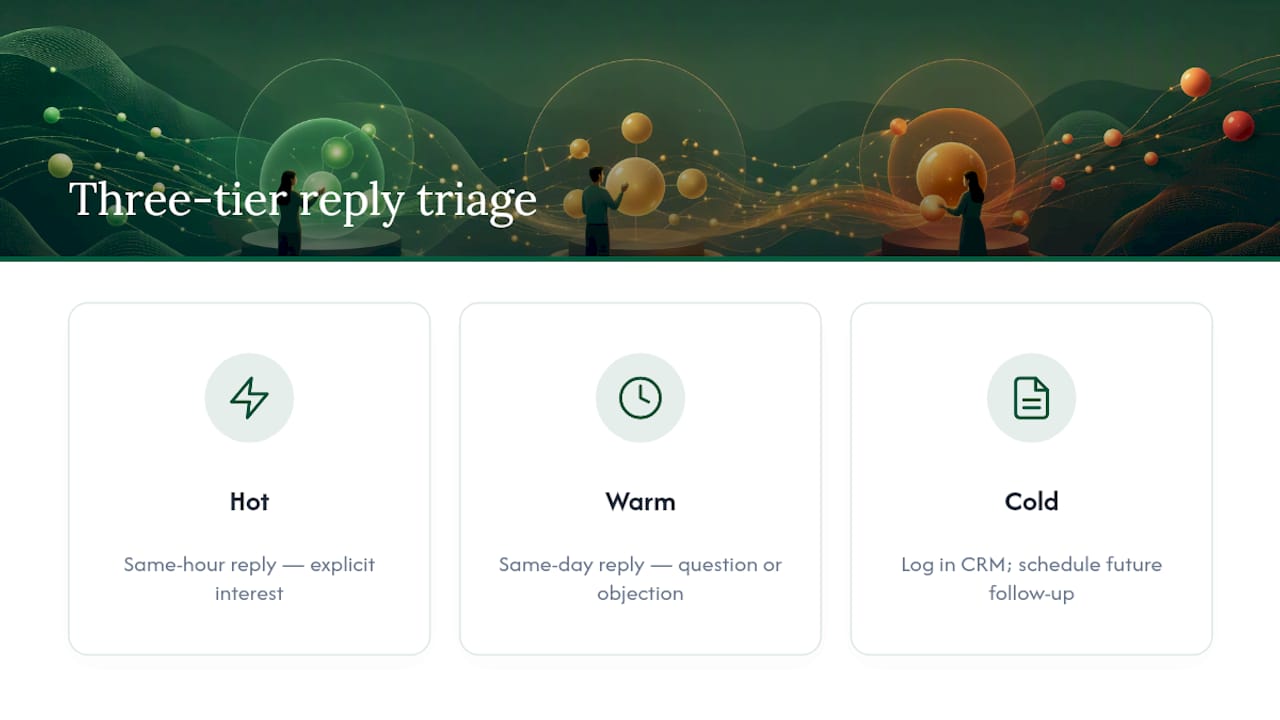
Triage works best with a simple three-tier system: hot (explicit interest, needs a same-hour reply), warm (a question or objection, needs a same-day reply), and cold (a soft no or timing issue, needs logging and a future follow-up date). Assigning that tier the moment a reply lands, rather than reading every message with equal urgency, is what keeps a busy rep from burning an hour on a “maybe later” while a “yes, let’s book time” sits unanswered two threads down.
Automation helps here too. Keyword detection can flag replies containing phrases like “not interested,” “remove me,” or “unsubscribe” for immediate suppression processing, while flagging “schedule,” “call,” or “pricing” for priority human review. That doesn’t replace judgment, but it does stop urgent replies from getting lost in a queue sorted purely by timestamp.
Strategies for Personalizing Outreach Within Inbox Management
Personalization and inbox management aren’t separate disciplines. How you personalize directly affects how your inbox setup performs, because generic-sounding batches of mail are exactly what spam filters are tuned to catch.
Real signals beat generic templates every time; a recent funding announcement, a job change, a specific product feature the prospect’s company just launched, gives a first line that reads as researched rather than mass-produced. That kind of personalization at the copy level reduces the pattern-matching signals that trigger spam filters, because no two emails in a sequence look identical to an algorithm scanning for bulk mail.
Modular snippets solve the scale problem without sacrificing that specificity. Build a library of industry hooks, trigger-event openers, and pain-point framings, then assemble them per prospect rather than writing from scratch or copying one static template. The output still varies enough to avoid looking automated, but the production time stays manageable across hundreds of contacts.
Timing personalization matters as much as copy. Varying send times and follow-up intervals across a sequence, rather than firing every touch at the same hour on the same day count, avoids the kind of rigid pattern that both spam filters and sharp prospects notice instantly.
The Real Priority Order Most Teams Get Backwards
Most advice on outreach starts with copy: better subject lines, sharper hooks, cleverer personalization. That’s backwards. A brilliant email sent from a mailbox with a broken DMARC record never reaches an inbox at all, so the copy quality is irrelevant. Deliverability infrastructure is the actual bottleneck for most teams, not creativity.
The conventional wisdom also oversells manual effort. Teams assume tighter inbox management means more hours spent triaging and organizing. It’s the opposite. The teams getting this right automate the mechanical layer, sending domains, ramp schedules, follow-up timing, and reserve human attention for the one thing automation can’t do: judgment calls on live replies.
If you’re fixing this from scratch, sequence matters. Fix authentication first. Then fix sender naming and rotation. Ownership rules come third. Copy personalization matters, but it’s the last lever to pull, not the first. A managed workflow that handles the infrastructure layer end to end, the way LeadPilot’s approach does, removes the part most teams get wrong before they ever touch a subject line.
— Harsh
Let LeadPilot Handle the Infrastructure You’d Otherwise Build by Hand
Building everything covered above, domain provisioning, authentication records, mailbox rotation, ownership rules, follow-up automation, takes weeks of setup and ongoing monitoring most lean teams don’t have spare hours for. Runleadpilot removes that entire layer: it identifies your ideal customer profile from your website, researches matching decision-makers, writes personalized sequences from real signals, and manages the dedicated sending domains, inboxes, and follow-up automation behind the scenes.

Founders running lean teams get outbound infrastructure without hiring a deliverability specialist. Sales teams get a system that ramps mailboxes safely and routes warm replies straight to a human, without anyone manually watching bounce rates. Agencies get isolated sending domains per client under one consolidated workflow. If you want to see how it maps to your own outreach before committing to anything, start a free campaign preview and check what it builds for your specific business.