Cold Email Sending Limits: A Guide for Founders & Agencies
Discover effective email sending limits for founders and agencies to maximize inbox placement and minimize spam risks with proper strategies.

Cold Email Sending Limits: A Guide for Founders & Agencies
For a warmed sending inbox, the safe daily range is about fifty to one hundred cold emails per mailbox. With two to three mailboxes per domain, a single domain can carry 100–200 sends per day before reputation risk climbs. The single most important action you can take: warm every new or reactivated domain before running any campaign volume. Skipping that step routinely produces spam-folder placement rates of 40–60%, while a properly warmed domain with clean authentication typically achieves 85–95% primary inbox placement.
Two thresholds govern everything else:
- Spam complaint rate: Keep it below 0.1%. Google’s bulk-sender enforcement treats anything at or above that level as a signal to throttle or block your domain.
- Per-mailbox ceiling: Data from over two million cold emails shows that exceeding about one hundred fifty sends per mailbox per day correlates with a sharp increase in spam rates, even on warmed infrastructure.
Runleadpilot manages dedicated sending domains and inboxes on your behalf, enforcing these limits automatically so your team never has to track them manually.
Key Takeaways
Managed outbound sending limits are set by provider behavioral signals, domain reputation, and per-mailbox volume thresholds, not arbitrary platform rules.
| Point | Details |
|---|---|
| Safe per-mailbox range | Send 50–100 cold emails per warmed mailbox per day; above 150/day, spam rates climb sharply. |
| Warmup is non-negotiable | Google Workspace needs 20–25 days of warmup; skipping it produces 40–60% spam placement. |
| Complaint threshold | Keep spam complaints below 0.1%; crossing that threshold triggers provider throttling or blocks. |
| Quota-to-cadence math | Monthly quota ÷ 22 days, minus 15% buffer for follow-ups, gives your net daily new-prospect sends. |
| Runleadpilot manages this for you | The platform automates domain warmup, per-mailbox pacing, and monitoring so teams scale without manual tracking. |
Table of Contents
- Why do email sending limits exist for managed outbound platforms?
- What are the safe sending ranges and ramp schedules?
- How do you map a plan quota to campaign cadence?
- When should you add domains, inboxes, or upgrade your plan?
- What does a practical warmup and deliverability checklist look like?
- What are the red flags, and how do you recover?
- How does email content and frequency affect your sending limits?
- Legal and compliance considerations for cold email sending limits
- The case for patience over volume in managed outbound
- Runleadpilot handles the infrastructure so you can focus on the pipeline
- Sources
Why do email sending limits exist for managed outbound platforms?
Inbox providers don’t publish a single hard cap. Instead, they watch a cluster of behavioral and technical signals, and when those signals look wrong, they throttle or block. Understanding which signals matter most tells you exactly which levers you control.
Authentication is the floor, not the ceiling. SPF, DKIM, and DMARC must be correctly configured before any send. Without them, providers have no basis to trust your domain, and warmup is largely wasted effort.
Beyond authentication, providers weight behavioral signals heavily: sending velocity, reply rates, time-of-day patterns, and content fingerprinting. A domain that jumps from zero to 200 sends per day in its first week looks nothing like a human. Algorithmic flags follow quickly.
Google and Microsoft enforce these signals differently. Google Workspace applies stricter velocity checks and requires a longer warmup runway. Microsoft 365 tends to throttle at the mailbox level rather than the domain level, which means a single misbehaving inbox on a shared domain can drag down the others. Both providers track engagement: a domain where nobody ever replies is a domain that looks like a spam operation.
Shared sending infrastructure, even on a managed platform, still requires per-mailbox caps. The platform’s IP reputation is a shared asset. One inbox sending at 300 per day can affect placement for every other inbox on the same infrastructure.
What are the safe sending ranges and ramp schedules?
Starter ramp for a new inbox
New Google Workspace inboxes need a minimum of 15 days of warmup, with 20–25 days recommended, while Microsoft 365 inboxes can reach reasonable placement in 10–14 days. A practical week-by-week ramp looks like this:
- Week 1: 5–10 sends per day, all warmup traffic, no cold prospects
- Week 2: 15–25 sends per day, mix of warmup and a handful of verified prospects
- Week 3: 30–50 sends per day, warmup maintained at 15–20 sends alongside cold sends
- Week 4: 50–75 sends per day, full campaign traffic with maintenance warmup running in the background
After full ramp, keep 15–20 warmup emails per day per mailbox as background maintenance. Stopping warmup entirely causes reputation drift within weeks.
Steady-state ceilings
Example calculations for small teams and agencies
Target: 200 sends per day. Using the scaling formula from Clay’s deliverability guide: 200 ÷ 50 = 4 inboxes needed; 200 ÷ 100 = 2 domains needed. In practice, provision 3 domains to keep one in a warmup or resting state.
Target: 500 sends per day. 500 ÷ 50 = 10 inboxes; 500 ÷ 100 = 5 domains. Budget for 6–7 domains to maintain rotation.
If you plan to send 80 cold emails per day, warm to 96–100. That headroom reduces the placement drop when real campaign sends begin.*
How do you map a plan quota to campaign cadence?
Most managed outbound plans express capacity as a monthly send quota. Converting that number into a daily cadence and a workable prospect list takes three steps.
Step 1: Calculate daily usable sends. Monthly quota ÷ 22 working days = gross daily sends. The result is your net daily new-prospect sends.
Example: A 20,000-email monthly quota ÷ 22 = 909 gross daily sends.
Step 2: Map to sequence steps. A 3-step sequence (initial email plus two follow-ups) means each prospect consumes 3 sends. 773 net sends ÷ 3 steps = 257 new prospects entering the sequence each day.
Step 3: Size your list. 257 new prospects per day × 22 working days = 5,654 prospects needed per month for that quota.
See Runleadpilot’s pricing page to match these numbers against specific plan tiers.
Checklist: hidden sends that eat your quota
- Follow-up steps in active sequences
- Trigger-based re-engagement emails
- API-driven sends from CRM workflows
- Out-of-office auto-reply handling (some platforms count these)
- Test sends and seed-list checks
When should you add domains, inboxes, or upgrade your plan?
Scale decisions follow a simple decision flow. Add mailboxes first when your domains are healthy and under their per-domain ceiling. Add domains when per-domain inbox count exceeds three, or when a domain’s reputation starts showing stress signals. Upgrade your plan quota when infrastructure is healthy but monthly sends are consistently hitting the cap.
Domain rotation tiers to maintain:
- Active domains: currently in campaign rotation, sending at steady-state volume
- Resting domains: pulled from rotation for a 4–6 week rest period to recover reputation
- Warmup domains: new or returning domains building toward active status
Keep at least one warmup domain for every 3–4 active domains. That pipeline means you always have a replacement ready when a domain needs to rest, with no gap in throughput.
Operational tasks that must accompany any scale event:
- Verify DNS records (SPF, DKIM, DMARC, MX) on every new domain before warmup begins; use MXToolbox to confirm propagation
- Provision new inboxes and connect them to your warmup network before adding them to campaign rotation
- Update your monitoring dashboard to include the new inboxes from day one
- Schedule the resting period for any domain being rotated out
Pro Tip: Never add more than two new domains in the same week. Staggering provisioning keeps your monitoring clean and prevents a bad DNS configuration from affecting multiple domains simultaneously.
What does a practical warmup and deliverability checklist look like?
First 30 days by provider
For Google Workspace inboxes, follow the 4-week ramp above. For Microsoft 365, you can compress weeks 1–2 into 10 days, but do not skip the maintenance warmup phase. For both, run warmup sends alongside cold sends from week 2 onward rather than treating them as sequential phases.
Technical checklist before any send
Every domain needs these verified before warmup or campaign sends begin:
- SPF record published and validated
- DKIM key generated, published, and signing outbound mail
- DMARC policy set (start with
p=nonefor monitoring, move top=quarantineafter 30 days of clean data) - MX records pointing to the correct mail server
- Custom tracking domain configured (avoid shared tracking domains)
- Unsubscribe link present in every email template
- Seed-list test run to check placement before first campaign send
Monitoring thresholds
| Metric | Green | Yellow (investigate) | Red (pause) |
|---|---|---|---|
| Spam complaint rate | Below 0.1% | Below 0.1% | Above 0.1% |
| Bounce rate | Below 2% | 2%–3% | Above 3% |
| Reply rate | Above 3% | 1%–3% | Below 1% |
| Inbox placement | Above 85% | 70%–85% | Below 70% |
Check these metrics weekly during ramp, daily during the first two weeks of any new domain. Tools like email tracking dashboards surface these signals without manual log-pulling.
What are the red flags, and how do you recover?
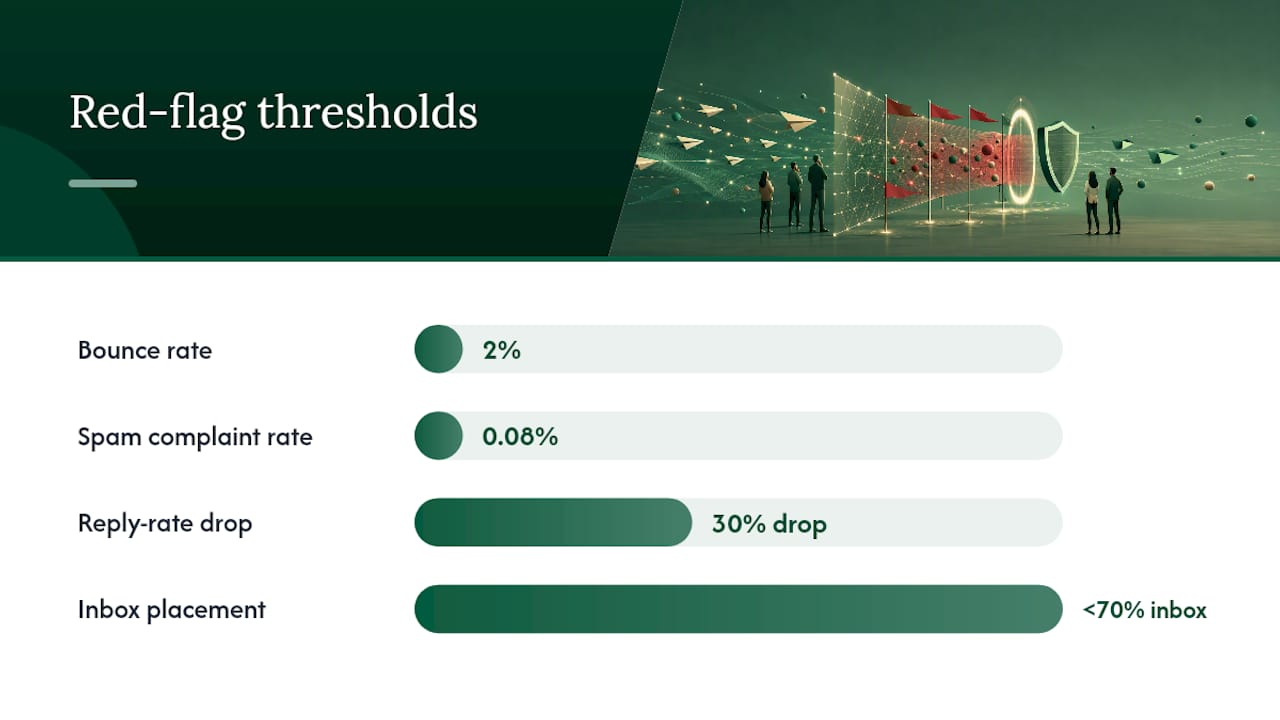
Primary warning signs:
- Bounce rate climbing above 2% on a previously healthy domain
- Spam complaint rate crossing 0.08% (act before it hits 0.1%)
- Reply rate dropping more than 30% week-over-week with no list or copy change
- Placement test showing inbox rate below 70%
- A provider review notice or sending suspension
Recovery playbook:
- Pause all campaign sends immediately. Do not reduce volume; stop entirely. Continuing at lower volume while the domain is flagged extends the damage window.
- Isolate the affected domain. Identify whether the problem is one inbox or the full domain. Check bounce and complaint data by inbox.
- Revalidate your list. Run the prospect list through a verification tool. Remove any address with a hard bounce or complaint history.
- Rewarm with a conservative ramp. Start at 10–15 sends per day and rebuild over 2–3 weeks. Do not rush back to steady-state volume.
- Run a placement test before resuming campaigns. Confirm inbox placement is above 80% before restarting cold sends.
Realistic recovery timelines: A domain with a mild complaint spike typically recovers inbox placement within 7–14 days of pausing and rewarming. A domain that received a provider suspension may take 30–60 days. Domains with persistent list quality problems sometimes never fully recover, which is why list quality and real prospect replies matter more than any warmup tactic.
How does email content and frequency affect your sending limits?
Content and send frequency are deliverability signals, not just copy decisions. Providers scan for patterns that correlate with spam: identical subject lines across thousands of sends, heavy image-to-text ratios, URLs pointing to domains with poor reputation, and sending bursts that cluster all sends into a one-hour window.
Personalization at the sentence level, not just the first-name merge tag, produces measurably different engagement.
Frequency matters too. Sending a second follow-up within 24 hours of the first, at scale, generates complaint rates that a slower cadence avoids. A 3–4 day gap between sequence steps is a reasonable floor. Spreading sends across the full business day rather than batching them in the morning also reduces velocity flags.
Legal and compliance considerations for cold email sending limits
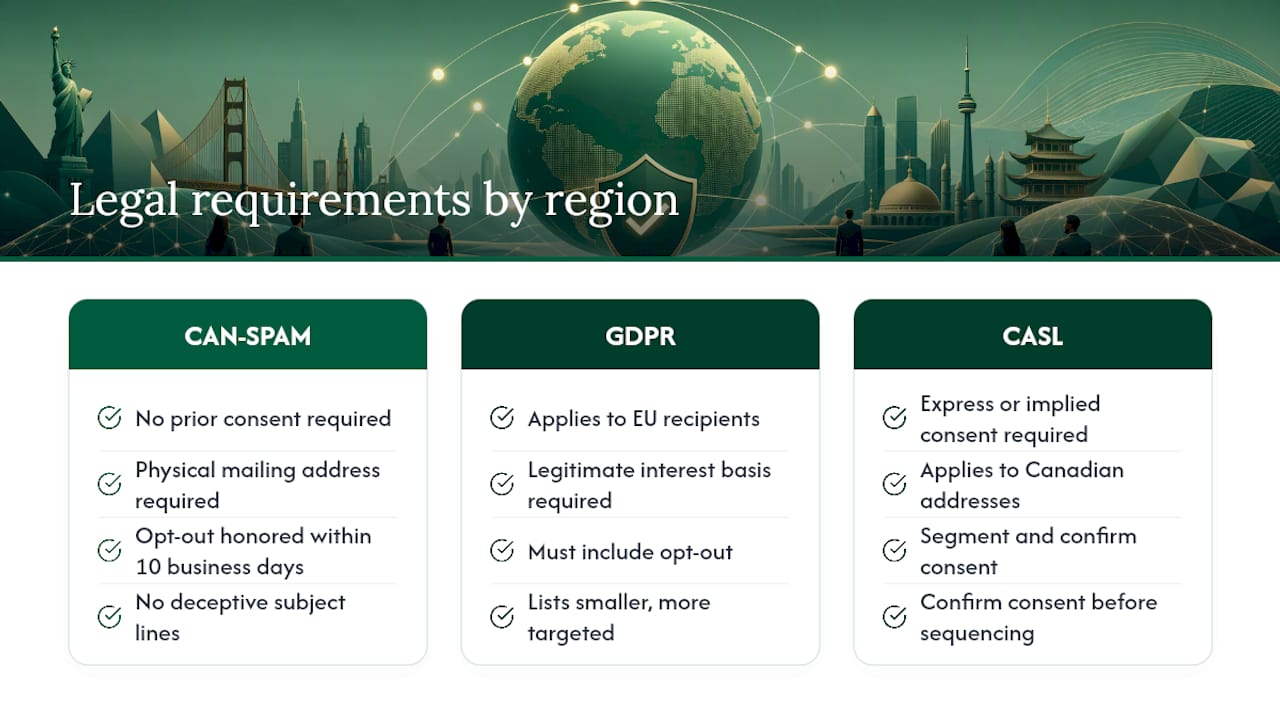
CAN-SPAM governs commercial email in the United States. For B2B cold outreach, the key requirements are: a physical mailing address in every email, a clear opt-out mechanism that is honored within 10 business days, no deceptive subject lines, and accurate header information. CAN-SPAM does not require prior consent for B2B emails, which is why cold outreach to business addresses is legal under US law when those requirements are met.
GDPR applies when you are emailing recipients in the European Union, regardless of where your company is based. Under GDPR, cold B2B email to individual business addresses (as opposed to generic role addresses like info@) requires a legitimate interest basis and must include an opt-out. The practical implication for sending limits: GDPR-compliant lists tend to be smaller and more targeted, which actually supports better deliverability because engagement rates are higher on a well-scoped list.
Canada’s CASL is stricter than both. It requires express or implied consent before sending commercial electronic messages to Canadian addresses. If your prospect list includes Canadian contacts, segment them and confirm consent basis before adding them to any sequence.
The compliance floor for any outbound campaign: every email must have a working unsubscribe link, you must process opt-outs promptly, and your list must be sourced from a legitimate channel. Non-compliance is not just a legal risk; providers treat high opt-out rates as a spam signal, which feeds directly back into your sending limits.
The case for patience over volume in managed outbound
Most teams that come to Runleadpilot with a deliverability problem share one history: they pushed volume before infrastructure was ready. The instinct makes sense. You have a list, you have a quota, and the campaign should be running. But a domain that gets flagged in week one can take two months to recover, and during that window, you are not reaching anyone.
The math actually favors patience. Within three weeks, that second scenario is sending at 200 per day and reaching almost nobody.
What the data from warmup studies consistently shows is that real prospect replies are the strongest positive signal a domain can generate. Synthetic warmup engagement helps, but providers can detect networked warmup behavior and discount it. The fastest path to high-volume sending is a short, disciplined warmup followed by highly targeted sends that generate genuine replies. That is the sequence that builds a domain reputation that lasts.
Runleadpilot handles the infrastructure so you can focus on the pipeline
Managing dedicated sending domains, warmup schedules, DNS records, and per-mailbox pacing is a full-time operational job. Runleadpilot takes that off your plate entirely. The platform provisions dedicated domains for your account, runs automated warmup against business-tier inbox pools, enforces per-mailbox send limits, and monitors complaint and bounce rates in real time so problems surface before they become suspensions.

For founders and lean sales teams, that means no manual DNS setup, no spreadsheet tracking warmup progress across six inboxes, and no guessing whether your daily send count is safe. For agencies managing multiple clients, Runleadpilot’s multi-client workspace keeps each client’s domain infrastructure isolated, so one client’s list quality issue never bleeds into another’s sending reputation.
The platform maps your plan quota directly to campaign cadence, showing you exactly how many new prospects enter sequences each day and flagging when follow-up volume is eating into your net new-prospect sends.
Start with a free campaign preview to see how your quota maps to real prospect volume before committing to a plan.
Sources
- Email Warmup: The Complete Guide to Landing in the Primary Inbox (2026)
- Cold Email Warm Up: What Actually Works in 2026 Data from 1M+ Inboxes
- Cold Email Sending Limits: Data from 2 Million Emails (2026)
- b2b-cold-email-deliverability
- Email warmup: what it actually does (and what it does not)
Run Google Postmaster Tools checks and third-party placement tests weekly during any ramp period. The data those tools return is the earliest signal you will get before a deliverability problem becomes a suspension.