Cold Email Sequences That Actually Book B2B Meetings
Discover effective cold email sequences that secure B2B meetings. Learn tips, templates, and strategies to enhance your outreach success.

Cold Email Sequences That Actually Book B2B Meetings
The highest-performing B2B cold email sequences run a tight 4–6 email core, space touches two to three days apart in the first week, and add phone or LinkedIn for any account worth more than a few thousand dollars. Each follow-up earns its place by adding a new angle, not repeating the opener. Most positive replies arrive between emails 3 and 5, so sequences that stop after very few touches leave real pipeline on the table.
Before you send a single email, verify these five things:
- Your sending domain is separate from your primary domain, fully warmed, and has SPF, DKIM, and DMARC records in place
- Every prospect on your list matches your ICP at the title, company size, and industry level
- Each email in the sequence has one job and one CTA
- Your first email is under 150 words
- You have a genuine breakup email as the final touch
That is the short answer. The rest of this guide gives you the architecture, templates, deliverability setup, and a full 10-touch multichannel playbook to build it properly.
Key Takeaways
The most effective B2B cold email sequences combine a 4–6 email core with a new angle at every touch, proper deliverability infrastructure, and a genuine breakup email as the final step.
| Point | Details |
|---|---|
| Sequence length by segment | SMB: 4–5 touches over 14–21 days; enterprise: 8–12 touches over 30–45 days. |
| Reply rate benchmarks | Average cold email reply rates run 3–4.5%; top performers beat this through tighter segmentation. |
| Thread-reply architecture | Keep touches 1–3 on one thread, then open a new subject at touch 4 to refresh attention. |
| Deliverability first | Use a dedicated sending domain, verify SPF/DKIM/DMARC, and warm the inbox for 3–4 weeks before launching. |
| Runleadpilot for managed outreach | Runleadpilot handles targeting, personalized copy, domain management, and reply routing for founders and lean sales teams. |
Table of Contents
- What are cold email sequences, and why do most of them fail?
- How should you structure a cold email sequence by segment?
- How do you write each email in a cold sequence?
- Five ready-to-use cold email sequence templates
- What does good deliverability actually require?
- How do you personalize cold emails at scale without losing quality?
- What KPIs should you track, and how do you run A/B tests?
- A 10-touch, 21-day multichannel sequence playbook
- Your pre-launch and first-14-days monitoring checklist
- When does running sequences in-house stop making sense?
- Runleadpilot handles the full sequence workflow so your team can focus on closing
- Sources
What are cold email sequences, and why do most of them fail?
A cold email sequence is a planned series of one-to-one outreach messages sent to a prospect who has not previously engaged with you. The goal is not to broadcast news or nurture a warm lead. It is to start a conversation with someone who does not know you yet, using a structured cadence of touches that each add new value.
That distinction matters. A nurture campaign assumes some prior interest and typically sends the same message to thousands of people. A cold sequence is personal by design, even when it is automated. Each message should feel like it was written for one person, because the best ones effectively are.
Five reasons cold sequences fail
Poor targeting. Sending to a list that does not match your ICP is the fastest way to burn a domain. A VP of Engineering at a 500-person SaaS company has completely different pain points than a Director of Operations at a 15-person agency. Generic copy aimed at both converts for neither.
Weak personalization. Dropping a first name and company name into a template is not personalization. Prospects have seen that pattern thousands of times. Real personalization references something specific: a recent funding round, a job posting that signals a business priority, a product change, or a role-relevant metric.
Repetition across touches. The most common sequencing mistake is sending the same pitch four times with slightly different subject lines. Each email in a sequence should have a distinct job: pattern interrupt, reframe, pivot, social proof, or breakup. Sequences that treat each email as having a specific role report that most positive replies arrive between emails 3 and 5, not at email 1.
Bad cadence. Sending three emails in three days feels like spam. Waiting three weeks between touches lets the prospect forget you entirely. The right spacing depends on the segment, but the general rule is two to three days between early touches, then stretching to four to five days later in the sequence.
Deliverability issues. A perfectly written sequence that lands in spam converts at zero. Sending from your primary domain without warmup, using spam-trigger language, or mailing unverified lists will tank your sender reputation within weeks. This is a technical problem with a technical fix, covered in detail later.
How should you structure a cold email sequence by segment?
Sequence architecture is not one-size-fits-all. The right number of touches, the spacing between them, and the channel mix all shift depending on who you are targeting and how much each account is worth.
Default architectures by segment
SMB (1–50 employees): A 4–5 touch sequence over 14–21 days is the standard. These buyers move faster, have shorter decision cycles, and are often the decision-maker themselves. Sending 4–6 touches over 14–21 days covers most cold email programs well, with a genuine breakup email closing the sequence. Phone is optional for SMB unless deal size justifies it.
Mid-market (50–500 employees): A 6–8 touch sequence over 21–30 days, mixing email with LinkedIn connection requests and at least one phone attempt. Multiple stakeholders may be involved, so the sequence sometimes needs to run in parallel to two or three contacts at the same account.
Enterprise (500+ employees): Cold sequences building awareness from scratch often use 8–12 touchpoints, spread over 30–45 days. Enterprise buyers require more social proof, more patience, and a multichannel approach. Phone and LinkedIn are not optional here. A single email thread rarely breaks through.
Timing and spacing
Space emails two to three days apart during the first week, then stretch to four to five days for later touches. The early touches are when attention is highest. Later touches serve as reminders and reframes, not repeated pitches.
A thread-reply architecture works well for the first three touches: keep them on the same email thread so the prospect sees the conversation building. Touch 4 should open a new subject line entirely, which refreshes attention and prevents the thread from being buried. This thread-reply first, new-subject later approach is one of the more underused structural moves in cold outreach.
Pro Tip: Run many small, tightly targeted campaigns of 21–50 recipients rather than one large blast. Smaller batches let you personalize properly and protect your sender reputation if one segment underperforms.
Channel mix guidance
Email is the base of every sequence. Phone and LinkedIn increase hit rate for higher-value accounts, but adding channels without a clear plan just creates noise.
- Add a LinkedIn connection request or profile view after email 2 for mid-market and enterprise targets
- Make a phone call after email 3 if the account is worth pursuing aggressively
- Leave a voicemail only if you have something specific to say; generic voicemails hurt more than they help
- Use LinkedIn InMail as a last-resort touch after the email sequence ends, not as a parallel track
How do you write each email in a cold sequence?
Every email in a sequence has one job. The moment you try to accomplish two things in one message, you accomplish neither. Here is how to write each component.
Subject lines
Short subject lines outperform long ones in cold outreach. Aim for five words or fewer. The goal is to get the open, not to explain the offer.
Formulas that work:
- Question format: “Quick question, [First Name]”
- Observation format: “[Company] + [specific trigger]”
- Referral format: “[Mutual connection] suggested I reach out”
- Curiosity format: “Idea for [Company]”
What to avoid: subject lines that sound like marketing (“Increase your revenue by 3x”), all-caps words, excessive punctuation, and anything that could trigger a spam filter (“FREE,” “guaranteed,” “limited time”).
Test subject lines before anything else. They determine whether the rest of the email gets read.
Openers that prove relevance fast
The first sentence of a cold email is the hardest to write and the most important. It needs to prove you did your homework without sounding like you are showing off.
The observation-implication-CTA structure works well:
- Observation: Something specific and true about the prospect (“I saw [Company] just launched [product feature]…”)
- Implication: Why that matters in the context of your offer (“…which usually means [relevant challenge] becomes a priority”)
- CTA: A single, low-friction ask (“Worth a 15-minute call to see if we can help?”)
Never open with “I hope this email finds you well.” Never open with a paragraph about your company. Get to the point in sentence one.
Body structure
Short emails consistently outperform longer ones for cold outreach, with recommended lengths clustering between 75–150 words for B2B messages. One idea per email. One CTA per email. No exceptions.
Format for mobile: short paragraphs of one to two sentences, no walls of text, no bullet-heavy pitches. If your email looks like a brochure on a phone screen, it reads like one too.
CTAs that get replies
The best CTAs in cold email are binary or near-binary. They remove friction by making the “yes” obvious.
- “Would it make sense to connect?” (yes/no)
- “Are you the right person to talk to about this?” (redirects if not)
- “Open to a 15-minute call Thursday or Friday?” (specific, easy to answer)
- “Worth a quick chat?” (lowest friction possible)
Avoid CTAs that require the prospect to do work: “Check out our website,” “Download our case study,” “Fill out this form.” Those are nurture tactics, not cold outreach tactics.
The breakup email
The final touch in any sequence should be a genuine breakup email. Not a passive-aggressive “I guess you’re not interested,” but a respectful close that gives the prospect an easy out while leaving the door open.
A breakup email that works:
That email gets replies. People respond to being let go because it feels human.
Five ready-to-use cold email sequence templates
Each template below includes full copy, day offsets, subject lines, and a short note on why it works. Keep emails under 150 words. Personalize the bracketed fields before sending.
1. The trigger-based sequence (funding, hiring, or product launch)
Why it works: Trigger events signal that a company is in motion. Reaching out when a prospect just raised a round or posted five sales roles tells them you did your homework. Relevance is built in.
Day 0 — Email 1 Subject: Congrats on the [Series X] round
Hi [First Name], saw the announcement about [Company]'s [round]. Companies at that stage usually start scaling outbound fast and hit the same wall: building a qualified pipeline without burning out the team. We help [similar companies] solve that. Worth a quick chat?
[Your name]
Day 3 — Email 2 (thread reply) Subject: Re: Congrats on the [Series X] round
Following up in case this got buried. We recently helped [similar company type] book [X] qualified meetings in [timeframe] without adding headcount. Happy to share how if it’s relevant.
Day 7 — Email 3 (thread reply) Subject: Re: Congrats on the [Series X] round
One more thought: most teams we talk to at your stage are either building outbound from scratch or trying to fix a sequence that isn’t converting. Either way, 15 minutes usually clarifies whether we can help. Open to it?
Day 14 — Email 4 (new subject) Subject: Closing the loop
Hi [First Name], I’ll stop following up after this. If outbound pipeline ever becomes a priority, feel free to reach out. Happy to help when the timing is right.
2. The product-market-fit test sequence (early-stage founders)
Why it works: Short, direct, and honest. Early-stage founders respect brevity. This sequence tests messaging quickly without over-engineering the copy. A compact Day 0 / Day 3 / Day 7 / Day 14 cadence is a proven structure for fast validation.
Day 0 — Email 1 Subject: Quick question about [pain point]
Hi [First Name], we built [product] to help [ICP] with [specific problem]. You’re exactly the type of company we built it for. Would it be useful to see how it works in 15 minutes?
Day 3 — Email 2 (thread reply) Subject: Re: Quick question about [pain point]
Wanted to follow up. We’re talking to a handful of [ICP] companies this month to get feedback on whether [product] solves the right problem. Your perspective would be genuinely useful, even if it’s not a fit.
Day 7 — Email 3 (thread reply) Subject: Re: Quick question about [pain point]
Last follow-up on this. If [pain point] isn’t on your radar right now, totally understand. If it is, I’d love 15 minutes. Either way, no pressure.
3. The low-touch SDR outreach sequence (high-volume, SMB)
Why it works: Designed for volume. Short, punchy, and easy to personalize at scale with a single observation token. High-performing senders run tightly targeted campaigns of 21–50 recipients rather than blasting thousands.
Day 0 — Email 1 Subject: [Company] + [your company]
Hi [First Name], noticed [Company] is [specific observation — hiring, expanding, using a specific tool]. We help [ICP] with [one-line outcome]. Worth a quick call?
Day 3 — Email 2 (thread reply) Subject: Re: [Company] + [your company]
Following up. We’ve helped [similar companies] [specific result]. Happy to share more if relevant.
Day 8 — Email 3 (new subject) Subject: Still worth connecting?
Hi [First Name], one last note. If [pain point] is something you’re working on, I’d love to connect. If not, no worries at all.
4. The executive outreach sequence (VP / C-suite)
Why it works: Executives get more email than anyone. This sequence leads with business impact, not product features, and respects their time by being extremely short. The 5–7 touch cadence with thread-reply architecture is well-suited to senior targets who need multiple exposures before responding.
Day 0 — Email 1 Subject: [Specific business outcome] for [Company]
Hi [First Name], [one-sentence observation about their business]. We help [similar companies] [specific outcome]. Is this on your radar for [current quarter]?
Day 5 — Email 2 (thread reply) Subject: Re: [Specific business outcome] for [Company]
Wanted to add one thing: [relevant case study or data point in one sentence]. Happy to share more context if useful.
Day 12 — Email 3 (thread reply) Subject: Re: [Specific business outcome] for [Company]
[First Name], I know your inbox is full. If [business problem] is something your team is working on, 20 minutes could be worth it. If not, I’ll stop here.
Day 20 — Email 4 (new subject) Subject: One last thought
Hi [First Name], last note from me. [One-sentence insight or resource relevant to their role]. If you ever want to explore [outcome], I’m here.
Day 30 — Email 5 (new subject) Subject: Closing the loop
Closing this out. If [pain point] becomes a priority, feel free to reach out. Best of luck with [specific initiative you observed].
5. The re-engagement sequence (past prospects who went cold)
Why it works: Someone who engaged before is warmer than a net-new prospect. This sequence acknowledges the prior conversation, adds new information, and gives them an easy way back in.
Day 0 — Email 1 Subject: Checking back in
Hi [First Name], we spoke [timeframe] ago about [topic]. A few things have changed on our end that might be relevant: [one-sentence update]. Worth reconnecting?
Day 5 — Email 2 (thread reply) Subject: Re: Checking back in
Following up. Since we last talked, [relevant development — new feature, case study, customer result]. Happy to share more if the timing is better now.
Day 12 — Email 3 (new subject) Subject: Still relevant?
Hi [First Name], last note. If [pain point] is still something you’re working on, I’d love to reconnect. If priorities have shifted, totally understand.
What does good deliverability actually require?
Great copy in the spam folder converts at zero. Deliverability is infrastructure, and it needs to be set up before you send a single email in your sequence.
SPF, DKIM, and DMARC
These three DNS records authenticate your sending domain and tell receiving mail servers that your emails are legitimate. All three are required.
- SPF (Sender Policy Framework): lists which servers are authorized to send email on behalf of your domain
- DKIM (DomainKeys Identified Mail): adds a cryptographic signature to each email that verifies it has not been tampered with
- DMARC (Domain-based Message Authentication, Reporting, and Conformance): tells receiving servers what to do when SPF or DKIM fails, and sends you reports on authentication failures
Set DMARC to p=none initially to monitor without blocking, then move to p=quarantine once you have confirmed your authentication is clean.
Domain setup and warmup
Never send cold outreach from your primary domain. Use a dedicated sending domain (e.g., getcompanyname.com or companyname-outreach.com) that you can retire if reputation takes a hit. Proper dedicated-domain setup and a gradual warmup ramp prevent reputation damage and improve inbox placement. For more on selecting the right warmup tools, the best email warmup tools for B2B teams guide covers managed and DIY options in detail.
A practical warmup ramp:
| Week | Daily send volume | Notes |
|---|---|---|
| Week 1 | 10–20 emails/day | Human-to-human only, high engagement |
| Week 2 | 20 emails/day | Mix in some cold prospects |
| Week 3 | 40 emails/day | Begin real sequences at low volume |
| Week 4+ | 75–150 emails/day | Scale gradually based on metrics |
Throttling and per-domain caps
Even a fully warmed domain has limits. Sending 500 emails per day from a single inbox will trigger spam filters. A safe ceiling for a warmed sending inbox is 100–150 emails per day. If you need more volume, add inboxes across multiple warmed domains rather than pushing one inbox past its limit.
Deliverability monitoring
Watch these metrics weekly:
- Bounce rate: keep hard bounces below 2%. Above that, stop and clean your list.
- Spam complaint rate: Google and Microsoft flag accounts with complaint rates above 0.1%. One complaint per 1,000 emails sent is already a warning sign.
- Open rate: a sudden drop in open rate often signals inbox placement problems before bounce rates spike.
- Reply rate: the ultimate signal. If reply rate drops while open rate holds, the copy is the problem. If both drop together, deliverability is the problem.
Use tools like Google Postmaster Tools and Microsoft SNDS to monitor domain reputation directly. If you see reputation degrading, pause sending immediately, clean your list, and reduce volume before resuming.
How do you personalize cold emails at scale without losing quality?
Personalization is the variable that separates a 1% reply rate from a 5% reply rate. But most teams personalize the wrong things.
High-value signals to use
The signals that actually move the needle are ones that indicate a business priority or a change in the prospect’s situation:
- Trigger events: funding rounds, acquisitions, new product launches, executive hires, or expansions into new markets
- Job postings: a company hiring five SDRs signals they are building outbound; a company posting for a Head of Data signals a data infrastructure investment
- Role-relevant metrics: if you sell to marketing leaders, referencing their company’s estimated ad spend or organic traffic trend is more relevant than a generic compliment
- Technology signals: tools a company uses (visible via job postings or public data) reveal their stack and their gaps
- Content they have published: a recent blog post, podcast appearance, or LinkedIn article gives you a genuine conversation starter
Safe token usage vs. real insight
Merge tags (first name, company name, job title) are table stakes, not personalization. Use them, but do not confuse them with the real thing.
Real personalization is a bespoke sentence that could only be written for that specific prospect. It takes 30–60 seconds of research per contact. At scale, that means either limiting your list size or using a tool that automates signal research.
Dos and don’ts:
- Do: reference a specific trigger event with a clear implication for their business
- Do: use sales prospecting tools that surface intent signals and company-level data automatically
- Do: write one personalized opening sentence and keep the rest templated
- Don’t: fake personalization (“I love what you’re doing at [Company]” with no specifics)
- Don’t: over-personalize to the point of being creepy (referencing personal social media activity)
- Don’t: use personalization tokens in subject lines if the data is unreliable (a wrong first name in a subject line is worse than no first name)
Pro Tip: Write the personalized first sentence last. Draft the template body first, then add the observation sentence at the top once you have done the research. It is faster and keeps the template consistent.
What KPIs should you track, and how do you run A/B tests?
Vanity metrics will mislead you. Open rate is a starting point, not a success metric. Here is what actually matters.
Core KPIs
Reply rate: the percentage of prospects who reply to any email in the sequence. Modern average cold email reply rates sit around 3–4.5%, with top performers beating those averages through tighter segmentation and better personalization. If you are below 2%, something is broken. If you are above 6%, you have found something worth scaling.
Positive reply rate: replies that express interest, ask a question, or agree to a call. This is the metric that maps to pipeline. A 4% reply rate with 80% of replies being “unsubscribe” is not a success.
Meeting booked rate: the percentage of prospects who convert to a scheduled call. This is the number your sequence ultimately exists to move.
Spam complaint rate: keep this below 0.1%. Above that, your domain reputation is at risk.
Bounce rate: hard bounces above 2% mean your list needs cleaning before you send another email.
A/B testing plan
Test one variable at a time. The most impactful variables to test, in order of priority:
- Subject line (highest leverage, fastest signal)
- Opening sentence (second-highest leverage)
- CTA wording (yes/no vs. open-ended)
- Email length (75 words vs. 150 words)
- Send day and time (Tuesday morning vs. Thursday afternoon)
Run each test for at least 100 sends per variant before drawing conclusions. Smaller sample sizes produce noise, not signal. For tracking opens, clicks, and replies at the sequence level, email tracking tools built for B2B outbound give you the per-touch visibility you need to run clean experiments.
Reply-quality scoring
Not all replies are equal. Score your replies into three buckets:
- Positive: expressed interest, asked a question, agreed to a call
- Neutral: asked to follow up later, referred you to another contact
- Negative: unsubscribed, said not interested, or marked as spam
Track the ratio of positive to total replies. A sequence with a 4% reply rate but 70% positive replies is dramatically better than one with a 6% reply rate and 20% positive replies. The first one books meetings. The second one mostly generates unsubscribes.
A 10-touch, 21-day multichannel sequence playbook
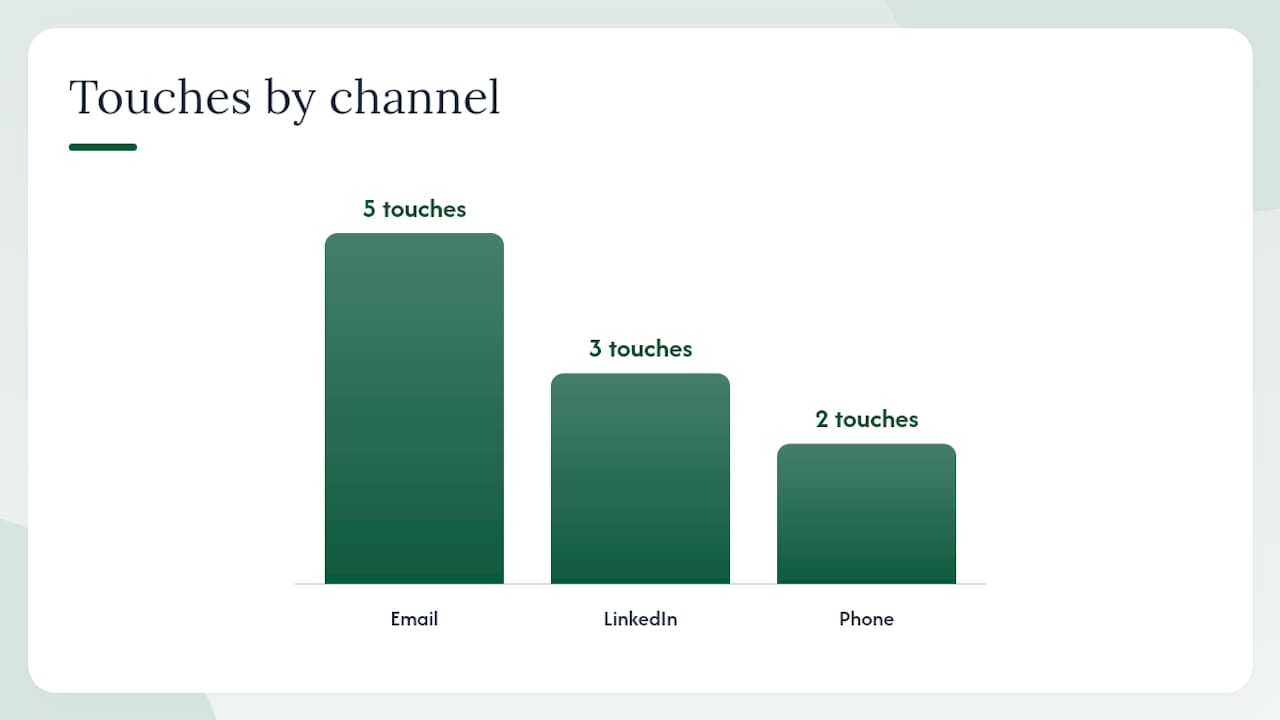
This playbook is built for mid-market accounts where email alone is not enough. It combines email, LinkedIn, and phone across 21 days, with each touch having a specific job.
| Day | Channel | Touch # | Job | Sample action / copy |
|---|---|---|---|---|
| Day 0 | 1 | Pattern interrupt | Send personalized email referencing a specific trigger event. Subject: “[Company] + [your company]” | |
| Day 1 | 2 | Visibility | View the prospect’s profile. No message yet. | |
| Day 3 | 3 | Reframe | Thread reply adding a new angle (case study or relevant metric). Subject: Re: original | |
| Day 4 | 4 | Connection | Send a connection request with a short, non-pitchy note. | |
| Day 5 | Phone | 5 | Direct outreach | Call and leave a voicemail referencing your email. Keep it under 20 seconds. |
| Day 7 | 6 | Pivot | Thread reply shifting the angle (different pain point or different stakeholder). Subject: Re: original | |
| Day 10 | 7 | InMail or message | If connected, send a short LinkedIn message. One sentence, one question. | |
| Day 12 | Phone | 8 | Check-in call | Call again. If they answer, reference the emails. If not, skip the voicemail. |
| Day 14 | 9 | New thread | Open a new subject line entirely. Fresh angle, fresh context. Subject: “One more thought” | |
| Day 21 | 10 | Breakup | Genuine close. Give them an easy out. Subject: “Closing the loop” |
Full copy for key touches:
Touch 1 (Day 0 email): Hi [First Name], saw that [Company] recently [specific trigger]. Companies at that stage usually [relevant challenge]. We help [ICP] with [outcome]. Worth 15 minutes?
Touch 6 (Day 7 pivot email): Hi [First Name], wanted to try a different angle. Most [role] we talk to are dealing with [different pain point]. If that resonates more than [original angle], happy to shift the conversation.
Touch 9 (Day 14 new thread): Subject: One more thought Hi [First Name], I know I’ve reached out a few times. One thing I haven’t mentioned: [new piece of value or insight]. Thought it might be relevant given [specific context]. Open to a quick call?
Touch 10 (Day 21 breakup): Subject: Closing the loop Hi [First Name], I’ll stop following up after this. If [pain point] ever becomes a priority, feel free to reach out. Best of luck with [specific initiative].
Troubleshooting notes:
- If reply rate is below 1% after 50 sends, the targeting or the opening line is wrong. Fix those before adjusting cadence.
- If you are getting replies but no meetings, the CTA is too high-friction. Switch to a yes/no question.
- For lower-seniority targets or fast-validation scenarios, a blitz cadence compressing touches into 7–10 days can validate messaging faster. Use it for testing, not for enterprise accounts.
- If positive reply rate is strong but volume is low, the list is too small. Expand the ICP definition or add more companies in the same segment.
Your pre-launch and first-14-days monitoring checklist
Pre-launch checks
Technical:
- Sending domain is separate from primary domain
- SPF, DKIM, and DMARC records are configured and verified
- Domain has been warmed for at least 3–4 weeks
- Daily send volume is within the warmed inbox’s safe limit
- Bounce verification tool has cleaned the list (remove invalid addresses before sending)
Content:
- Every email in the sequence has one job and one CTA
- Personalization tokens are tested and pulling correctly (no “[First Name]” appearing in sent emails)
- Subject lines are under five words and free of spam-trigger language
- The final email is a genuine breakup message
- Each follow-up adds a new angle rather than repeating the opener
List:
- Every contact matches your ICP at title, company size, and industry level
- Contacts have been verified for email validity
- Unsubscribe mechanism is in place and functional (required under CAN-SPAM)
- For any EU-based contacts, confirm a lawful basis for processing under GDPR before sending
First 14 days monitoring plan
| Day | What to check | Threshold to act |
|---|---|---|
| Day 1–2 | Bounce rate | Above 2%: pause and clean list |
| Day 3–5 | Open rate | Below 20%: check deliverability and subject lines |
| Day 5–7 | Reply rate | Below 1%: review targeting and opener |
| Day 7–10 | Spam complaints | Above 0.1%: pause immediately, investigate list quality |
| Day 10–14 | Positive reply rate | Below 30% of replies: review CTA and body copy |
Quick remediation steps:
If bounce rate spikes above 2%, stop sending immediately. Run the remaining list through an email verification service, remove invalid addresses, and resume at half the previous volume.
If spam complaints exceed 0.1%, pause the sequence. Review the list for contacts who did not match your ICP, check whether your unsubscribe link is working, and reduce daily volume by 50% before resuming.
If open rate drops suddenly without a change in copy, the problem is deliverability. Check Google Postmaster Tools for domain reputation signals and consider pausing to let the domain recover.
Legal compliance note: CAN-SPAM requires a physical mailing address and a working opt-out mechanism in every commercial email. GDPR applies to EU-based recipients and requires a lawful basis for processing their data. Confirm compliance with a qualified legal professional before launching sequences targeting EU contacts.
When does running sequences in-house stop making sense?
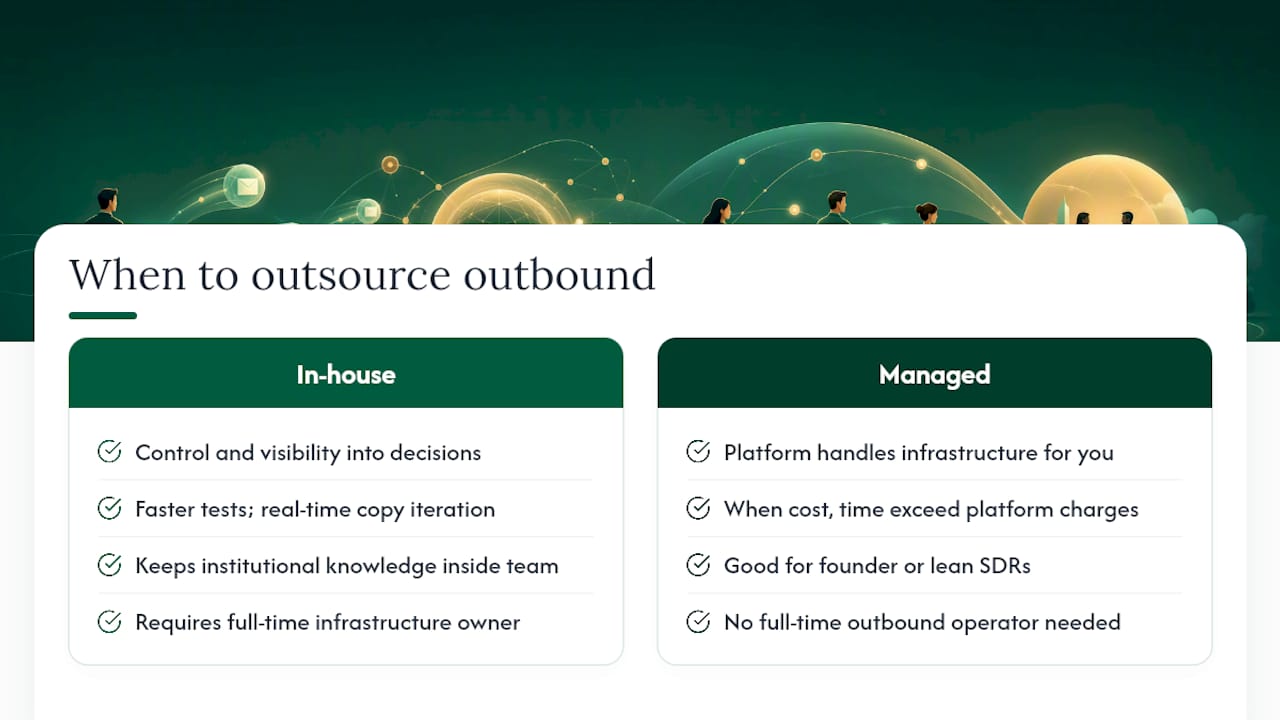
Most teams underestimate what it actually takes to run cold email sequences well. The copy is the visible part. The infrastructure underneath it, warmed domains, verified lists, per-contact research, reply routing, and ongoing deliverability monitoring, is where most in-house programs quietly fail.
The honest trade-off looks like this: in-house gives you control and visibility into every decision. You can test faster, iterate on copy in real time, and keep institutional knowledge inside the team. But it requires someone who owns the infrastructure full-time. A founder or a two-person sales team cannot run a properly warmed multi-domain setup, research 50 contacts a week, write personalized openers, and still close deals. Something always gets cut, and it is usually the thing that matters most.
The scale-versus-personalization tension is real. Blasting 500 generic emails a day is easy. Writing 50 emails that each have a genuine observation in the first sentence is hard. Most teams end up somewhere in the middle and wonder why reply rates are mediocre.
Managed outbound makes sense when the cost of the infrastructure and the time to run it properly exceeds what a platform charges to do it for you. For a founder team or a lean SDR team that needs pipeline without a full-time outbound operator, that math often tips toward managed. For a 10-person sales team with a dedicated ops person and an existing tech stack, in-house is often the right call, provided they actually invest in the infrastructure.
The decision to outsource outbound is not about capability. It is about where your team’s time is worth the most. Writing cold email copy and managing domain warmup is not where most founders or sales leaders should be spending their hours.
Runleadpilot handles the full sequence workflow so your team can focus on closing
Cold email lead generation done right requires warmed domains, verified lists, personalized copy, and a reply-routing system that hands warm conversations to the right person at the right time. Most teams can build pieces of that. Few build all of it without significant time investment.

Runleadpilot is a managed outbound platform that handles the entire SDR workflow from targeting to reply handoff. It reads your website to identify your ICP, finds and researches matching decision-makers, writes personalized cold emails from real business signals, manages dedicated sending domains and inboxes, and routes warm replies to your team. You get the pipeline output of a full outbound program without hiring an SDR or managing the infrastructure yourself. Founders, lean sales teams, and outbound agencies use it to run sequences that convert without the operational overhead.
Before committing, you can build a free campaign preview to see exactly who Runleadpilot would target and what the emails would say. If the targeting and copy look right, you launch. If not, you have lost nothing.
Sources
- Sales Sequence (HubSpot)
- Cold Email Best Practices That Get Replies | Sendspark
- Email Outreach in 2026: How to Get Replies, Not Deletes
- Cold Email Sequence: The Framework That Books Meetings