Founders: 8–15% Replies From a Deliverability First SaaS Cold Email
A practical playbook for SaaS founders: tighten ICP signals, protect sending domains, run a 3-email test, and route positive replies within 24 hours.

Founders: 8–15% Replies From a Deliverability First SaaS Cold Email
The highest-leverage SaaS cold email strategy combines a tight ICP, protected sending infrastructure, short value-first sequences, and a 24-hour reply routing rule. Start this week: define your ICP by title, vertical, and one buying trigger, buy a secondary sending domain, and draft a 3-email sequence built around a single value offer. For a well-targeted list, expect an 8-15% positive reply rate, not the 1-2% you get from generic blasts.
TL;DR:
- Use a highly targeted ICP based on specific buying signals, such as recent funding, job postings, or tech stack changes, rather than just demographics.
- Limit outreach volume to 100–200 highly verified emails per campaign to gather meaningful feedback and protect domain reputation.
- Verify all email addresses before sending and run a warmup process of 10–21 days using protected domains to ensure high inbox placement.
- Focus the first email on eliciting a reply, using concise, personalized messages with a clear trigger-based hook, rather than pushing for a sale.
- Respond to positive replies within five minutes and route them immediately with context to maximize conversion chances.
Table of Contents
- Quick-Start Checklist: Launching a Test Campaign This Week
- How Do You Define a SaaS ICP That Actually Converts?
- Why Sending Infrastructure Makes or Breaks Your Deliverability
- What Makes a SaaS Cold Email Get a Reply?
- What’s the Right Cadence for a SaaS Cold Email Sequence?
- Personalizing Outreach at Scale Without Writing Every Line by Hand
- Which Metrics Actually Predict SaaS Cold Email Success?
- How Fast Should You Respond to a Positive Reply?
- How LeadPilot Runs This Playbook for You
- Why the First Fix Is Almost Never the One Founders Try First
- Try a Free Campaign Preview Before You Commit to Anything
- Sources
Quick-Start Checklist: Launching a Test Campaign This Week
You don’t need six weeks of planning to get your first cold email campaign live. You need one clean list, one working domain, and one sequence that asks for a reply, not a sale. Here’s the order that actually works, based on what SaaS founders running lean outbound teams do differently from the ones who burn their domain reputation in week one.
- Lock the ICP on paper first. Write down the title, company size, vertical, and one buying trigger you’re targeting. If you can’t fit it in two sentences, it’s not tight enough yet.
- Verify the list before you touch copy. Run every email through a verification tool and drop anything that bounces or has a risk assessment as risky. A dirty list is the fastest way to torch a new domain.
- Get DNS authentication and warmup running in parallel with list-building. SPF, DKIM, and DMARC take a day to configure but 10 to 21 days to build sending reputation, so start warmup before your list is even finished.
- Set up basic tracking. A shared inbox or CRM view, plus calendar links for anyone who replies positive, is enough for a first test. Don’t build a full reporting dashboard before you’ve sent a single email.
- Cap your send volume. New domains and inboxes should stay well under 20 sends per day per inbox. Aim for a first batch of 100 to 200 targeted emails, not thousands.
- Write a 3-email sequence with one CTA per email. Ask for a reply on email one, offer proof on email two, and do a soft breakup on email three.
That 100 to 200 email range isn’t arbitrary. A small, well-targeted test surfaces far more usable signal than a 5,000-send blast to a loosely matched list, because you can actually read every reply and adjust before your reputation takes a hit. The goal of week one isn’t volume. It’s proof that your targeting and infrastructure both work before you scale either one.
How Do You Define a SaaS ICP That Actually Converts?
Most SaaS cold email campaigns fail before a single message goes out, because the list is built on demographics instead of buying signals. A VP of Engineering at a 200-person company isn’t a buyer just because the title and headcount match your customer profile on paper. A tight ICP needs four dimensions working together, not one.
- Title and function: the exact role that owns the budget or the pain, not just anyone who could plausibly use the product.
- Vertical: an industry where your product solves a specific, recognizable problem, not “any B2B company.”
- Company size: a headcount or revenue band where your pricing and implementation actually fit.
- A live buying trigger: something happening right now that makes the timing right.
Triggers are what separate a cold list from a warm one. Recent funding rounds, active job postings for a role your product supports, a new executive hire in the department you sell to, or a detectable change in their tech stack are all sourceable signals. Combining tech-stack, hiring, and funding signals to pre-qualify targets consistently produces higher reply quality than lists built on title and headcount alone. If a prospect just posted three open sales engineering roles, they have a scaling problem your onboarding tool might solve today, not eventually.
The practical workflow looks like this: pull a raw list from a data provider, layer in enrichment for the trigger signal, then run every contact through email verification before it touches your sequencer. Skipping the verification step is how bounce rates creep past acceptable thresholds and take your domain reputation with them.
Pro Tip: Build your trigger search before your title search. Start with “who just did X” and work backward to “which of those match my ICP,” rather than pulling a broad title list and hoping triggers show up later.
Why Sending Infrastructure Makes or Breaks Your Deliverability
Cold email dies in the infrastructure layer more often than the copy layer, and almost nobody talks about it that way. You can write the best subject line in the world and it won’t matter if your message lands in spam.
The first rule is isolation: never send cold outreach from your primary company domain. Using secondary sending domains that mirror your brand (something like trygetacme.com next to getacme.com) protects your main domain’s reputation if a sending issue ever trips spam filters. Register a handful of these, each with its own SPF, DKIM, and DMARC records configured correctly from day one.
Warmup is not optional and it’s not instant. New domains and inboxes need a controlled warmup period of 10 to 21 days, where automated warmup tools exchange emails to build sending history before you point real prospects at them. Skip this and your first real campaign lands in spam regardless of how good the copy is.
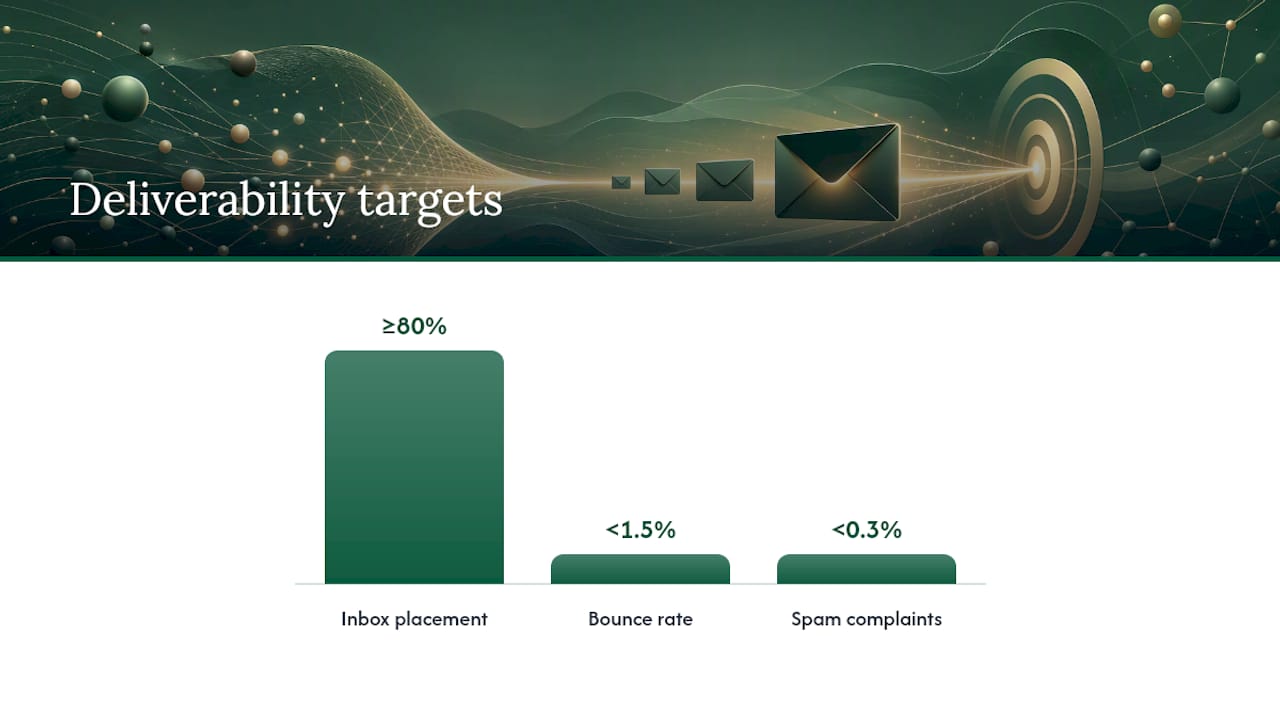
Deliverability benchmark: Treat placement as your first metric, not your last. If seed tests show inbox placement under 80%, fix the infrastructure before touching your copy. Keep bounce rate under 1.5% and spam complaints under 0.3%. No amount of copywriting rescues a domain with broken authentication.
A few more rules that keep outbound safe as you scale:
- Use real Google Workspace or Microsoft 365 inboxes, never shared SMTP relays or bulk-sending pools.
- Cap each domain at 2 inboxes maximum to avoid concentrating risk on a single asset.
- Once warmed up, keep volume around 15 to 25 cold sends per inbox per day, spread across your domain pool rather than stacked on one.
- Run periodic seed tests to catch placement problems before a real campaign exposes them.
If you’re managing this manually across a dozen inboxes, a warmup tool built for B2B teams saves the operational overhead of tracking each domain’s age and reputation by hand.
What Makes a SaaS Cold Email Get a Reply?
The first email’s only job is to earn a reply. Not a demo, not a signature, a reply. That single shift in goal changes how you write everything, from the subject line down to the CTA.
Subject lines that work tend to fall into a few repeatable patterns:
- A direct question tied to the trigger (“scaling support after the Series A?”)
- A specific number or metric (“saw the 40% headcount jump”)
- A mutual connection or shared context (“saw you’re hiring 3 SDRs”)
- A curiosity gap with no clickbait (“quick one on your onboarding flow”)
- Company name plus a specific pain point (“Acme + churn during onboarding”)
- A short, almost internal-sounding note (“re: your Q1 pipeline”)
- A compliment on something public they published or shipped
- A one-word or two-word subject that reads like a colleague, not a marketer (“quick question”)
The first line has to prove you did the research, and it has to come from a real, checkable data source. Pull from recent LinkedIn activity, a job posting they published, a funding announcement, or a product launch. Populating that first-line slot from a specific, timely signal is what separates a personalized email from a mail-merge with a first name swapped in.
Here are three templates you can edit today, each under 100 words:
1. Problem observation (email one) “Saw [trigger, e.g. your job posting for a Sales Ops Manager]. Companies scaling [specific function] usually hit [specific pain point] around this stage. Curious if that’s showing up for you yet. Worth a quick reply either way?”
2. Proof follow-up (email two, three to four days later) “Following up on my last note. [Similar company type] ran into the same issue and fixed it by [one specific tactic, no product pitch]. Happy to share the exact approach if useful.”
3. Reframe or breakup (email three, five to seven days later) “Haven’t heard back, so I’ll assume this isn’t a priority right now. If [pain point] becomes relevant later, feel free to reach out. Closing the loop on my end.”
Keep every email under 100 words. Longer than that, and you’re writing a pitch deck, not a message someone reads on their phone between meetings. For a deeper set of subject-line frameworks and edge cases, it’s worth testing multiple patterns against the same list before you commit to one.
What’s the Right Cadence for a SaaS Cold Email Sequence?
Email alone leaves a lot of pipeline on the table. Multichannel sequences that combine email, LinkedIn, and phone consistently outperform email-only outreach, mostly because buyers today are so inbox-saturated that a name they’ve seen twice already feels less cold on the third touch.
A practical 10-touch cadence over roughly three weeks looks like this:
- Day 1: Email one (problem observation)
- Day 1: LinkedIn connection request, no message
- Day 4: Email two (proof follow-up)
- Day 6: LinkedIn engagement (comment or like on their recent post)
- Day 8: Phone call attempt
- Day 9: Email three (reframe)
- Day 12: LinkedIn direct message referencing the email thread
- Day 15: Phone call attempt two
- Day 17: Email four (new angle, different value offer)
- Day 20: Breakup email, close the loop
The order matters because each channel does a different job. Email carries the substance. LinkedIn builds recognition passively. Phone calls convert warm-but-silent prospects who saw your name three times but never clicked reply. Layering channels this way reduces the friction of that first phone call, because you’re no longer a total stranger.
Reserve full multichannel treatment for your highest-fit segments, the ones where a booked demo is worth the manual LinkedIn and phone effort. Lower-tier segments can run email-only sequences at higher volume. Whatever the channel mix, stop after the breakup email for that segment. Chasing a contact past three or four unanswered touches burns reputation for a return that rarely justifies it.
Personalizing Outreach at Scale Without Writing Every Line by Hand
Personalization at scale isn’t about writing 500 individual emails. It’s about building a data pipeline that feeds the right variable into the right slot, every time, without you touching each one.
There are two levels to personalize at: account-level and contact-level. Account-level personalization references something true about the company (funding, headcount growth, a recent product launch). Contact-level personalization references something specific to the individual (a LinkedIn post, a role change, a conference talk). Account-level scales faster because one data point covers every contact at that company. Contact-level converts better but takes more enrichment work per prospect.

The enrichment pipeline that supports this needs a few consistent fields: company name, trigger event, trigger date, contact’s role, and one proof point relevant to their vertical. Pull these from LinkedIn Sales Navigator exports, funding databases, job board scrapers, or your CRM’s existing enrichment integration, then run a spot check on a sample before you push the full list live. A pipeline that pulls stale trigger dates (a “recent” funding round from eight months ago) reads as sloppy, not personal.
Vertical-specific proof points work best when they’re framed around the outcome, not the client name. Instead of naming a specific competitor’s customer, describe the situation generically: “a 50-person fintech team cut onboarding time by half after fixing X.” That keeps the proof credible without exposing confidential client relationships or crossing into name-dropping territory that can backfire if the prospect knows the company.
Pro Tip: *Build one enrichment template per vertical instead of one per company.
For teams that want a deeper workflow on scaling this without losing the personal feel, a practical AI personalization framework walks through the data structuring in more depth.
Which Metrics Actually Predict SaaS Cold Email Success?
Track four numbers, in this order of priority: inbox placement, open rate, positive reply rate, and meeting-book rate. Placement comes first because a great email in spam converts nothing.
For a tightly targeted SaaS ICP, expect 8-15% positive reply rates and a meeting-book rate somewhere between 1% and 3%, depending on your average contract value. Higher-ACV enterprise SaaS tends to sit at the lower end of that booking range because the buying committee is bigger and slower; lower-ACV, self-serve-adjacent products often book faster.
Run A/B tests one variable at a time, on a two-week cycle:
- Week one and two: test two subject line patterns against an identical list and sequence.
- Week three and four: hold the winning subject line, test two first-line personalization approaches.
- Week five and six: test CTA framing (soft question vs. direct ask) with everything else locked.
Change one variable per cycle. Testing subject line, first line, and CTA simultaneously tells you nothing about which change moved the number.
How Fast Should You Respond to a Positive Reply?
Speed converts replies into pipeline. The 5-minute response rule exists because a prospect who replied “interested, tell me more” and gets silence for six hours has usually cooled off by the time you write back. Set up a webhook that pushes positive replies straight to Slack or SMS, so someone on the team sees it in real time, not during a nightly inbox sweep.
Sort replies into three categories the moment they land:
- Positive/interested: route immediately to a calendar link or a human for scheduling.
- Objection or question: send a short, specific answer within the hour, not a generic FAQ dump.
- Not now/unsubscribe: log it, remove from sequence, no further contact.
Whoever picks up a handed-off lead needs the original trigger that started the outreach, any proof points already shared, and a suggested demo focus based on what the prospect actually asked about. A handoff without that context forces the rep to re-research the account from scratch, and that delay is exactly what the 5-minute rule was trying to prevent.
How LeadPilot Runs This Playbook for You
Everything covered so far is doable manually, and plenty of founders do it that way for their first few campaigns. But the operational load, tracking domain warmup, sourcing triggers, writing personalized first lines, and monitoring reply routing, adds up fast once you’re running more than one campaign at a time.
Runleadpilot automates that full workflow. It learns your ICP from your website, sources and researches matching decision-makers using the same trigger-based signals covered above, drafts personalized sequences from real buying signals, manages dedicated sending domains through the full authentication and warmup process, and routes warm replies to your team within minutes of them landing. It’s the same system this guide describes, running end-to-end instead of stitched together across five separate tools.
DIY makes sense if you’re testing your ICP for the first time and want full control over every variable while you learn what resonates. A managed platform makes more sense once you know your ICP works and you want to scale volume without scaling your own operational headcount. Runleadpilot offers a free campaign preview before any commitment, so you can see the targeting and draft copy before deciding which route fits.
Why the First Fix Is Almost Never the One Founders Try First
Most SaaS founders trying to fix a dead cold email campaign go straight to rewriting the copy. That’s usually the wrong first move. The single biggest reply-rate lift I’ve seen come from tightening the trigger, not the sentence. Same domain. Just a sharper trigger.
Two reminders worth keeping taped above your desk. First, don’t scale a list before you’ve verified it converts on a small batch. Second, don’t chase volume past the point where you can still read every single reply. If you can’t keep up with responses, you’re already sending too much.
If you want to see how tight targeting and infrastructure work together without building it all by hand, a free campaign preview shows the ICP and draft copy before you commit to anything.
— Harsh
Try a Free Campaign Preview Before You Commit to Anything
Runleadpilot gives you the full system this guide just walked through, minus the weeks of setup. Instead of manually sourcing triggers, configuring DNS records, and writing first lines from scratch, you get a working preview built from your own website and ICP before you spend a dollar.

The free preview shows you the decision-makers Runleadpilot would target, a sample of the personalized sequence it would send, and how the sending infrastructure gets set up around your brand. Founders running lean teams typically start here, review the targeting, then move into a managed plan sized to how many buyers they need researched each month. Agencies running outbound for multiple clients can consolidate several workspaces under one billing setup instead of juggling separate tools per client.
If the playbook in this guide sounds right but the execution feels like more than your team has bandwidth for, start with the free campaign preview and see the targeting and copy before you decide on anything else.
Sources
For deeper detail on any single piece of this system, a few resources are worth bookmarking. The complete SaaS cold email playbook covers founder-specific tactics for getting the first dozen customers through outbound. For infrastructure specifics, including inbox-to-domain ratios and warmup patterns, the deliverability and infrastructure guide goes deeper than what fits here. On the multichannel side, the multi-touch outreach workflow guide breaks down how to layer LinkedIn and phone touches without overwhelming a prospect. And for template banks beyond the three included above, cold email sequences that book meetings has more variations to test against your own list.
- Cold Email for SaaS Founders: The Complete 2026 Playbook | Built by Joey
- SaaS Cold Email: Best Strategy and Templates for B2B Outreach
- Cold Email for SaaS Companies: Infrastructure, ICP, and Copy (2026)
- 13 Cold Outreach Tactics SaaS Teams Can Use to Book Better Demos