How Inbox Rotation Keeps Cold Email Out of Spam Folders
Discover how inbox rotation can enhance your cold email deliverability by preventing spam filters and optimizing sender identities.

How Inbox Rotation Keeps Cold Email Out of Spam Folders
Inbox rotation spreads outbound volume across multiple warmed mailboxes so no single sender account triggers spam filters or hits provider caps. It works when each mailbox is properly warmed and capped, but it can’t fix a bad list or weak copy. Start with 3 to 5 warmed mailboxes, cap sends low, and ramp weekly based on bounce and placement signals.
TL;DR:
- Properly warmed and authenticated mailboxes are essential, with SPF, DKIM, and DMARC records fully propagated before rotation begins.
- Maintain a low initial send volume per mailbox, gradually increasing it each week based on bounce rates and placement metrics.
- Use weighted rotation to prioritize stronger mailboxes and stagger new accounts to avoid overloading or damaging deliverability.
- Continuous monitoring of bounce, placement, and blocklist status at the mailbox level is crucial to prevent widespread impact.
- Automating rotation management with platforms like LeadPilot reduces operational complexity, ensures consistent warm-up, and mitigates common setup failures.
Table of Contents
- What Inbox Rotation Is and Why It Matters for Deliverability
- Prerequisites and Warm-Up Checklist Before You Rotate
- Setting Up Rotation Logic: Round-Robin, Weighted, and Jitter
- What to Monitor to Keep a Rotation Healthy
- Fixing the Most Common Inbox Rotation Failures
- Scaling Rotation Without Losing Deliverability
- How LeadPilot Handles Rotation for Agencies and Lean Teams
- Why Most Rotation Advice Skips the Part That Actually Breaks
- Let a Managed Platform Handle the Rotation for You
- Sources
What Inbox Rotation Is and Why It Matters for Deliverability
Rotation means spreading your daily send volume across several mailboxes instead of pushing everything through one account. Internet service providers watch sending patterns per account, not just per domain, and a mailbox that suddenly fires off 300 cold emails a day looks like a spam operation even if the copy is decent.
Think of it as load balancing for sender identities. Instead of one server handling every request until it buckles, you split the traffic so no single point takes the full hit. Each mailbox stays under safe thresholds while your total outbound volume keeps climbing.
Rotation is not a fix for everything, though. It distributes sends across accounts so total volume can scale without signaling spammy behavior from one sender, but the same source is clear that it won’t correct:
- A purchased or scraped list full of dead addresses
- Generic, templated copy that reads like a mass blast
- Missing personalization or irrelevant targeting
- A domain reputation already damaged before rotation started
Prerequisites and Warm-Up Checklist Before You Rotate
Adding an unprepared mailbox to a rotation pool is the fastest way to poison the whole group. Before any mailbox touches live outreach, three things need to be locked down.
- DNS authentication. SPF, DKIM, and DMARC records must be published and fully propagated for every sending domain. Skipping this step is the single most common reason new domains get flagged in the first week.
- Warm-up period. Give each mailbox roughly 14 to 21 days of progressively increasing send volume, starting at just a handful of emails a day, before it joins active campaigns.
- Domain-to-mailbox ratio. Keep it tight. Guidance from ProspectingManual recommends around 2 to 3 mailboxes per sending domain before you add a new domain rather than piling more mailboxes onto one.
Pro Tip: Run a seed-list placement test the moment warm-up ends. Send to a handful of accounts across Gmail, Outlook, and Yahoo and check where the message actually lands before you trust the mailbox with real prospects.
Also set up external blocklist monitoring now, not after a problem shows up. Checking a domain’s status after deliverability tanks means you’ve already lost days of outreach.

Setting Up Rotation Logic: Round-Robin, Weighted, and Jitter
Once your mailboxes are warmed and authenticated, the next decision is how sends get distributed. Most outbound platforms give you a choice between a few methods:
- Round-robin cycles through mailboxes evenly, which is simple and fair when every account is equally healthy.
- Weighted rotation sends more volume to your strongest performers and less to newer or shakier accounts, which the Mailwarm guide on mailbox rotation flags as the better long-term approach over naive round-robin.
- Random with jitter adds small timing variations between sends so the pattern doesn’t look mechanically scheduled.
For caps, start each mailbox at a low daily send volume and increase gradually each week, but only after bounce and placement numbers stay clean. Jumping the ramp because a campaign is behind schedule is how mailboxes get burned.
One rule matters more than the method you pick: keep one sender per prospect for the life of a sequence. Switching senders mid-conversation breaks threading and looks suspicious to both the recipient and the receiving server.
Pro Tip: When you add a new mailbox to an existing pool, stagger its introduction and give it a low initial weight for the first week or two. Don’t let a brand-new account carry the same load as one that’s been sending clean for months.
What to Monitor to Keep a Rotation Healthy
A rotation setup is only as good as the visibility you have into it. Watch these metrics per mailbox, not just at the campaign level:
- Bounce rate should stay under 2%. Anything higher points to list quality problems.
- Inbox placement should land above 80% in the primary tab, not promotions or spam.
- Open and reply rates per mailbox reveal which senders are underperforming before the damage spreads.
- External blocklist status needs continuous monitoring, since a single blocklisted domain can drag down placement across the entire pool.
Separate mailbox-level issues from domain-level ones. A mailbox with a rising bounce rate is a contained problem you can pause and fix. A domain-level blocklist hit affects every mailbox riding on that domain, which is why automated blocklist alerts save days of blind troubleshooting compared to catching the problem after replies stop coming in.
Set up daily or weekly dashboards and route degradation alerts straight to Slack or email. Waiting for a weekly report to notice a spike in complaints means a week of damage already done.
Fixing the Most Common Inbox Rotation Failures
Most rotation problems fall into four recognizable patterns, and each one has a specific fix.
- Uneven distribution. One mailbox is carrying more volume than the others because of a misconfigured weight or a manual override left in place. Rebalance the pool or pull the offending sender out temporarily.
- A new domain added too soon. If a fresh domain starts throwing bounces or lands in spam, pull it from the pool immediately, finish out its warm-up properly, and reintroduce it later at a low cap.
- Campaign-wide bounce or placement drop. When the whole pool degrades at once, the rotation logic usually isn’t the problem. Audit your list for stale or invalid addresses and suppress anything bad before sending another batch.
- Spam complaints or legal flags. Stop sends from the implicated mailboxes right away and review your targeting and consent basis before resuming.
Tools like the ones described in lemlist’s help documentation on inbox rotation let you override a sender for a specific step or reassign a disconnected mailbox, which is worth checking in your own platform before you assume a rotation issue requires a rebuild.
Scaling Rotation Without Losing Deliverability
Growth breaks more rotations than neglect does. The instinct to add volume fast is exactly what causes the failures above, so a few rules keep scaling safe.
Add a new sending domain once your existing domains are running close to the 2 to 3 mailbox ceiling, rather than stacking more mailboxes onto domains you already have. Favor weighted rotation with dynamic back off, so a mailbox showing early trouble automatically gets less volume instead of waiting for a human to notice.
- Run seed-list placement checks before every volume increase, not just at launch.
- Watch whether declining replies trace back to rotation health or to weak targeting and copy. Rotation manages sender reputation; it doesn’t rewrite a subject line.
Pro Tip: If open rates are fine but replies aren’t, the bottleneck is almost never the rotation setup. It’s the message.
How LeadPilot Handles Rotation for Agencies and Lean Teams
Running this manually across a dozen mailboxes eats a full-time job. Runleadpilot automates the operational load: it manages dedicated sending domains, runs warm-up on a fixed schedule, checks DNS authentication before a mailbox goes live, and applies weighted rotation with automatic monitoring baked in, as described in how LeadPilot works.
- Automated warm-up sequencing per mailbox
- DNS and authentication checks before activation
- Weighted rotation with health-based adjustments
- Reply routing that keeps one sender per prospect intact
For agencies, that also means multi-client workspaces with consolidated reporting instead of juggling separate dashboards for every account. Replies get handed off to your human team the moment a prospect responds.
Why Most Rotation Advice Skips the Part That Actually Breaks
Most rotation guides read like checklists: warm up your mailboxes, spread the volume, watch your metrics. What they gloss over is that rotation is a monitoring commitment disguised as a scaling tactic. The moment you add a fourth or fifth mailbox, you’ve also added a fourth or fifth thing that can quietly go wrong while you’re focused on the campaign, not the infrastructure underneath it.
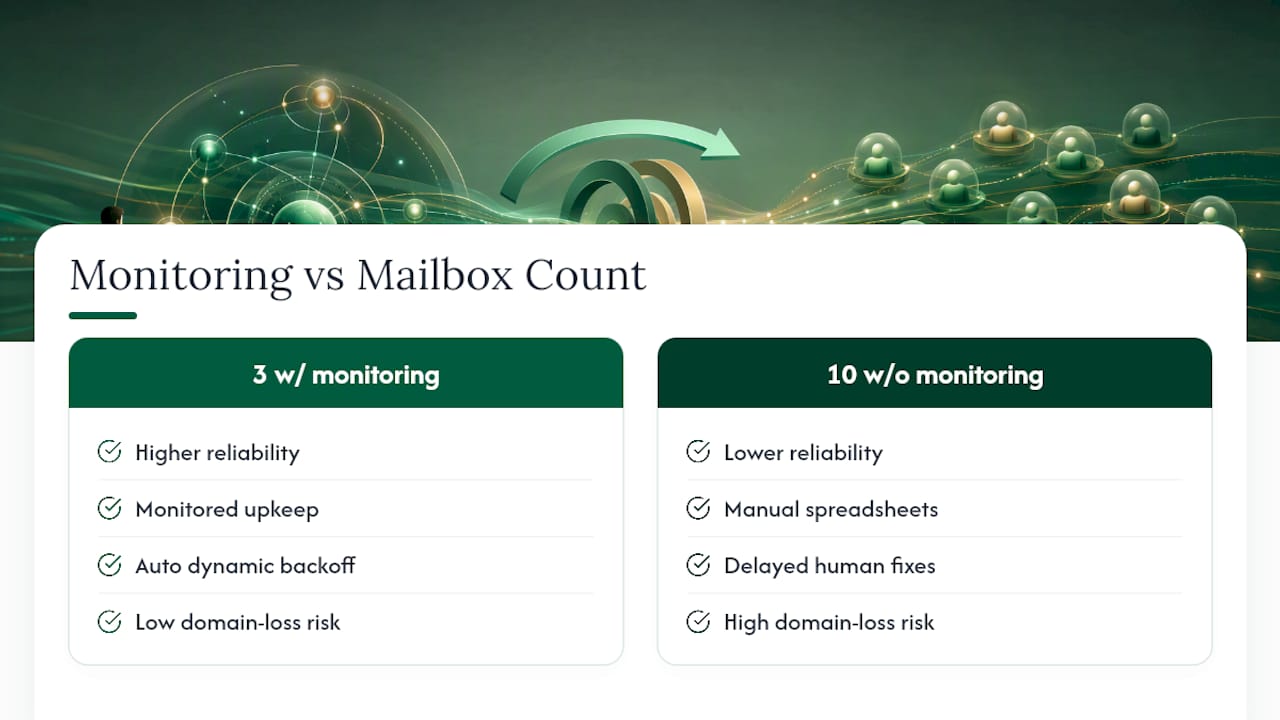
The conventional wisdom oversells the mechanics and undersells the maintenance. Weighted rotation with dynamic back off beats round-robin at scale for exactly this reason: it reacts to trouble automatically instead of waiting for someone to notice a dashboard has gone red. If you’re running rotation by hand with spreadsheets and manual checks, you’re one missed blocklist alert away from losing an entire domain’s worth of pipeline.
Prioritize monitoring infrastructure before you prioritize mailbox count. A pool of three mailboxes with real alerting beats a pool of ten running on hope.
— Harsh
Let a Managed Platform Handle the Rotation for You
Running inbox rotation well means someone has to own warm-up schedules, DNS checks, weighted caps, and blocklist alerts every single day. Runleadpilot takes that entire operational layer off your plate: it manages dedicated sending domains, warms mailboxes on a set schedule, applies rotation logic automatically, and hands you warm replies instead of a dashboard full of alerts to babysit.

That’s the real difference between running rotation manually and running it through a cold email automation platform: you get the deliverability benefits without becoming a full-time email ops person. If you want to see what a rotation setup would look like for your own outbound before committing to anything, build a free campaign preview and see how LeadPilot maps mailboxes, domains, and caps to your actual sending volume.
Sources
- Inbox Rotation Strategy: Architecture, Rules & Monitoring
- Inbox Rotation and Sending Limits in Cold Email Tools
- Best Mailbox Rotation Strategies to Improve Email Deliverability