Cold Email Personalization: A B2B Playbook That Gets Replies
Unlock the secrets of cold email personalization! Boost your reply rates with proven tactics that engage specific recipients effectively.

Cold Email Personalization: A B2B Playbook That Gets Replies
Cold email personalization means writing to a specific person about something real happening in their world, not swapping {{first_name}} into a template and calling it done. The three tactics that move the needle fastest: open with a signal (a funding round, a new hire, a published post), filter your list to a tight ICP before you write a single word, and use AI to generate a draft you then edit rather than writing from scratch. Those three moves alone separate campaigns that perform well with significantly higher reply rates than those stuck at very low single digits.
Before your next send, run this quick checklist:
- Write a subject line that references one real thing about the company (not their industry).
- Open with one sentence about what they just did or said, not who you are.
- Close with a single, low-friction ask: a yes/no question or a 15-minute slot, not a demo request.
Table of Contents
- What cold email personalization really means at each level
- Why personalization matters: realistic uplifts and the trade-offs
- Annotated cold-email templates that show why each one works
- A step-by-step workflow to personalize a cold email
- How to scale personalization without losing quality
- Legal and privacy essentials for U.S. cold emailers
- A research-backed workflow for using AI safely to scale personalization
- Key Takeaways
- What actually works in outbound: a practitioner perspective
- Runleadpilot handles the personalization pipeline for you
- Useful sources and further reading
What cold email personalization really means at each level
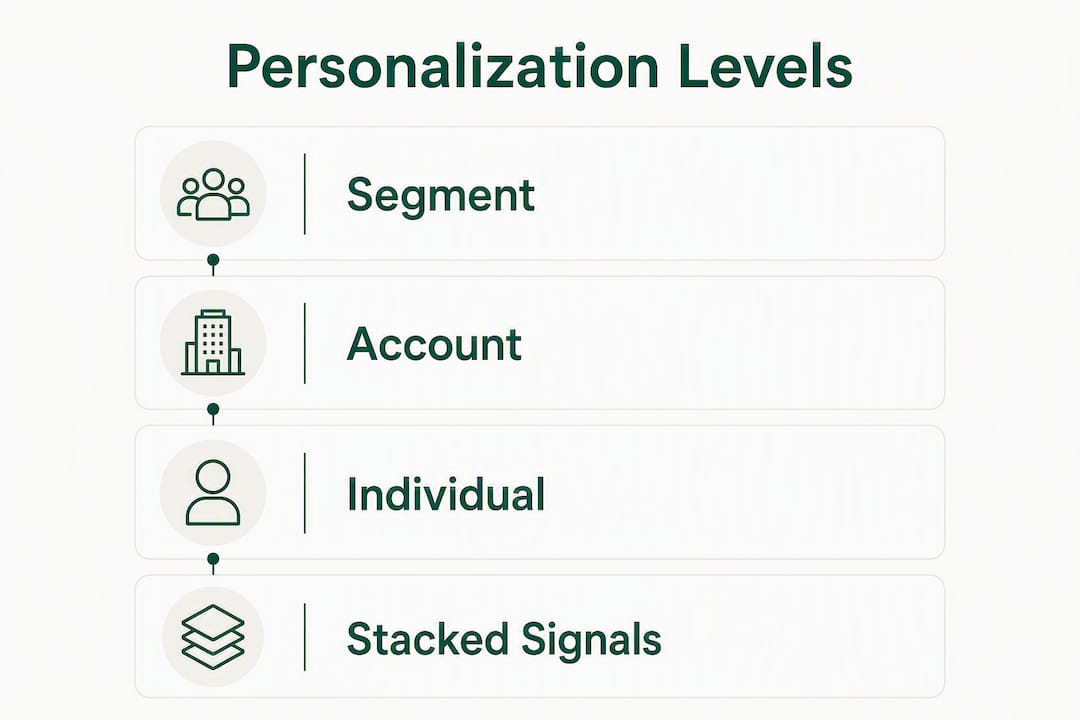
Most reps think personalization is a spectrum from “no effort” to “fully bespoke.” It’s more useful to think of it as three distinct levels, each with a different cost and a different ceiling on reply rate.

Segment-level personalization is the baseline. You write one message for a defined cohort, say, Series A SaaS founders with a sales team under 10, and every word in that message is true for every person on the list. No tokens, no research per contact. The ICP filter does the work. Defining ICPs with specific filters (company size, tech stack, funding stage) can handle roughly 80% of the personalization work for a segment before you touch copy.
Account-level personalization adds a trigger. The company just raised a round, posted a new pricing page, or started hiring SDRs. That event is the hook. You write one template per trigger type, then slot in the specific detail. This is where most B2B outbound should live: it’s scalable, it’s relevant, and it signals that you did your homework.
Individual-level personalization references something the specific person did: a LinkedIn post they wrote, a podcast they appeared on, a comment they left on a competitor’s product review. This is the highest-effort tier and the highest-ceiling tier. Reserve it for your top 50–100 accounts per quarter, not your full list.
Pro Tip: Stack two independent signals when you can. A prospect who just raised a Series B AND is actively hiring in RevOps is a far warmer target than one who only did one of those things. Stacking signals multiplies reply probability rather than adding to it.
What counts as a valid signal
Good signals indicate timing and intent. Bad signals indicate category membership.
Valid signals: a funding announcement, a new executive hire in the buyer’s function, a product launch or pricing change, a job posting that reveals a pain point, a LinkedIn article or podcast appearance, a tech stack change detected via tools like BuiltWith or Clearbit, and content interactions (if your analytics can surface them).
Not valid signals: industry, company size alone, or job title. Those are filters, not triggers. Using them as personalization hooks produces the kind of opener that reads, “As a VP of Sales at a mid-market SaaS company, you probably deal with pipeline challenges.” That sentence could go to 50,000 people. It signals zero effort.
Signal-based emails generate 3–5x better reply rates than firmographic-only targeting. Trigger-stacked campaigns can reach reply rates in the mid-to-high teens, while basic templates typically land at around 9%.
Why personalization matters: realistic uplifts and the trade-offs
The reply-rate ceiling for a well-written, signal-based cold email is higher than for basic templates for most B2B verticals. That’s not a guarantee; it’s a realistic upper range for campaigns where the list is verified, the signal is fresh, and the ask is specific. Basic templates with no trigger typically land at comparatively low reply rates.

The variable most teams underestimate is list quality. Verified email lists tend to achieve higher reply rates than unverified ones, because deliverability and sender reputation improve when bounce rates stay low. You can write a perfect personalized opener and still get buried in spam if your list is dirty. Personalization and deliverability are not separate problems; they compound each other.
Pro Tip: Verify every list before a campaign goes live. Tools like NeverBounce, ZeroBounce, or Hunter’s bulk verifier catch invalid addresses before they damage your sending domain.
The operational trade-off is real. Individual-level personalization at manual speed caps most reps at 10–15 emails per day. That’s fine for enterprise AEs working named accounts. It’s a bottleneck for anyone running volume outbound. The AI-as-draft workflow can increase the number of reviewed personal emails a rep can send per day significantly, without sacrificing the human edit.
Here’s a simple framework for where to invest your effort, adapted from the 30/30/50 rule:
| Effort bucket | Allocation | What to do |
|---|---|---|
| Subject line + personalization | 30% | Signal-based opener, specific subject line |
| Deliverability | 30% | Domain warmup, list verification, sending cadence |
| Follow-ups | 50% | Consistent, signal-personalized touches across the thread |
The follow-up allocation surprises most people. Sending one great email and waiting is not a strategy. Consistent, signal-personalized follow-ups across the thread perform better than relying on a single brilliant opener.
Annotated cold-email templates that show why each one works
The opening line is the single largest predictor of reply after deliverability and list quality. Not the subject line. Not the CTA. The first sentence. Every template below is built around that principle.
Template 1: Series funding trigger
Subject: Congrats on the Series B, quick question on SDR capacity
Hi [Name], saw the announcement about your $18M round. Companies at that stage usually face the same bottleneck: the sales team can’t scale research and outreach fast enough to match the growth target. We help RevOps teams at post-Series B SaaS companies cut SDR ramp time by building the outbound pipeline for them. Worth a 15-minute call this week?
Why it works: The subject line is specific (not “Congrats on your funding”). The opener names the round without being sycophantic. The bridge connects the event to a predictable pain. The ask is a yes/no question, not a calendar link.
Template 2: Hiring spike trigger
Subject: Noticed you’re scaling your sales team
Hi [Name], you’ve posted four SDR roles in the last 30 days. That usually means one of two things: you’re building from scratch or you’re replacing attrition. Either way, the ramp period is the expensive part. [Company] helps teams like yours get pipeline moving before the new hires are fully productive. 15 minutes to see if it fits?
Why it works: The signal (job postings) is observable and timely. The “one of two things” framing shows you understand their situation without assuming. The ask is frictionless.
Template 3: New pricing page or product launch
Subject: Saw the new pricing page go live
Hi [Name], noticed [Company] relaunched pricing this week. That usually comes with a push to convert more inbound and reactivate dormant accounts. We work with SaaS teams on exactly that transition. Happy to share what’s worked for similar launches if you have 15 minutes.
Why it works: Referencing a specific page change signals you’re paying attention, not just scraping LinkedIn. The “happy to share what’s worked” framing is low-pressure and positions you as a peer, not a vendor.
Template 4: LinkedIn post or content trigger
Subject: Your post on pipeline velocity
Hi [Name], read your post on pipeline velocity last week. The point about SDR-to-AE handoff being where deals die resonated. We’ve been working on exactly that problem with a few RevOps teams. If you’re still thinking through solutions, I have one angle that might be worth 10 minutes.
Why it works: Referencing a specific post proves you read it. Agreeing with a specific point (not just “great post!”) builds credibility. The ask is framed as sharing an angle, not pitching a product.
Pro Tip: Keep the PS short and specific. “PS: We also work with [Company’s competitor] on this” is a social proof signal that takes five seconds to write and consistently lifts reply rates.
Here’s a quick reference for subject line and PS patterns:
| Element | Pattern | Example |
|---|---|---|
| Subject line | [Event] + [short question] | “Saw the Series B, quick question” |
| Subject line | [Observed behavior] | “Noticed you’re scaling your sales team” |
| Opener | [Signal] + [predictable pain] | “You’ve posted four SDR roles in 30 days…” |
| PS | Social proof or shared context | “PS: We work with [peer company] on this.” |
| CTA | Yes/no or time-bound ask | “Worth 15 minutes this week?” |
A step-by-step workflow to personalize a cold email
This is a production workflow, not a theory exercise. It runs in sequence and takes roughly 30–45 minutes to set up for a new campaign, then 30 seconds per email once the system is running.
- Define your ICP with hard filters. Company size, funding stage, tech stack, geography, and the buyer’s function. The tighter the filter, the less individual research you need. A list of 200 perfectly matched prospects beats a list of 2,000 loosely matched ones.
- Build your signal list. For each account, pull one or two fresh signals: a recent funding announcement, a new executive hire, a job posting, a published article, or a pricing change. Tools like LinkedIn Sales Navigator, Apollo, Crunchbase, and BuiltWith surface most of these. Log the signal in a column next to the contact.
- Enrich and verify contacts. Pull work email, title, and LinkedIn URL. Run the list through a verification tool (NeverBounce, ZeroBounce, or Hunter) before you write anything. Verified lists achieve roughly 2x the reply rate of unverified ones; clean the list before writing a word.
- Draft using AI with structured inputs. Feed the signal, the persona pain, the desired ask, and a sample of your rep’s voice into the model. Review the output, edit one or two sentences, and confirm the signal is accurate. This is the 30-second loop. (Full AI workflow in Section 8.)
- QA before sending. Check: Is the signal accurate and current? Is the sender name truthful? Is there a physical address and opt-out link? Is the subject line non-deceptive? Is the sending domain warmed up? Is the daily volume within your domain’s safe cadence?
- Send in focused windows. Ship reviewed emails in a morning block (typically 8–11 AM in the recipient’s time zone). Log each send with the signal used so you can track which trigger types drive the best reply rates.
Pro Tip: Never send from your primary domain. Use a dedicated sending domain (e.g., trymycompany.com) with proper SPF, DKIM, and DMARC records. Warm it up for at least three weeks before a campaign. Your email warmup strategy is as important as your copy.
How to scale personalization without losing quality
Scaling personalized outreach is a systems problem, not a copywriting problem. The teams that crack it treat it as a signal-matching and data-filtering operation, not a writing exercise.
The backbone of any scalable system is two layers of templates:
- Segment-level templates cover the shared context for a defined ICP. Every word is true for everyone in the segment. These do the heavy lifting.
- Trigger-specific templates add one variable slot for the signal. You write one template per trigger type (funding, hiring, product launch, content), then slot in the specific detail per contact.
With those two layers in place, the AI-as-draft workflow handles the rest. The model takes the signal sentence, the segment context, and the rep’s voice anchor, then generates a draft. The rep scans it, edits one sentence, verifies the signal, and sends. A signal-fed AI workflow lets a rep ship 75–120 reviewed personal emails per day versus 10–15 at manual speed.
Human review must stay in the loop at two points: before the email goes out (to catch hallucinations or stale signals) and after the first reply (to hand off warm conversations to a human). Automating the reply stage is where most teams lose deals.
On deliverability at scale:
- Use dedicated sending domains, one per 50–75 daily emails.
- Warm each domain for three weeks minimum before a campaign.
- Cap daily sends per inbox at 30–50 until reputation is established.
- Monitor bounce rates weekly; anything above 3% is a signal to pause and clean the list.
For A/B testing, go beyond open rates. Behavioral and contextual signals like reply rate, booking rate, and downstream pipeline are the metrics that actually tell you whether personalization is working. Test one variable at a time: subject line versus subject line, opener A versus opener B. Never test two variables simultaneously or the data is unreadable.
Legal and privacy essentials for U.S. cold emailers
Cold emailing is legal in the United States when CAN-SPAM requirements are met. The law does not require prior consent for B2B commercial email, but it does require operational controls most teams skip.
Core CAN-SPAM obligations:
- Use truthful “From,” “To,” and “Reply-To” headers. No fake sender names.
- Subject lines must not be deceptive. “Quick question” is fine. “Re: our last conversation” when there was no conversation is not.
- Include a valid physical mailing address in every email.
- Provide a clear, working opt-out mechanism.
- Honor opt-out requests within 10 business days.
Beyond the legal floor, there’s a practical privacy boundary. Using a prospect’s name, company, and a publicly observable business event (a funding round, a job posting, a published article) is legitimate and expected in B2B outreach. Referencing personal details that aren’t business-relevant (family information, personal social media activity, location data beyond city/state) crosses into territory that reads as surveillance, not sales. The test: would the prospect be surprised or unsettled that you know this? If yes, leave it out.
Operational checklist:
- Log all opt-out requests in your CRM immediately.
- Audit your sender names quarterly to confirm they match real people or entities.
- Never purchase lists from vendors who can’t confirm their data collection practices.
- Keep a suppression list and check it before every campaign.
This section covers general information about U.S. email law, not legal advice. Confirm current CAN-SPAM requirements with the FTC’s official guidance or a qualified attorney.
A research-backed workflow for using AI safely to scale personalization
AI is a draft engine. It is not an auto-sender, and the teams that treat it as one produce the kind of generic, hallucinated copy that gets marked as spam. The 30-second loop is a reproducible unit of work that keeps human judgment in the process at every step.
Here’s the loop in sequence:
- Pull the signal. One sentence describing what the prospect just did: “Acme Corp raised a $12M Series A on March 3, 2026.” Copy it verbatim from the source.
- Prompt with structured inputs. Feed the model four things: the signal sentence, the persona’s likely pain (one sentence), the desired ask (one sentence), and a voice anchor (two or three sentences from a previous email the rep wrote). Without the voice anchor, AI output sounds like AI output.
- Scan and edit. Read the draft aloud. Edit one or two sentences to match the rep’s natural register. Flag any claim that can’t be verified against the source signal.
- Verify the signal. Confirm the event is real and current before sending. A stale or wrong signal destroys credibility faster than a generic opener.
- Send and log. Record the signal type, the template used, and the send date. This log is what lets you analyze which trigger types drive replies.
Pro Tip: Generate two or three angles per prospect and pick the one that fits the rep’s voice, not the one that sounds most polished. The goal is a message that sounds like a person, not a press release.
Forbidden outputs to flag during review: any claim about the prospect’s revenue, headcount, or growth rate that wasn’t in your source data; any reference to a conversation that didn’t happen; any subject line that implies a prior relationship. These are the three most common AI hallucination patterns in cold email, and they’re the ones most likely to get a reply that says “who are you and how did you get this?”
Verification and logging practices matter beyond individual sends. Keep a simple log (signal source, signal date, send date, reply Y/N) so you can audit which signals are producing results and which are going stale. A funding signal that’s six months old is not a trigger; it’s background noise.
Key Takeaways
Signal-based cold email personalization consistently outperforms template-and-token outreach because it references real, timely events that prove relevance before the prospect reads the second sentence.
| Point | Details |
|---|---|
| Signal beats token | Referencing a real event (funding, hire, post) drives 3–5x better reply rates than firmographic-only targeting. |
| Verify before you send | Verified email lists achieve roughly 2x the reply rate of unverified ones; clean the list before writing a word. |
| AI scales the draft, not the send | A signal-fed AI workflow lets a rep ship 75–120 reviewed personal emails per day versus 10–15 at manual speed. |
| Follow-ups carry the campaign | The 30/30/50 rule allocates 50% of campaign effort to follow-ups; one great opener without follow-through underperforms. |
| Runleadpilot automates the pipeline | Runleadpilot detects your ICP, researches decision-makers, drafts signal-based sequences, and routes warm replies for human follow-up. |
What actually works in outbound: a practitioner perspective
The conventional wisdom on cold email personalization is that more is always better. Write longer research notes, reference more details, spend more time per prospect. That advice is wrong for most teams, and it’s wrong in a way that’s expensive.
The reps who consistently hit reply rates in the mid-to-high teens don’t spend more time per email. They spend more time on the system: tighter ICP filters, better signal sources, cleaner lists, and a review loop they can run in a focused morning block. The email itself is often shorter than what most guides recommend, not longer.
The metric that separates good outbound teams from great ones isn’t reply rate. It’s replies-to-meetings ratio. A 15% reply rate that converts at 10% to meetings is worse than a 9% reply rate that converts at 40%. That conversion gap almost always comes down to whether the personalization was relevant to a real pain or just impressive-sounding. Referencing a funding round is a hook. Connecting that funding round to a specific operational pressure the prospect is now facing is what gets the meeting.
The teams that figure this out early stop treating personalization as a copywriting problem and start treating it as a signal-matching problem. They build a short list of trigger types that reliably connect to their buyer’s pain, write one template per trigger, and run the AI-as-draft loop to fill in the specifics. The morning review block, typically 8–11 AM, is when they scan drafts, edit for voice, verify signals, and ship. That’s the routine. It’s not glamorous, but it’s the one that produces pipeline.
Runleadpilot handles the personalization pipeline for you
Writing signal-based emails at scale requires a research layer, a drafting layer, a deliverability layer, and a follow-up layer running in sync. Most lean teams can build one or two of those well. Keeping all four running while also closing deals is where the system breaks down.

Runleadpilot is the managed alternative for founders and sales teams who want the output of a full SDR workflow without building the infrastructure themselves. It reads your website to detect your ICP, sources and researches matching decision-makers, drafts personalized cold-email sequences from real business signals, manages dedicated sending domains and inboxes for deliverability, runs follow-ups, and routes warm replies directly to your team. Agencies can run multi-client workspaces under consolidated billing.
Before committing, you can build a free campaign preview to see exactly which prospects Runleadpilot would target and what the personalized drafts look like for your ICP. No contract required to see the output.
Useful sources and further reading
The sources below back the claims in this guide and are worth bookmarking for deeper study.
- Cold Email Personalization: What Actually Works — best for signal-based strategy, ICP filtering, and reply-rate benchmarks.
- Cold Email Personalization: How to Scale 1-to-1 Outreach That Gets Replies — best for the AI-as-draft workflow, the 30-second loop, and scaling mechanics.
- How I Wrote a Cold Email That Got a 50% Reply Rate — practical breakdown of the 30/30/50 effort rule and follow-up strategy.
- How to Personalize Cold Emails at Scale (With Examples) — useful for common failure modes and follow-up sequencing.
- Is Cold Emailing Illegal? — the clearest plain-language breakdown of CAN-SPAM basics for U.S. senders.
- Content Personalization Guide: Tools, Tips & Examples — covers behavioral and contextual signals that translate directly into email personalization inputs.
- AI Email Personalization: How Reps Send 100 Personal Emails — practical walkthrough of the AI-as-draft loop and prompt structure.
- Runleadpilot Blog: Outbound Sales Guides — ongoing guides on outbound strategy, deliverability, and cold email best practices from the Runleadpilot team.