Best Email Warmup Tools for B2B Teams: Managed AI Options
Discover the best email warmup tools for B2B teams. Enhance your outreach with AI-powered solutions that ensure inbox deliverability!

Best Email Warmup Tools for B2B Teams: Managed AI Options
For most B2B founders, lean sales teams, and outbound agencies, the right answer is a managed, AI-powered warmup built into a full outbound platform. Runleadpilot handles dedicated sending domains, seed-network engagement, and DNS setup so you never touch those moving parts manually. Before anything else, though, confirm SPF, DKIM, and DMARC are correctly configured on every sending domain. Warmup cannot compensate for broken authentication.
Table of Contents
- What are the best email warmup tools, and when do you actually need them?
- How warmup tools work: seed networks, ramping schedules, and mailbox signals
- Technical prerequisites before you start warmup
- How to evaluate and choose an email warmup solution
- What realistic warmup timelines and KPIs look like
- Common misconceptions and risks with warmup tools
- How Runleadpilot implements managed AI warmup
- A practical 30-day warmup quickstart for busy teams
- Key Takeaways
- Why managed warmup is the right default for B2B outbound
- Runleadpilot handles warmup so your team can focus on replies
- Useful sources and further reading
What are the best email warmup tools, and when do you actually need them?
Email warmup tools create positive engagement signals — opens, replies, thread activity, spam-folder rescues — through networks of real inboxes. Those signals tell mailbox providers like Gmail and Microsoft 365 that your domain is trustworthy before you send at volume.
You need warmup when:
- Launching a new domain or inbox for cold outreach
- Migrating to a new email service provider (ESP)
- Reviving an inbox that has been idle for 30+ days
- Scaling outbound volume beyond what your current reputation supports
You do NOT need warmup when your domain is blacklisted, your authentication records are broken, or your contact list is dirty. Fix those first. Warmup platforms simulate opens, replies, and thread activity using seed networks, but they carry no diagnostics for SPF/DKIM/DMARC failures or blacklist removal.
Different tools fit different buyers. Roundups categorize tools by best-fit use case — solo founders warming one or two inboxes, lean sales teams managing a handful of accounts, and agencies running dozens of sending profiles simultaneously each have different needs.
Pro Tip: If you are unsure whether warmup is your actual problem, run a spam placement test first. If your emails land in spam on a fresh domain with clean authentication, warmup is the fix. If they land in spam on a domain you have been sending from for months, start with a blacklist check and an authentication audit.
How warmup tools work: seed networks, ramping schedules, and mailbox signals
Warmup replicates natural sending behavior through staged volume increases and cross-inbox engagement. The tool sends emails from your inbox to a network of seed accounts, which then open, reply, star, and move those messages out of spam. Mailbox providers read that pattern as evidence of a healthy, engaged sender.
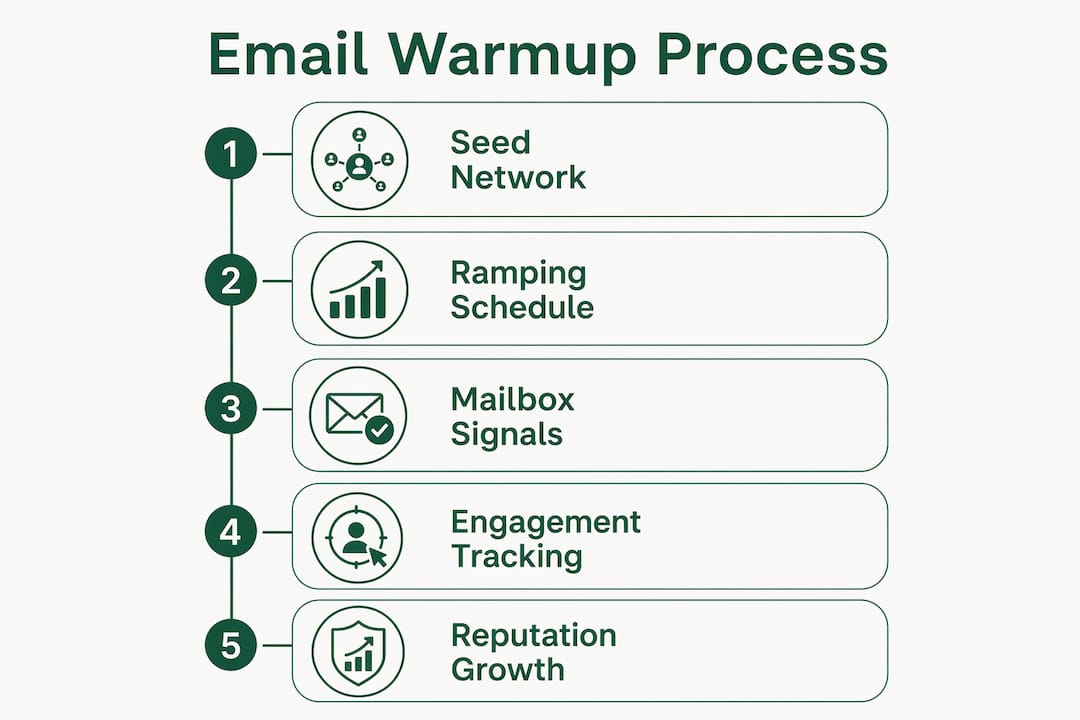
Seed network quality is the single biggest differentiator between tools. Authentic seed networks outperform bot-driven traffic and accelerate deliverability gains. Size matters, but diversity matters more. A network of real inboxes spread across Gmail, Microsoft 365, Yahoo, and business-grade SMTP providers gives you reputation signals that actually mirror the providers your prospects use.
Gradual ramping schedules are standard practice across the best email warming tools. Vendors typically offer three speeds:
- Slow ramp: 5–10 emails per day, increasing by 5–10 per week. Lowest risk, best for brand-new domains.
- Medium ramp: 20–30 emails per day at launch, doubling weekly. Suitable for inboxes with some prior history.
- Fast ramp: 50+ emails per day from day one. Higher risk; only appropriate for domains with existing positive reputation.
Signals mailbox providers track during warmup include open rate, reply rate, thread depth, spam-folder rescues, soft bounce rate, hard bounce rate, and complaint rate. A sudden spike in bounces or complaints during warmup indicates problems requiring immediate pause to investigate list quality or authentication.
Technical prerequisites before you start warmup

Confirm SPF, DKIM, and DMARC are correct before you run a single warmup email. Authentication gaps and high bounce or complaint rates are the core drivers of placement failure — warmup cannot fix them.
Pre-flight checklist:
- SPF record: published and listing all authorized sending IPs or services
- DKIM signing: active on the sending domain, key length 2048-bit minimum
- DMARC policy: at minimum
p=nonewith a reporting address; move top=quarantineorp=rejectonce you confirm alignment - Dedicated sending domain: never warm your primary company domain; use a subdomain or a purpose-built sending domain
- Dedicated inbox per outbound profile: one inbox per persona or campaign thread
- Reverse DNS (rDNS): if using custom SMTP, confirm the PTR record resolves to your sending hostname
- List hygiene: verify contacts before warmup begins; a bounce rate above 2% during warmup signals a list problem
- DNS propagation: allow 24–48 hours after any DNS change before starting warmup
| Authentication Record | What to Check | Tool to Use |
|---|---|---|
| SPF | Authorized senders listed, no +all |
MXToolbox SPF Lookup |
| DKIM | Selector active, 2048-bit key | Google Admin Toolbox |
| DMARC | Policy set, RUA address valid | DMARC Analyzer |
| rDNS | PTR resolves to sending hostname | MXToolbox Reverse Lookup |
Pro Tip: Run an authentication check within the first 24 hours of warmup. If you see DKIM failures or SPF misalignment in your sending logs, pause warmup immediately. Continuing to send with broken authentication trains mailbox providers to distrust your domain.
How to evaluate and choose an email warmup solution
Prioritize seed-network authenticity, cost-effectiveness at scale, and integrated DNS/inbox management. These factors distinguish truly scalable tools from those that appear good only in demos.
Questions to ask any vendor:
- How many unique inboxes are in your seed pool, and what share are Google Workspace or Microsoft 365 accounts?
- Are those inboxes real human accounts or programmatically generated bots?
- What is your pricing for 5, 10, and 20 inboxes? Is it per-inbox or flat-rate?
- Do you provide DNS setup, or is that the customer’s responsibility?
- What deliverability metrics do you surface — inbox placement by provider, spam rate, bounce rate, complaint rate?
- How do you handle a domain that is already landing in spam?
Reviews highlight tools that charge per inbox as scaling poorly for teams managing many sending accounts. An agency running 20 inboxes on per-inbox pricing can pay 4–5x what a flat-rate plan would cost for the same coverage.
Tool comparisons show a split between warmup-only services and those that add spam-placement tests and authentication checks. If you are running outbound at any real volume, the combined deliverability platform is worth the price premium over a warmup-only tool.
Managed vs. self-serve: Managed options handle DNS, domain provisioning, seed engagement, and reporting for you. Self-serve tools give you controls but require your team to configure and monitor everything. For founders and lean teams, the time cost of self-serve often exceeds the price difference.
What realistic warmup timelines and KPIs look like
Expect measurable improvement in reputation signals within 2–4 weeks. Full confidence at scale typically takes 6–8 weeks, and ongoing maintenance is required after that.
| Ramp Speed | Starting Volume | Weekly Increase | Risk Level | Confidence Timeline |
|---|---|---|---|---|
| Slow | 5–10/day | +5–10/day | Low | 6–8 weeks |
| Medium | 20–30/day | 2x weekly | Moderate | 4–6 weeks |
| Fast | 50+/day | 2x weekly | High | 2–4 weeks |
KPIs to track weekly:
- Inbox placement rate by provider — target above 90% for Gmail and Microsoft 365
- Spam placement rate — anything above 5% warrants a pause and investigation
- Open rate trend — should climb steadily during warmup; a plateau or drop signals a problem
- Bounce rate — keep hard bounces below 1%; soft bounces below 3%
- Complaint rate — above 0.1% triggers Google’s spam thresholds
A sudden drop in inbox placement mid-warmup usually means one of three things: a seed network issue, a DNS change that broke authentication, or a spike in complaint rate from a list segment. Pause volume increases, diagnose the cause, and resume only after the metric stabilizes.
Common misconceptions and risks with warmup tools
Warmup is necessary but not sufficient. It will not fix authentication, list hygiene, or blacklists.
Top misconceptions:
- “Warmup replaces technical fixes.” It does not. Warmup only builds inbox reputation through engagement simulation — it cannot remediate blacklists, fix authentication errors, or clean poor-quality lists.
- “Fast ramps are safe if the tool supports them.” Speed increases risk. A fast ramp on a new domain with no prior reputation is one of the fastest ways to trigger spam filters.
- “All seed networks are equal.” They are not. Bot-driven networks generate artificial signals that sophisticated filters increasingly detect and discount.
- “Per-inbox pricing scales fine.” Per-inbox pricing becomes a hidden scaling cost for agencies managing many sending accounts.
Reputation decay is real and fast. Vendors and practitioners recommend leaving warmup running as a preventative measure rather than a pre-launch-only activity. Stop warmup on an active sending domain and you can undo weeks of reputation building within days.
Mitigations: run authentication checks before and during warmup, verify lists before connecting them to any warmed inbox, and treat warmup as continuous infrastructure rather than a one-time setup task.
How Runleadpilot implements managed AI warmup
Runleadpilot offers managed AI warmup as part of a complete outbound sales automation platform. DNS management, dedicated sending domains, inbox provisioning, and seed engagement are all handled for you. You do not configure records or monitor seed pools manually.
| Evaluation Dimension | Runleadpilot Approach |
|---|---|
| Best for | Managed B2B outbound: founders, lean teams, agencies |
| Seed network | Managed seed processes across major providers |
| Automation and AI | Personalized sequences from real business signals; AI-written follow-ups |
| Managed vs. self-serve | Fully managed; no manual DNS or inbox configuration |
| Domain and inbox handling | Dedicated sending domains and inboxes provisioned per campaign |
| Reporting and deliverability | Campaign previews and deliverability dashboards |
| Pricing and billing | Monthly plans by buyer volume; agency plans with consolidated billing |
| Onboarding and support | Managed onboarding; warm replies routed to your team |
Key benefits for the audience:
- Agencies can run multi-client workspaces under one billing account
- Warm replies are handed off to your human team, not buried in a dashboard
- The platform reads your website to identify your ICP before writing a single email
- A free campaign preview is available before any paid commitment
Pro Tip: Start with the free campaign preview at runleadpilot.com to see your ICP, sample prospects, and a draft email sequence before you spend anything. It takes less than ten minutes and tells you immediately whether the targeting matches your actual buyers.
A practical 30-day warmup quickstart for busy teams
After confirming SPF, DKIM, and DMARC, follow this prioritized 30-day playbook.
Week 1: Setup
- Register a dedicated sending domain (e.g.,
yourbrand-outreach.com) - Publish SPF, DKIM, and DMARC records; wait 48 hours for propagation
- Connect the inbox to your warmup platform
- Set ramp speed to slow (5–10 emails per day)
- Verify authentication with MXToolbox before sending the first warmup email
Week 2: Monitor
- Check inbox placement rate daily for the first seven days
- Confirm spam placement stays below 5%
- Review bounce rate; pause if hard bounces exceed 1%
- Do not send any real campaign emails yet
Week 3: Escalate
- If KPIs are healthy, increase daily volume by 10–15 emails
- Run a manual spam placement test using a tool like Mail Tester or GlockApps
- Address any authentication warnings surfaced by the test
Week 4: Launch
- Begin real outreach at conservative volume (20–30 emails per day per inbox)
- Keep warmup running in parallel — do not turn it off
- Monitor complaint rate weekly; anything above 0.1% warrants a list audit
Troubleshooting bullets:
- Inbox placement drops suddenly: check for DNS changes or seed network outages
- Bounce rate spikes: run list verification before sending more warmup or campaign emails
- Complaint rate rises: remove unengaged segments immediately
- Authentication failures appear in logs: pause warmup, fix the record, re-verify before resuming
Pro Tip: Never run warmup and a cold campaign from the same inbox simultaneously in week one. Let warmup build at least two weeks of positive signal before layering in real outreach volume.
Key Takeaways
Managed, AI-powered warmup integrated into a full outbound platform offers B2B teams an efficient path to reliable inbox placement without the manual overhead of self-serve tools.
| Point | Details |
|---|---|
| Fix authentication first | SPF, DKIM, and DMARC must be correct before warmup starts — broken records cannot be warmed around. |
| Seed network quality drives results | Real inboxes across Gmail and Microsoft 365 outperform bot networks; ask vendors for specifics. |
| Per-inbox pricing hurts at scale | Agencies managing 10+ inboxes should prioritize flat-rate or consolidated billing models. |
| Warmup is continuous, not one-time | Stopping warmup on an active sending domain causes reputation decay within days. |
| Runleadpilot manages the full stack | Dedicated domains, inbox provisioning, AI sequences, and warm-reply handoff are all included. |
Why managed warmup is the right default for B2B outbound
The conventional wisdom treats warmup as a technical checkbox — something you do once before a campaign and then forget. That framing causes most of the deliverability failures I see teams blame on “bad lists” or “Gmail changes.”
The real problem is that warmup is infrastructure, not setup. A domain’s sender reputation is a living signal that decays the moment you stop maintaining it. Teams that treat warmup as a pre-launch task find themselves back in spam within weeks of pausing it, usually right when their outbound pipeline is starting to produce results.
The managed approach matters for a second reason: most founders and lean sales teams do not have the bandwidth to monitor seed pools, interpret placement reports, and adjust ramp schedules while also running a business. Self-serve tools are powerful if you have someone dedicated to deliverability. For everyone else, the time cost of doing it yourself quietly exceeds the price of a managed service — you just do not see it on an invoice.
The scenario where managed warmup pays for itself fastest: a founder scaling from 2 inboxes to 8 inboxes over 90 days. At that inflection point, per-inbox self-serve pricing becomes expensive, DNS management becomes a part-time job, and one misconfigured record can set back three months of reputation building. A managed platform absorbs all of that.
Runleadpilot handles warmup so your team can focus on replies
Most teams evaluating email warmup tools are really solving a deliverability problem that is one layer deeper: they need a full outbound system that keeps inboxes healthy, writes personalized emails, and routes warm replies to the right person. Runleadpilot is built for exactly that.

Runleadpilot reads your website, identifies your ideal customer profile, sources matching decision-makers, and writes personalized cold email sequences from real business signals. Dedicated sending domains and inboxes are provisioned and managed for you. Agencies get consolidated billing and multi-client workspaces. Every warm reply goes directly to your team for follow-up.
Start with a free campaign preview — no credit card, no commitment. You will see your ICP, a sample prospect list, and a draft sequence before you spend anything. For agencies evaluating managed outbound at scale, consolidated billing and multi-client workspaces are available from day one. Review pricing and plan options to find the right fit for your sending volume.
Useful sources and further reading
The claims in this article draw on the following sources. Each backs a specific section.
- Best Email Warmup Tools in 2026 — Tomba blog: Covers ramping schedules and buyer-type categorization; cited in “how warmup tools work” and “what you actually need them for.”
- TrulyInbox Review 2026 — emailwarmup.com: Documents warmup limitations around authentication and blacklists; cited in “prerequisites,” “misconceptions,” and “what and when.”
- Warmy.io Review 2026 — emailwarmup.com: Covers seed-network authenticity and per-inbox pricing at scale; cited in “how it works,” “evaluation checklist,” and “misconceptions.”
- Best Email Warm-Up Tools — emailtooltester.com: Distinguishes warmup-only tools from combined deliverability platforms; cited in “evaluation checklist.”
- lemwarm — lemwarm.com: Source for continuous warmup maintenance and reputation decay guidance; cited in “misconceptions” and “key takeaways.”
- MailReach SMTP Warm Up Service — mailreach.co: Reference for seed-network composition (30K+ Google Workspace and Microsoft 365 accounts) and daily warming volume practices.
- Warmup Inbox Review — prospectingmanual.com: Per-inbox pricing tiers and volume caps; useful background for the pricing-at-scale discussion.