Cold Email Subject Lines That Actually Get Opened
Unlock the secrets to effective cold email subject lines. Learn simple, specific strategies that boost open rates and get responses today!

Cold Email Subject Lines That Actually Get Opened
The single most effective approach to cold email subject lines is also the simplest: keep them short, make them specific, and never promise something the email doesn’t deliver. That combination outperforms clever wordplay every time, because most recipients spend under two seconds deciding whether to open or archive. Here are six you can paste and test today:
- First-touch prospecting: “Quick question about [Company]'s sales process”
- Referral: “[Mutual contact] suggested I reach out”
- Follow-up: “Still worth a conversation, [First Name]?”
- Job outreach: “Applying for [Role] — background in [relevant skill]”
- Networking: “Loved your talk at [Event] — one question”
- Re-engagement: “Circling back — still relevant?”
Pro Tip: Your sender name and preview text do as much work as the subject line itself. Set your “From” field to a real person’s name (not a company alias), and write preview text that extends the subject line’s promise rather than repeating it.
Key Takeaways
The single most effective cold email subject line is short, specific, and honest — and it pairs with preview text that extends the promise rather than repeating it.
| Point | Details |
|---|---|
| Keep it under 50 characters | Mobile inboxes show roughly 30–50 characters; front-load the hook so it survives any cutoff. |
| Specificity beats cleverness | Subject lines tied to a real trigger (hire, funding, content) outperform generic lines on the same list. |
| Prioritize reply rate over opens | Apple MPP inflates open rates; reply rate and CTR are the reliable signals for cold outreach performance. |
| Test one variable at a time | Isolate the subject line in every A/B test; changing two elements at once makes results unreadable. |
| Runleadpilot automates the research | Runleadpilot surfaces the business signals that make specific, high-performing subject lines possible at scale. |
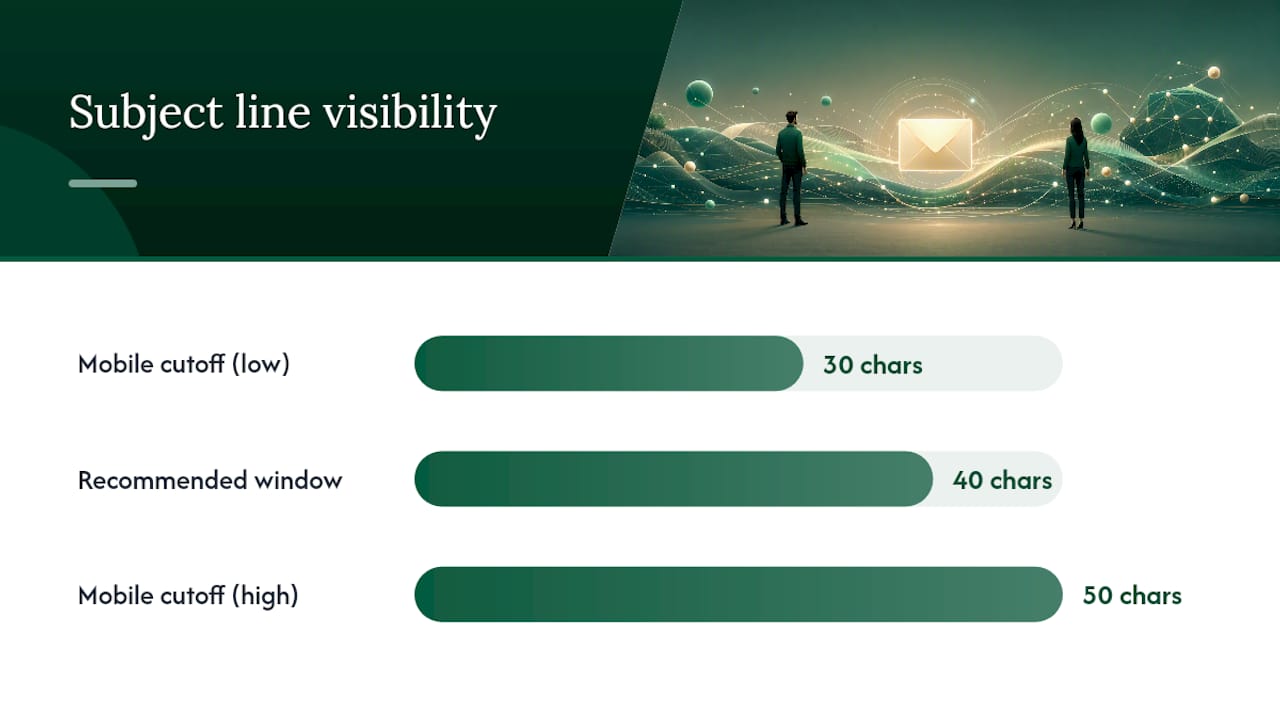
Table of Contents
- What separates great cold email subject lines from weak ones?
- Length, preview text, deliverability, and punctuation: what you need to know
- Fill-in-the-blank subject-line formulas by use case
- Copy-ready subject-line examples with a “why it works” note
- How to A/B test subject lines and which metrics actually matter
- When to use AI subject-line generators vs. writing them yourself
- What is cold email, and when should you use it?
- Your pre-send cheat sheet: QA checklist and 10 ready-to-copy templates
- How segmentation sharpens your subject lines
- Psychological triggers that make people open emails
- Common mistakes that kill your open rate
- How we write subject lines for B2B outbound at Runleadpilot
- Runleadpilot handles the hard part of cold email for you
- Sources
What separates great cold email subject lines from weak ones?
Three traits define the subject lines that consistently earn opens: they are specific, low-friction (readable in roughly two seconds), and honest — meaning the subject matches what the email actually says. Every other tactic is secondary.
Run any subject line through this checklist before sending:
- Specific, not vague. “Idea for [Company]'s onboarding flow” beats “Thought you’d find this interesting.” The first tells the reader exactly what they’re getting; the second could be anything.
- Readable in two seconds. If you need to re-read it to understand it, it fails. Aim for a single, clean thought.
- Honest match to the body. Clickbait opens get you nowhere if the reply rate is zero. The subject line is a promise; the email has to keep it.
- Mobile-first brevity. Front-load the most important word in the first 30 characters. Everything after that may be cut off on a phone screen.
- Contextual trigger. A subject line tied to something real — a recent hire, a funding round, a post the recipient wrote — outperforms generic lines because it signals you actually did your homework.
- Mutual connection cue. When you have one, use it. “[Name] suggested I reach out” is one of the highest-performing openers in cold outreach because it borrows trust.
Pro Tip: Lowercase subject lines often outperform title-case ones in B2B cold outreach because they look less like marketing and more like a message from a real person. Test both, but start with lowercase for first-touch sends.
Length, preview text, deliverability, and punctuation: what you need to know
How long should a cold email subject line be?
Short, mobile-first subject lines around seven words or 30–50 characters tend to perform better because most opens happen on a phone. The table below shows approximate character visibility across common email clients:
The practical rule: write for the 40-character window and treat anything beyond it as a bonus. Front-load the hook. “Quick question about your hiring process” works on every device; “I wanted to reach out because I noticed something interesting about your hiring process” loses most readers before they finish the subject line.
Using preview text to do more work
Preview text is the gray snippet that appears after the subject line in most inboxes. Most senders ignore it, which is a missed opportunity. A short subject line paired with a complementary preview text that extends the promise can lift your open-to-read rate without touching the subject line at all.
- Subject: “Quick question about [Company]'s pipeline”
- Preview: “Saw you’re hiring three AEs — wanted to share one idea that might help.”
That pairing does more than a longer subject line ever could.
Deliverability basics before you hit send
Sender reputation and authentication matter more than subject-line wording for inbox placement. Before any cold send:
- Use a business domain, not a free Gmail or Yahoo address.
- Set up SPF, DKIM, and DMARC records. Without them, your emails are likely to land in spam regardless of how good the subject line is. A guide to email warmup tools can help you get a new domain ready before your first send.
- Warm up new domains gradually — start with low daily volumes and ramp over several weeks.
- Avoid spam-trigger words: “FREE,” “GUARANTEED,” “ACT NOW,” “WINNER,” and anything that reads like a promotional blast.
- Never use deceptive prefixes like “Re:” or “Fwd:” on a first-touch email. It’s a deliverability risk and an ethical one.
Emojis, punctuation, and capitalization
In B2B cold outreach, emojis are generally a liability. They can trigger spam filters and read as unprofessional to many decision-makers. Occasional exceptions exist for very casual industries, but the default should be none. Exclamation points carry the same risk — one reads enthusiastic, two reads desperate. Sentence case or lowercase outperforms ALL CAPS by a wide margin.
Fill-in-the-blank subject-line formulas by use case
Templates organized by intent help teams build relevant subject lines faster, but every template needs a real data point inserted before it goes out. Generic copy-paste kills performance.
-
First-touch prospecting Formula: “Quick question about [Company]'s [specific process]” Personalize with: a department, a tool they use, or a challenge visible from their job postings. Preview text: “Noticed you’re scaling your [team/function] — have one idea worth 10 minutes.”
-
Follow-up Formula: “Still worth a chat, [First Name]?” Use when: 5–7 days after no reply to a first-touch email. Preview text: “Wanted to make sure my last note didn’t get buried.”
-
Referral / mutual connection Formula: “[Mutual contact] thought we should connect” Personalize with: the exact name of the shared contact. Preview text: “[Contact] mentioned you’re working on [relevant challenge].”
-
Job outreach Formula: “Applying for [Role] — [one concrete credential]” Use when: reaching a hiring manager directly, not through an ATS. Preview text: “Three years running [relevant function] at [previous company].”
-
Re-engagement Formula: “Still relevant, [First Name]?” Use when: a prospect went cold after initial interest. Preview text: “Things may have changed since we last spoke — happy to catch up.”
-
Networking Formula: “Loved your [post/talk/article] on [topic] — one question” Personalize with: the specific piece of content and a genuine question. Preview text: “Your take on [specific point] made me think of something worth sharing.”
-
Trigger event (funding, hire, launch) Formula: “Congrats on [specific event] — quick thought” Personalize with: the exact event (Series A, new VP of Sales, product launch). Preview text: “Companies at this stage often run into [specific challenge] — here’s how we help.”
-
Break-fix / pain-point Formula: “Are you still [doing X the hard way]?” Use when: you know the prospect’s likely pain from their industry or role. Preview text: “Most [role titles] we talk to are still [doing X manually] — there’s a faster path.”
Copy-ready subject-line examples with a “why it works” note
Personalization tied to a real context — a recent hire, a funding round, a post the recipient wrote — lifts opens and replies more than first-name tokens alone. The examples below are organized by goal.
First-touch prospecting
- “Question about [Company]'s outbound process” — specific function, zero fluff. Preview: “Saw you’re hiring SDRs — have one idea that might help.”
- “How [Competitor] is winning deals you’re missing” — curiosity plus competitive framing. Best for high-research sends only. Preview: “Happy to share what we’re seeing across your space.”
- “[Company] + [Your Company] — worth 15 minutes?” — direct ask, no preamble. Preview: “We help [role] teams at companies like yours do X.”
Follow-up
- “Did this get buried, [First Name]?” — conversational, low pressure. Preview: “Totally understand if the timing was off — wanted to check.”
- “One more thought before I close this out” — signals finality, which often prompts a reply. Preview: “If now’s not the right time, just say the word.”
Referral
- “[Name] said you’re the right person to talk to” — borrowed trust, high open rate. Preview: “They mentioned you’re working on [challenge].”
- “Intro from [Name] — quick note” — short and credible. Preview: “[Name] thought this might be worth 10 minutes of your time.”
Job seeker outreach
- “Applying for [Role] — background in [skill]” — honest and direct. Preview: “Spent three years doing exactly this at [Company].”
- “Referred by [Name] for the [Role] opening” — use only when true. Preview: “They thought my background in [area] was a strong fit.”
Networking
- “Your post on [topic] — one follow-up question” — shows you read it. Preview: “Your point about [specific detail] stuck with me.”
- “Met you briefly at [Event] — wanted to follow up” — context-anchored. Preview: “We talked about [topic] — happy to continue the conversation.”
Re-engagement
- “Checking in — still dealing with [pain point]?” — reopens the conversation around their problem. Preview: “We’ve helped a few companies in your space solve this recently.”
- “Six months later — still relevant?” — honest about the gap. Preview: “Things change fast. Happy to share what’s new on our end.”
Break-fix / pain-point
- “Still managing [X] manually?” — works when you know the pain. Preview: “Most [roles] we talk to are — there’s a faster way.”
Pro Tip: Flag your highest-research examples (referral, trigger event, mutual connection) for small-batch sends of 20–50 prospects. Save the broader templates for larger segments where you can’t verify every detail. Sending a “congrats on your funding” line to a company that didn’t raise is worse than sending a generic line.
How to A/B test subject lines and which metrics actually matter
Open rate is the most-watched metric in email, and also the least reliable one since Apple Mail Privacy Protection (MPP) launched. MPP pre-loads email content for Apple Mail users, which inflates open rates artificially. If a significant portion of your list uses Apple Mail, your open rate is not a clean signal.
Here’s a practical A/B testing protocol:
- Isolate one variable. Test the subject line only. Keep the email body, send time, and sender name identical across both variants. Changing two things at once means you can’t know which one moved the needle.
- Use a representative segment. Split your list randomly, not by engagement tier. Testing on your most-engaged contacts will inflate results for both variants.
- Set a minimum sample size. Smaller lists make it hard to reach statistical confidence. A rough floor: 200 recipients per variant before drawing conclusions.
- Run tests at the same time. Send both variants simultaneously to eliminate day-of-week and time-of-day effects.
- Wait for the right window. Most cold email replies come within 48–72 hours. Don’t declare a winner at hour four.
Which metrics to prioritize
- Reply rate: the most reliable signal for cold outreach. A reply means the subject line earned the open AND the email earned a response.
- Click-through rate (CTR): useful when your email includes a link (a case study, a calendar link). Clicks confirm the reader engaged with the content.
- Meeting or demo booked: the downstream metric that actually matters for sales. Track this at the sequence level, not just the subject-line level.
- Open rate: use it directionally, not definitively. A/B testing should prefer reply and click metrics when Apple MPP muddies opens. A tool like email tracking software can help you separate real opens from MPP-inflated ones.
Once you have a winning variant, roll the subject line pattern into your templates. Document what made it work (the trigger event, the specific function mentioned, the length) so the learning transfers to future sequences, not just the one campaign.
When to use AI subject-line generators vs. writing them yourself
AI generators like Klaviyo’s subject-line tool and ActiveCampaign’s generator are genuinely useful for one thing: producing a large set of variants quickly so you have more options to filter. They are not a replacement for human judgment on which lines are actually good.
Here’s a workflow that gets the best of both:
- Seed the prompt with specifics. Don’t ask for “cold email subject lines for a SaaS company.” Give the tool the prospect’s industry, the trigger event, the pain point, and the desired tone. Garbage in, garbage out.
- Generate 10–20 variants. More options mean more chances to find a line that’s genuinely good rather than generically acceptable.
- Filter by the checklist. Run every AI-generated line through the traits checklist from earlier: specific, readable in two seconds, honest match to the body, under 50 characters.
- Human-edit the top three picks. AI tends toward safe, generic phrasing. A human editor catches the lines that sound like they were written by a robot and sharpens the ones that are almost right.
- A/B test before a broad send. Never push an AI-generated line to your full list without testing it on a smaller segment first.
The risk of skipping human review is real. An AI tool might generate “Congrats on your recent funding!” for a company that hasn’t raised in three years, or use a first-name token that breaks when the field is empty. One unchecked error sent to 500 prospects is harder to recover from than a slower, more careful process.
Pro/con summary:
- AI at scale: fast, high-volume variant generation; good for broad segments where deep personalization isn’t feasible. Risk: generic phrasing, token errors, no contextual judgment.
- Human-crafted for high-value targets: slower, but the specificity and tone are right. Use for named accounts, referral sends, and any line where a mistake would damage a relationship.
Pro Tip: Before any AI-generated line goes to a live list, run it through a simple three-question check: Does it match the email body? Does it contain a real, verifiable detail? Would you be comfortable if the recipient knew it was AI-generated? If any answer is no, rewrite it.
What is cold email, and when should you use it?
Cold email is an unsolicited message sent to someone you have no prior relationship with, with the goal of starting a conversation. Common legitimate uses include B2B sales prospecting, job outreach, networking, event invitations, and partnership pitches.
Used well, cold email is one of the most direct and cost-effective outreach channels available. Used poorly, it damages sender reputation and, in some cases, creates legal exposure.
When cold outreach makes sense:
- You have a specific, relevant reason to contact this person.
- The recipient would plausibly benefit from the conversation.
- You can’t reach them through a warm introduction or inbound channel in a reasonable timeframe.
When to choose a different approach:
- You have a warm connection or a referral available — use it.
- The prospect has already engaged with your content or visited your site — inbound or warm outreach will convert better.
Compliance basics: CAN-SPAM and GDPR
Under the U.S. CAN-SPAM Act, every commercial email must identify the sender clearly, include a valid physical address, and honor opt-out requests promptly. Cold email to business addresses is generally permitted under CAN-SPAM as long as these requirements are met.
If you’re emailing recipients in the EU or UK, GDPR and UK GDPR apply stricter rules, typically requiring a legitimate interest basis for B2B outreach and a clear opt-out mechanism. When in doubt, consult a qualified legal professional for your specific situation.
Your pre-send cheat sheet: QA checklist and 10 ready-to-copy templates
Pre-send QA checklist
- Subject line is 40–50 characters or fewer.
- Preview text is written and extends the subject line (not a repeat of it).
- All merge tokens have tested fallbacks (e.g., “there” if first name is missing).
- Sending domain is warmed up and authenticated (SPF, DKIM, DMARC).
- No spam-trigger words in the subject line or first sentence.
- “From” name is a real person, not a company alias.
- Opt-out mechanism is present and functional.
- You’ve done a seed send to your own inbox to check rendering.
10 ready-to-copy templates
- “Quick question about [Company]'s [process]”
- “[Mutual contact] suggested I reach out”
- “Still worth a conversation, [First Name]?”
- “Applying for [Role] — [one credential]”
- “Congrats on [specific event] — quick thought”
- “Loved your [post/talk] on [topic] — one question”
- “Are you still [doing X the hard way]?”
- “Did this get buried, [First Name]?”
- “Checking in — still dealing with [pain point]?”
- “[Company] + [Your Company] — worth 15 minutes?”
To use merge tokens safely, always set a fallback value in your sending tool (most platforms support syntax like {{first_name | fallback: "there"}}). Before any broad send, push the sequence to two or three seed addresses — your own inbox plus a colleague’s — to confirm tokens resolve correctly and the email renders well on mobile.
How segmentation sharpens your subject lines
A subject line written for “everyone” performs like it was written for no one. The more precisely you define the segment before writing, the more specific and relevant the subject line can be, and specificity is what drives opens.
Effective segmentation for cold outreach typically starts with firmographic data: company size, industry, and growth stage. A subject line for a Series A SaaS company looks different from one targeting a 200-person professional services firm. Firmographic targeting lets you write subject lines that reference the prospect’s actual situation rather than a generic pain point that might not apply.
Beyond firmographics, behavioral and trigger-based segmentation produces the sharpest lines. Grouping prospects by a shared recent event (all companies that raised funding in the last 90 days, all companies that posted a VP of Sales job in the last 30 days) lets you write one highly specific subject line that feels personal to every recipient in that group. That’s the difference between personalization at scale and personalization theater.

Role-based segmentation matters too. A CFO and a VP of Sales at the same company have different priorities. The subject line that works for one will often miss the other entirely.
Psychological triggers that make people open emails
The most reliable psychological triggers in cold email subject lines are curiosity, relevance, and social proof — in roughly that order of reliability.
Curiosity works when it’s earned. A subject line like “One thing your competitors are doing differently” opens well because it implies the reader might be missing something. The risk: if the email body doesn’t deliver a real answer, the reader feels tricked and the reply rate collapses. Curiosity-driven subject lines open well but decay if the body doesn’t deliver. Use curiosity to earn the open, then immediately pay it off in the first sentence.
Relevance is the most durable trigger. When a subject line references something the recipient actually cares about — their company, their role, a challenge specific to their industry — it signals that this email is worth reading. Relevance doesn’t require a clever hook; it just requires research.
Social proof shows up in referral lines (“[Name] suggested I reach out”) and in lines that reference recognizable companies or outcomes (“How [Company] cut their sales cycle by X”). It borrows credibility from a known source and reduces the perceived risk of opening an unknown email.
Urgency and scarcity can work but burn out fast. “Last chance” and “expires Friday” read as manipulative in B2B cold outreach unless the deadline is real. Rotate them sparingly and only when the urgency is genuine.
The trigger to avoid entirely: false familiarity. Subject lines that imply a prior relationship (“Following up on our conversation”) when there was none are deceptive, damage trust on open, and in some contexts may violate CAN-SPAM’s prohibition on deceptive headers.
Common mistakes that kill your open rate
Most cold email subject-line failures come from the same short list of errors.
Writing for yourself, not the recipient. “Introducing [Your Company]” is the most common first-touch subject line and one of the worst-performing. The recipient doesn’t care about your company yet. They care about their problem.
Being vague in the name of being clever. “Thought this might interest you” and “Quick question” (without any context) are so overused they’ve become invisible. Specificity is what makes a subject line feel like it was written for this person, not blasted to a list.
Going too long. A 12-word subject line that gets cut off at word six on a phone screen loses its meaning. Write for the 40-character window.
Using deceptive prefixes. “Re:” or “Fwd:” on a first-touch email is a short-term open-rate trick that destroys trust the moment the recipient realizes there was no prior thread. It also risks CAN-SPAM violations.
Ignoring the preview text. Leaving preview text blank means the inbox shows the first line of your email body, which is often a legal footer or a broken merge token. That’s a wasted opportunity every time.
Over-personalizing with stale data. Referencing a funding round from two years ago or a job title the person no longer holds signals that your research is automated and outdated. Verify trigger events before using them.
How we write subject lines for B2B outbound at Runleadpilot
The most consistent lesson from running outbound campaigns across B2B clients is that the subject lines that look the least like marketing perform the best. Not because recipients can’t tell the difference, but because a plain, specific, honest line signals that a real person did real research.
The process that produces the best results starts before the subject line is written. Identifying a concrete trigger — a recent hire, a job posting, a product update, a piece of content the prospect published — gives the subject line something real to reference.
One pattern that consistently outperforms: pairing a trigger-event subject line with a first sentence that immediately explains why that event is relevant to the offer. The subject line earns the open; the first sentence earns the read. When those two elements are misaligned, the reply rate drops even when the open rate looks healthy.
For agencies managing outbound across multiple clients, the challenge is maintaining that specificity at volume. That’s where a managed platform like Runleadpilot’s agency offering becomes the practical answer — not because automation replaces judgment, but because it handles the research and signal-gathering that makes specific subject lines possible at scale.
Runleadpilot handles the hard part of cold email for you
Writing great subject lines is one piece of a much larger production problem. You still need to find the right prospects, research each one, manage sending domains, run follow-up sequences, and route warm replies to the right person. Most lean teams don’t have the bandwidth to do all of that well.

Runleadpilot’s cold email automation platform handles the full workflow: it reads your website to identify your ideal customer profile, finds and researches matching decision-makers, writes personalized emails from real business signals, manages dedicated sending domains for deliverability, automates follow-ups, and hands warm replies directly to your team. You get the specificity that drives opens without the manual research overhead.
Key capabilities tied directly to subject-line performance:
- Personalization from live business signals (funding, hires, content) — the same triggers that make subject lines work
- Dedicated sending domains and inbox management for clean deliverability
- Sequence automation with follow-up cadences built in
- Warm reply routing so your team only touches conversations that are already moving
Build a free campaign preview at Runleadpilot to see exactly how it works before committing to a plan.
Sources
- B2B Cold Email Subject Lines: What’s Hot, What’s Not
- Subject line best practices — Klaviyo
- Cold Email Subject Lines for 2026 (100+ Examples + Frameworks) | Mailsfinder
- EMAIL SUBJECT LINE GENERATOR — ActiveCampaign
- 150 email subject lines that get opens (2026) | Mailneo