Act Within 48–72 Hours: B2B Playbook for LinkedIn Signals
Spot and act on LinkedIn signals: prioritize Tier 1 events within 48–72 hours, use three short templates, and route signals into a LinkedIn+email cadence.

Act Within 48–72 Hours: B2B Playbook for LinkedIn Signals
Act on job changes, budget-owner hires, substantive comments, and hiring or funding news within 48 to 72 hours, and you’ll see meaningfully higher accept and reply rates than cold, unsignaled outreach. Lower-confidence signals like a single profile view or a follow deserve a slower, 3 to 21 day window. The rule that matters most: reference the signal in your first message, or don’t bother sending it.
TL;DR:
- Signals related to job changes into budget-owning roles and substantive posts discussing specific problems are the highest-confidence triggers for outreach, especially within the first week.
- Act on recent signals within 3 days, prioritize multiple corroborating signals, and ensure company size and role fit your ideal customer profile before engaging.
- Use signals as part of a multichannel approach by combining LinkedIn activity with email follow-ups within 72 hours, increasing the chances of timely contact.
- Personalize messages based on the signal type and recipient’s role, and keep outreach brief, referencing the specific signal with a clear, low-friction question.
- Respect privacy by referencing only public activities, avoid over-messaging, and include human review to prevent sounding templated or intrusive.
RunleadpilotTurn Fresh Signals Into OutreachLeadPilot finds matching decision-makers, writes signal-based emails, manages follow-ups, and hands warm replies to your team.Explore LeadPilot
Table of Contents
- What Are LinkedIn Signals for Outreach, and Why Do First-Party Events Beat Modeled Intent?
- The Top LinkedIn Signals Worth Tracking, Ranked by Confidence
- How Do You Prioritize LinkedIn Signals? Tiers, Clustering, and Disqualifiers
- Exactly When and How to Reach Out: A Timing and Message Playbook
- Tools and Workflows That Surface Signals Without Slowing You Down
- What Reply Rates and Meeting Rates Should You Expect from Signal-Driven Outreach?
- How a Managed Signal-Driven Workflow Runs in Practice
- Tailoring Messages to the Signal Type and the Recipient’s Role
- Respecting Privacy and Etiquette When Acting on LinkedIn Signals
- Making LinkedIn Signals Part of a Broader Multichannel Outreach Plan
- An Editorial Checklist Before Any Signal-Driven Message Goes Out
- Sources
What Are LinkedIn Signals for Outreach, and Why Do First-Party Events Beat Modeled Intent?
A LinkedIn signal is a timestamped, observable action tied to a real person or company account: a new job title, a comment on a post, a spike in profile views, a company page hiring announcement. These are real-time cues from buyer behavior that tell you the moment is right, not just the person is right.
That distinction separates signal-based outreach from the intent data most marketing teams buy from third-party vendors. Third-party intent scores are modeled. They infer interest from aggregated, anonymized web behavior across a data co-op, then assign a probability score to an account. Useful for building a target list, weak for timing a message. LinkedIn signals are the opposite: person-level, dated, and attached to a name you can message in the same platform where the event happened.
That’s the practical advantage nobody talks about enough. You’re not guessing which account might be in-market based on a composite score. You’re watching a specific director of operations post about a hiring freeze, or a VP of sales comment on a post about pipeline forecasting problems, and you can open LinkedIn’s messenger and respond to that exact person within minutes. No data export, no CRM sync delay, no stale contact record.
First-party signals also solve the attribution problem that plagues most outbound programs. When you reference a specific post or a specific title change in your opening line, you know precisely what triggered the outreach and can measure whether that trigger correlates with replies. Modeled intent data rarely offers that clarity because the “signal” behind the score is a black box.
None of this means you should fire off a message the instant you see one signal. A single data point is thin evidence. Someone updating a job title doesn’t always mean new budget. A profile view might be a recruiter, not a buyer.
Before acting on any individual event, run it through a short mental checklist:
- Is this signal recent (within the past week) or stale?
- Does the role or department plausibly own the budget for what you sell?
- Is there a second corroborating signal from the same account?
- Does the company’s size and industry match your ideal customer profile?
Signals that pass all four checks deserve fast action. Signals that fail two or more deserve a pass, or at least a longer wait for corroboration.
The Top LinkedIn Signals Worth Tracking, Ranked by Confidence
Not every blip on someone’s profile deserves a message. Some signals are near-certain buying triggers. Others are noise that looks like intent if you squint. Here’s how to rank them.
- Job changes into budget-owning roles. A new VP of Marketing, Head of Sales Ops, or Director of Revenue post is the single highest-confidence signal available on the platform, because a posted title change usually means approved headcount and a fresh budget cycle. New leaders also tend to re-evaluate existing vendor relationships in their first 90 days, which is exactly the window you want to be in front of them.
- Substantive posts and comments about a problem you solve. Someone writing three paragraphs about the pain of manual outbound prospecting, or commenting with genuine detail on a peer’s post about churn, is telling you what’s on their mind in their own words. This beats any inferred score.
- Multiple profile views from the same company within days of each other. One view could be a recruiter or a curious peer. Three or four views from different people at the same account, clustered in a short window, usually means a buying committee is doing quiet research before a call gets booked internally.
- Company-level hiring posts, funding announcements, and press mentions. A company posting five open sales roles, or announcing a funding round, signals expansion and new spending authority at the account level, even if you haven’t identified the specific buyer yet.
- Page follows and content engagement, including engagement with competitor content. Someone following your company page or liking a competitor’s product announcement shows category awareness. It’s a real signal, but a soft one on its own.
- Document and Smart Link engagement. If you’ve shared a deck or a Smart Link and someone reopens it, spends time on specific pages, or forwards it internally, that behavioral data is closer to bottom-funnel intent than almost anything else on this list.
The distinction that trips up most SDRs: comments and shares carry far more weight than reactions or likes. A double-tap on a post takes one second and means almost nothing about intent. A two-sentence comment that engages with the substance of a post takes real effort, and personalized outreach built on that kind of engagement produces roughly three times the connection accept rate of a generic request. Treat a comment as a green light. Treat a like as a maybe.
Pro Tip: Set up a simple tagging habit: whenever you log a signal, note whether it was a comment/share (high signal) or a reaction/view (low signal). After a month, you’ll have your own data on which signal type actually converts for your specific offer, instead of relying on general benchmarks.
How Do You Prioritize LinkedIn Signals? Tiers, Clustering, and Disqualifiers
Not every qualifying signal deserves the same urgency. The most useful mental model for LinkedIn outreach strategies is a three-tier system that maps directly to how fast you act and what you say.
Tier 1: act within 3 days. This is reserved for budget-owner job changes, direct comments on your own content, or a document reopen combined with a profile view from the same person. These are high-confidence, high-specificity signals where waiting costs you the window. Speed to outreach, ideally within 48 hours, is consistently tied to higher conversion on this tier.
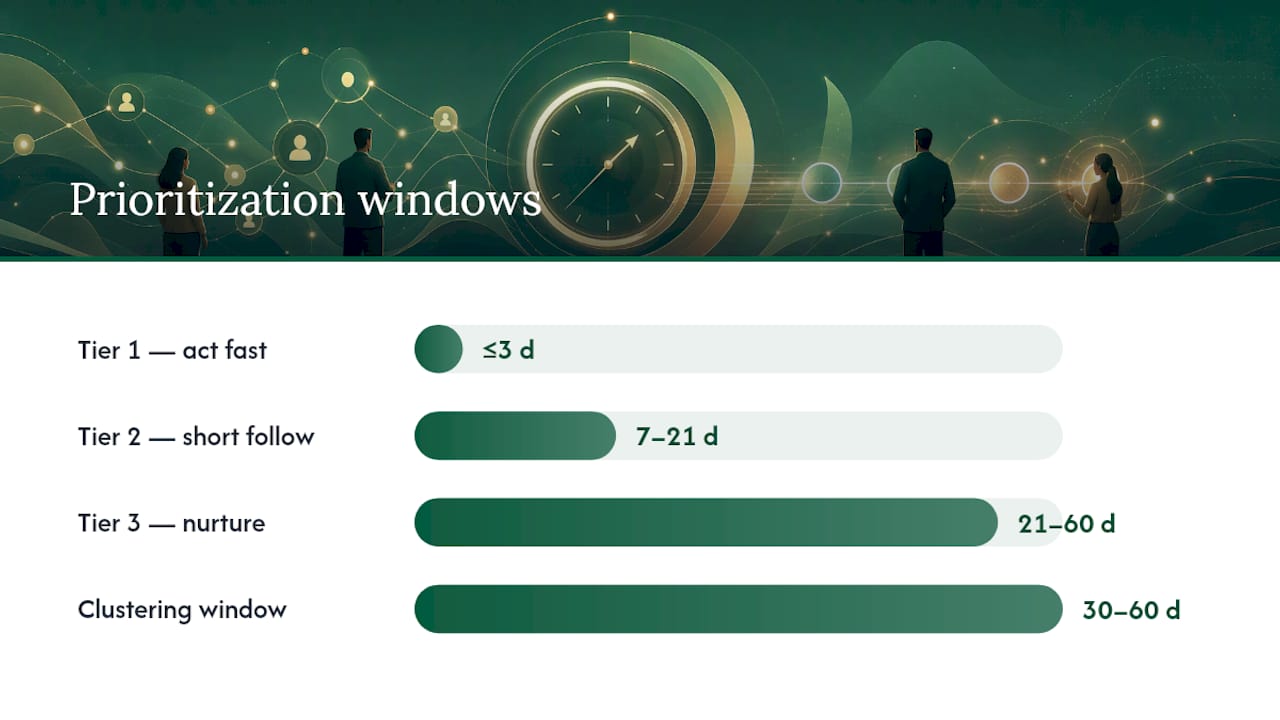
Tier 2: act within 7 to 21 days. Company hiring sprees, funding announcements, and multiple profile views from one account fall here. The intent is real, but you often don’t yet know who the specific decision-maker is, so this window gives you time to identify the right person and build a slightly more researched opener.
Tier 3: nurture over 21 to 60 days. Page follows, single reactions, and generic industry commentary belong here. Add these accounts to a watch list rather than a send queue. If a Tier 3 account later produces a Tier 1 signal, that’s your trigger to move.
Signal clustering benchmark: Requiring two to three correlated signals within a 30 to 60 day window meaningfully raises confidence over acting on any single event, because clustered signals corroborate each other and cut down on false positives.
Clustering is the discipline most outbound teams skip, and it’s the reason “signal-based” campaigns sometimes underperform expectations. One signal is a data point. Two or three signals from the same account within a short window, say a new hire in the target department plus a company post about scaling that team, is a pattern. Patterns convert better than isolated events.
Firmographic fit still has to gate everything. A perfect Tier 1 signal at a company with 12 employees means very little if your product is built for 200-person teams. Before you act on any signal, run it against basic disqualifiers:
- Company size outside your ideal customer profile range
- Role seniority too junior to influence or approve a purchase
- Growth signals in an unrelated department (engineering hiring when you sell to marketing)
- Signals more than 60 to 90 days old with no recent corroboration
Watch for two common false positives. The first is backfill hiring, where a company posts a role because someone left, not because they’re growing or changing strategy. Check the company’s other recent posts for context before assuming expansion. The second is generic commentary, where someone reposts an industry trend piece with a one-line caption and no personal opinion. That’s engagement with a topic, not evidence of a problem they’re actively trying to solve. Save your outreach budget for the signals that show actual specificity.
Exactly When and How to Reach Out: A Timing and Message Playbook
Timing without the right channel wastes the signal. Here’s the sequence that maps tiers to action.
- Tier 1 signals get same-day or next-day action. Comment on their post first if it’s a content-based signal, then send a connection request referencing the specific point they made, then follow with a short message once connected. Comment-based prospecting, engaging publicly before connecting, produces some of the warmest inbound-feeling replies when done within 24 to 48 hours.
- Tier 2 signals get a connection request within the first week, paired with a short note that references the company-level event (hiring, funding) rather than a specific personal detail you don’t have yet.
- Tier 3 signals get no immediate outreach. Add the account to a nurture list and check back if a second signal appears within 60 days.
Channel choice follows a simple decision tree. If the person hasn’t accepted a connection yet, a personalized connection note beats a cold InMail almost every time, because it’s free and lower-friction. If you’re already connected, a direct message wins over InMail. If you have a verified work email and the signal is time-sensitive, running LinkedIn and email in parallel gives you two shots at the same 72-hour window.
Every message should follow the same three-part formula: name the signal, state one line of relevance, close with a low-friction ask. Skip the pitch. Skip the “I wanted to reach out because.” Just name what you saw and ask a small question.
Three micro-templates, each under 75 words, because short, specific messages with a clear question consistently outperform long pitches:
Job change: “Congrats on the new [Title] role at [Company]. Most people stepping into this seat in their first 90 days end up rethinking [specific process]. Worth a quick 15 minutes to compare notes on how peers are approaching it?”
Comment on a post: “Appreciated your comment on [Poster]'s post about [topic], you nailed the part about [specific detail]. Curious how [Company] is handling that today, any interest in trading notes?”
Profile view / research signal: “Noticed you’d been checking out [specific page/content]. If you’re evaluating options for [problem], happy to send over the two-minute version instead of a full pitch, no strings attached.”
Pro Tip: Cap your outreach at four touches: connect or InMail, then two follow-ups spaced roughly 4 to 7 days apart, then a final “closing the loop” message. Most replies come from touch two or three, not the first message, so don’t judge a signal-based campaign off a single send.
Tools and Workflows That Surface Signals Without Slowing You Down
You don’t need a data science team to run this. LinkedIn’s native features cover most of what a small outbound team needs, and Sales Navigator sharpens the rest.
Sales Navigator’s saved search alerts and lead alerts do the heavy lifting: set filters for job changes, posts, and company updates on your saved lead lists, and the platform pushes those events to you daily instead of forcing you to check profiles manually. Native LinkedIn notifications catch a smaller slice, mostly direct engagement with your own posts and connections, but they’re free and worth checking twice a day.
For a small team, a simple daily workflow works better than a complicated system: fifteen minutes each morning reviewing overnight alerts, sorting into the three tiers, and building a micro-list of five to ten accounts to act on that day. Small, recent micro-lists consistently outperform large static lists because every account on the list has a live, dated reason to be there.
Larger teams need light structure on top of that:
- Push qualifying signals into your CRM with a tag for signal type (job change, comment, hiring, funding).
- Assign a designated outreach owner per signal so nothing sits unclaimed in a shared inbox.
- Set a weekly review to check which signal types are actually converting to replies, and adjust the tagging rules from there.
- Route Tier 3 accounts to a nurture sequence rather than letting them die in a spreadsheet.
One warning worth repeating: automation should surface and route signals, not draft and send messages unsupervised. LinkedIn caps daily invitations and flags accounts that automate connection requests or messages at volume, so any workflow that skips human review before sending is risking the account, not just the reply rate. Use automation to save you the manual scanning. Keep a person writing and approving the actual message.
A prospecting tool comparison can help you decide which combination of Sales Navigator, CRM routing, and lightweight automation fits your team’s size before you build a custom stack.
What Reply Rates and Meeting Rates Should You Expect from Signal-Driven Outreach?
Four numbers matter here, and you should be tracking all of them per campaign, not just overall reply rate.
- Connection acceptance rate, the percentage of sent requests that get accepted.
- First-message reply rate, replies to your opening message after connecting.
- Meetings booked per 100 connections, the number that ties activity to pipeline.
- Positive-reply rate, replies that indicate real interest, not just a polite “not right now.”
Benchmark range: Generic connection requests typically land in the 30% to 40% acceptance range, with reply rates around 5% to 15%. Signal-referenced outreach frequently pushes positive-reply rates two to five times higher than standard, unsignaled cold outreach.
The fastest way to prove signal value to a skeptical manager or client isn’t a benchmark, it’s a controlled test inside your own pipeline. Run two arms for two to three weeks: Arm A sends standard outreach with no signal reference, Arm B sends signal-referenced outreach using the templates above, both targeting similarly sized accounts. Aim for at least 100 sends per arm before drawing conclusions, since smaller samples swing wildly on reply rate.
Track results weekly rather than waiting for the full test window to close, so you can catch a broken message or a bad list early. When reporting results, attribute replies to signal type, not just to “signal vs. no signal,” since a job-change-triggered message and a profile-view-triggered message rarely perform the same.
How a Managed Signal-Driven Workflow Runs in Practice
Most teams that try to run this manually hit the same wall: watching for signals, researching each account, writing a personalized opener, and managing follow-ups is a full-time job by itself, on top of actually closing deals. That’s the operational gap this kind of managed, AI-powered platform is built to close.
The workflow looks like this: identify the ideal customer profile directly from a company’s own website and existing customers, build a micro-list of matching decision-makers, draft outreach that references real, current signals rather than a generic template, run the follow-up cadence automatically, and hand off any warm reply to a human for the actual conversation. The full mechanics of that handoff run from initial targeting through the moment a real person picks up the reply.
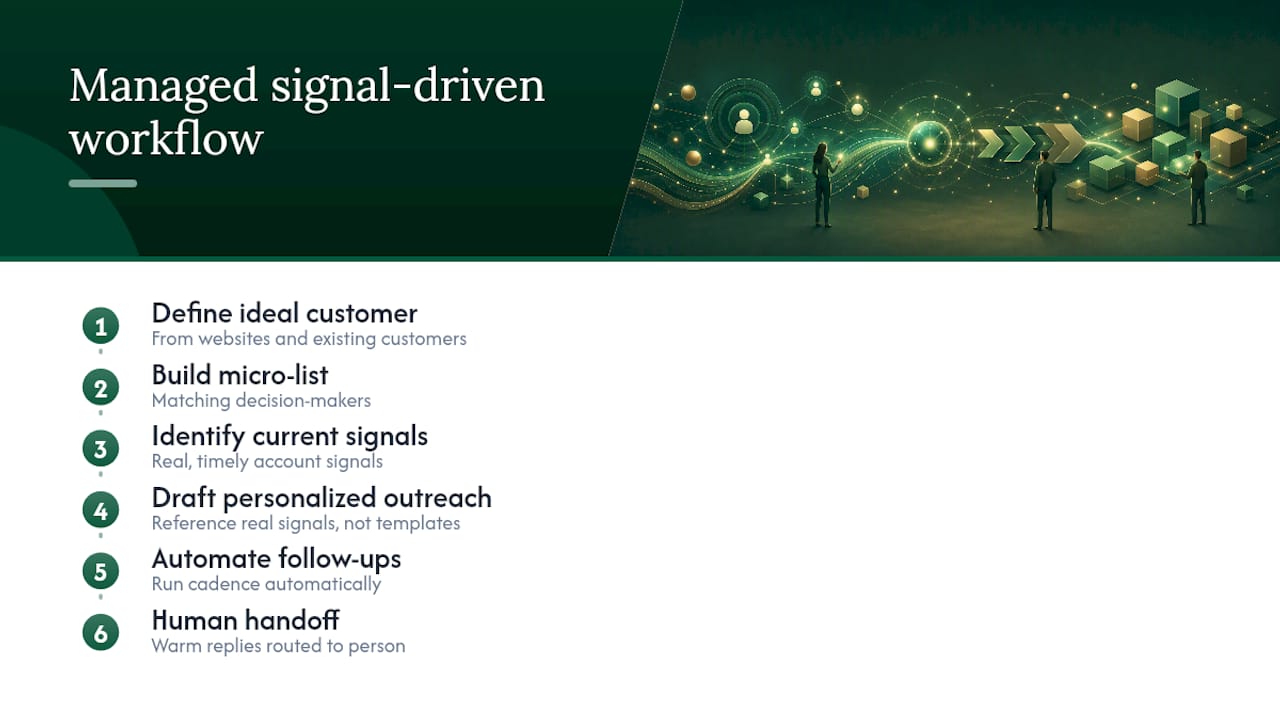
A few specifics worth preserving from that process include building a free campaign preview before any purchase so a team can see the targeting and draft messaging before committing, managing dedicated sending domains and inboxes to maintain deliverability, and including human review to catch templated-sounding copy before messages go out and to keep sending patterns within safe limits.
Whether that’s the right fit depends on where a team actually sits. A founder or a two-person sales team watching LinkedIn manually will run out of hours before they run out of signals. A managed lead generation approach makes more sense once the volume of qualifying signals outpaces what one or two people can research and personalize by hand, which for most growing B2B teams happens faster than they expect.
Tailoring Messages to the Signal Type and the Recipient’s Role
The signal you’re reacting to should change more than your opening line, it should change your entire message structure. A comment on a technical post deserves a message that engages with the specific technical point raised, written the way a peer would write it. A job-change signal for a new VP deserves a broader, strategic framing since new leaders are usually thinking about direction, not tactics, in their first weeks.
Industry context matters just as much as role. A finance leader responds better to a message grounded in a specific number or outcome. A marketing leader responds better to a message that references a campaign, channel, or piece of content they’ve clearly engaged with. Selling to an operations role usually calls for a process-focused angle, since that’s the lens most ops leaders naturally think in.
Seniority also changes the ask. A director-level contact can often take a meeting on their own authority, so a direct “worth 15 minutes” ask works fine. A more junior contact might need a softer ask, like offering to send a short resource, since they may not have the authority to book a call without checking with someone else first. Matching the ask to the recipient’s actual decision-making power avoids the awkward moment of pushing a meeting on someone who can’t say yes to it anyway.
Respecting Privacy and Etiquette When Acting on LinkedIn Signals
Watching someone’s public activity and reacting fast is not the same as watching them too closely, and the line matters both ethically and for your reply rates. Stick to signals the person made public on their own: posts, comments, job title changes, company announcements. Never reference something that feels surveillance-like, such as noting the exact time someone viewed your profile or implying you’ve been tracking their activity closely.
The safest framing is always: “I saw your post” or “Congrats on the new role,” never “I noticed you’ve been looking at my page for the third time this week.” One feels like normal networking. The other feels like being watched, and it kills trust before the conversation even starts.
Etiquette also means respecting a no. If someone doesn’t accept a connection request or doesn’t reply after two or three follow-ups, stop. Sending a fifth message referencing yet another new signal reads as pressure, not persistence. Give real accounts a cooldown period of several weeks before you re-approach with a fresh signal, and never message the same person from multiple accounts on your team trying to force a response.
Finally, keep the tone conversational rather than sales-scripted. Signal-based outreach works precisely because it feels like a real person noticed something real. The moment it reads like a template with a name swapped in, it loses the advantage that made the signal worth acting on in the first place.
Making LinkedIn Signals Part of a Broader Multichannel Outreach Plan
LinkedIn signals work best as the trigger inside a bigger system, not as a standalone channel. Once you’ve identified a Tier 1 or Tier 2 signal, the same insight should inform your email outreach, not just your LinkedIn message. If you know someone just posted about a hiring freeze, that context belongs in a follow-up email too, not only in the LinkedIn note.
A practical approach: use LinkedIn to spot and validate the signal, then run parallel touches across LinkedIn and email within the same 48 to 72 hour Tier 1 window. Email tends to have a longer shelf life for follow-ups since it isn’t bound by connection status, while LinkedIn gives you the fastest first response when someone’s already active on the platform. Running both increases the odds of landing in front of the person at the moment they’re actually paying attention.
Sales teams that already run automated prospect sourcing or structured email sequencing have a natural home for signal data: feed the signal type and date into whatever system triggers your email cadence, so a LinkedIn event can kick off an email follow-up automatically instead of living in a separate silo. Teams building this kind of automation from scratch can also look at lead qualification automation frameworks for patterns on filtering signals before they ever reach a rep’s queue. The goal isn’t picking LinkedIn over email. It’s making sure whichever channel responds fastest carries the same, specific reason for reaching out.
An Editorial Checklist Before Any Signal-Driven Message Goes Out
Every team that gets good at this eventually converges on the same short checklist, run before hitting send, not after drafting the message.
First, confirm the signal is genuinely recent, ideally under 72 hours old, and check whether a second signal from the same account shows up in the past month. A cluster beats a single event every time. Second, validate firmographic fit and role seniority before writing a word. A perfect signal at the wrong company size is still the wrong account. Third, pick the channel based on connection status, not habit, and write one line that references the specific signal rather than a generic opener. Fourth, assign a follow-up cadence and a named reply owner before the first message goes out, and cap the sequence at four touches. If nothing’s landed by touch four, the account goes to nurture, not to a fifth message.
What I’d add to that list, beyond the mechanics: resist the urge to treat every signal as urgent. The teams that burn out their best accounts are the ones firing off a message the second any activity appears, regardless of tier. Discipline around timing is what makes the whole approach work, not speed for its own sake.
— Harsh
Sources
- How Signals Improve Sales Outreach
- LinkedIn Intent Signals for B2B Sales: A Practical Reading Guide
- Signal-Based Selling on LinkedIn: How to Run It | LinkedInsider
- LinkedIn Signal-Based Prospecting: A Complete Playbook | Pointer