Automated Prospect Sourcing for B2B Teams: A Practical Guide
Discover how automated prospect sourcing can transform your B2B outreach. Start with a free campaign preview to see the results!

Automated Prospect Sourcing for B2B Teams: A Practical Guide
Automated prospect sourcing is the use of software or AI agents to continuously find accounts that match your ideal customer profile, identify the right decision-makers, verify their contact details, and surface them ready for outreach — without a rep doing manual research. The single best next step you can take today: run a short pilot or free campaign preview to validate fit before committing to any platform. Runleadpilot’s free campaign preview lets you see exactly who the system surfaces for your ICP before you spend a dollar on managed outreach.
Key Takeaways
Automated prospect sourcing works when you combine a precise ICP, verified contact data, signal-based targeting, and a managed delivery layer — and validate the whole system with a short, measured pilot before scaling.
| Point | Details |
|---|---|
| Define ICP before configuring anything | Precise ICP rules (vertical, size, titles, technographics) are the foundation every other automation step depends on. |
| Verify contacts before every send | Real-time verification keeps bounce rates under 3% and protects your sending domain reputation. |
| Run a pilot for several weeks first | Use a moderate sample of verified contacts, set reasonable reply and meeting rate thresholds, and QA the first 100 contacts manually. |
| Track reply rate and meeting rate weekly | A reply rate below 3% signals a personalization or ICP problem; fix upstream before scaling volume. |
| Runleadpilot manages the full SDR loop | From ICP detection to warm reply handoff, Runleadpilot handles sourcing, verification, outreach, and deliverability as a managed platform. |
Table of Contents
- What does automated prospect sourcing actually cover?
- Why B2B sales teams automate prospect sourcing
- Which prospecting processes should you automate?
- How AI-powered prospect sourcing systems work
- What you need in place before you start
- A step-by-step implementation plan
- How to monitor results and improve over time
- How Runleadpilot handles automated prospect sourcing end-to-end
- Common pitfalls and red flags to watch for
- When should you build your own stack versus buy a managed platform?
- Runleadpilot’s free campaign preview: see your pipeline before you pay
- An editorial perspective on the build-vs-buy instinct
- Sources
What does automated prospect sourcing actually cover?
Automated prospecting is the application of software to identify and engage potential customers, replacing the manual cycle of searching LinkedIn, building spreadsheets, and chasing down email addresses. The scope is broader than most teams realize when they first look at it.
A complete automated prospect sourcing workflow runs roughly like this:
- Signal detection: The system monitors triggers — funding rounds, new hires, job postings, product launches — that indicate an account is in-market.
- Account discovery: Matching accounts are pulled from data sources and filtered against your ICP criteria (vertical, headcount, tech stack, geography).
- Contact resolution: The agent identifies the right decision-makers by title and seniority within each matched account.
- Verification: Email addresses and phone numbers are validated in real time against multiple sources to reduce bounces.
- Outreach draft: Personalized first-touch messages are generated from the signals found, ready for review or automated send.
The contrast with manual research is stark. A rep building a list by hand spends hours per account. A static purchased list goes stale the moment it’s delivered. Automated sourcing is continuous: new accounts enter the pipeline as signals appear, and contacts are refreshed rather than frozen in time.
Pro Tip: Don’t confuse a lead database with automated prospect sourcing. A database gives you a snapshot. An agent-based system gives you a living pipeline that updates as your market moves.
Why B2B sales teams automate prospect sourcing
The efficiency argument is the most immediate one. Automated sales prospecting tools free reps from manual list research so they can spend more time actually selling. Industry estimates suggest automation can reclaim 15 or more hours per week per rep by eliminating manual research, data entry, follow-up scheduling, and sequence management. That’s nearly half a standard workweek redirected from admin to revenue-generating conversations.
Beyond time savings, the business case rests on four concrete outcomes:
- Pipeline scale and freshness: Continuous discovery means your pipeline grows around the clock, not just when a rep has time to build a list. Accounts that hit your ICP criteria today appear in your queue today.
- Higher contact accuracy: Real-time verification catches bad emails before they’re sent, which keeps bounce rates low and protects sender reputation.
- Better timing through signal monitoring: Reaching a prospect the week they post a VP of Sales job opening, or the month after a Series B close, produces meaningfully higher reply rates than cold outreach with no timing logic.
- Smarter prioritization: Automated scoring ranks accounts by fit and intent signals, so reps work the highest-probability opportunities first rather than working alphabetically through a list.
Which prospecting processes should you automate?
Not everything in the prospecting workflow belongs to a machine. Getting the boundary right is what separates a productive pilot from a frustrating one.
Processes that are strong candidates for automation
- ICP matching: Filter accounts against firmographic and technographic criteria automatically.
- Account discovery: Pull new accounts from data sources as they meet your ICP rules.
- Contact discovery and verification: Identify decision-makers and validate contact details in real time.
- Data enrichment: Append missing fields (revenue, tech stack, headcount) to existing CRM records.
- Signal-based scoring: Score and rank accounts by buying signals and ICP fit without manual review.
- Outreach drafting: Generate personalized first-touch emails from account and contact signals.
- Sequence management: Schedule and send follow-ups, manage timing, and pause sequences on reply.
- Routing and handoff: Flag warm replies and route them to the right rep automatically.
- CRM sync: Write contact records, activity logs, and status updates back to your CRM without manual entry.
What should stay human-led
Relationship-building, negotiation, nuanced qualification calls, and final approval of outreach messaging before it goes to high-value accounts — these stay with people. Automation handles the research and the first touch; humans handle the conversation.
A multichannel approach that combines email, phone, and social touchpoints with enrichment and scoring is the architecture most teams land on. But you don’t need all of it on day one.
**Minimum Viable Prospecting (MVP) automation checklist for a pilot. **
- ICP matching and account discovery configured
- Contact verification running before any send
- At least one personalized email sequence active
- CRM sync writing back activity data
- Reply routing to a human inbox
Pro Tip: Start with the smallest automation scope that produces a measurable output: verified contacts delivered to a rep’s queue. Add channels and complexity only after the core loop proves out.
How AI-powered prospect sourcing systems work
The data flow in a modern automated lead sourcing system has six stages. Understanding each one helps you evaluate vendor claims and spot gaps in your own setup.

Signal ingestion → normalization and enrichment → scoring and matching → verification → outreach draft → handoff
Here’s what happens at each stage:
- Signal ingestion: The system pulls from intent data providers, job boards, funding databases, news feeds, and web crawlers to detect buying signals in real time.
- Normalization and enrichment: Raw data is cleaned, deduplicated, and enriched with firmographic and technographic fields from third-party sources.
- Scoring and matching: An ICP model scores each account against your defined criteria and ranks contacts by fit and signal strength.
- Verification: Email addresses are validated through real-time checks against multiple verification sources before any outreach is triggered.
- Outreach draft: An AI writing layer generates personalized messages using the signals found — a recent funding round, a new hire, a technology change — rather than generic templates.
- Handoff: Warm replies are detected and routed to a human rep, with full context attached, so no conversation falls through the cracks.
Critical integrations to confirm before you commit to any platform: CRM bidirectional sync, dedicated sending domains with IP warm-up, SPF/DKIM/DMARC authentication, enrichment data sources, and webhooks for workflow triggers. CRM import and integration patterns vary significantly between platforms, so test the sync before you go live.
AI agents in sales workflows are increasingly handling not just data retrieval but multi-step reasoning: deciding which signal is most relevant for a given prospect, selecting the right message variant, and timing sends based on engagement history.
What you need in place before you start
A pilot that launches before these prerequisites are met will produce misleading results at best and deliverability damage at worst.
Data readiness checklist
- CRM fields are clean and consistently formatted (no mixed-case company names, no duplicate contacts)
- Canonical company names are standardized across records
- Historical engagement data (opens, replies, meetings) is accessible for scoring calibration
- Contact deduplication has been run recently
ICP clarity requirements
Your ICP needs to be specific enough that a system can match against it without human judgment on every record. Vague ICPs (“mid-market SaaS companies”) produce noisy results. Precise ones work:
- Vertical: e.g., B2B SaaS, professional services, logistics
- Headcount range: e.g., 20–200 employees
- Decision-maker titles: e.g., VP of Sales, Head of Revenue Operations, Founder
- Technographic signals: e.g., uses Salesforce, HubSpot, or Outreach
- Geography: e.g., United States, specific states or metros
Deliverability checklist
- Dedicated sending domains purchased and configured (separate from your primary domain)
- SPF, DKIM, and DMARC records set for each sending domain
- Inbox warm-up plan in place before volume sends begin
- Bounce rate monitoring active from day one
U.S. compliance considerations
CAN-SPAM applies to commercial email: include a physical address, a clear opt-out mechanism, and honor unsubscribes promptly. TCPA governs calls and voicemail drops — automated calling to cell phones without prior express consent carries real liability. Some states layer additional rules on top of federal requirements. These are action items, not legal advice; confirm current requirements with qualified counsel before launch.
Roles for launch: one person owns ICP definition and updates, one reviews outreach messaging before sequences go live, and one monitors deliverability metrics daily during the first two weeks.
A step-by-step implementation plan
Follow this sequence to run a low-risk pilot and build toward scale.
- Define your ICP. Document vertical, size, titles, technographics, and geography. Get sign-off from sales and marketing before configuring anything.
- Choose pilot scope. Pick one ICP segment, one sequence, and a target of 200–400 verified contacts for the pilot period.
- Configure data and integrations. Connect your CRM, set up sending domains, configure enrichment fields, and run a deduplication pass.
- Build your sequence. Write 3–4 email steps with personalization tokens tied to real signals. Set timing: day 1, day 4, day 8, day 14.
- Manual QA gate. Before any automated send, manually verify the first 100 contacts in your export. Check email format, title accuracy, and company match against your ICP. Fix upstream scoring rules if more than 5% fail.
- Small-scale send. Launch to 50–100 contacts first. Monitor bounce rate and reply rate for 72 hours before expanding volume.
- Monitor and iterate. Track KPIs weekly. Run one experiment per week (subject line, opener, timing). See the metrics section below for thresholds.
- Scale. Once reply rate and meeting rate hit your success thresholds, expand to additional ICP segments and increase weekly send volume.
Pilot scope template:
| Parameter | Target |
|---|---|
| Pilot duration | 4–6 weeks |
| Contact sample size | 200–400 verified contacts |
| Reply rate threshold | 3–6% to continue |
| Meeting rate threshold | 1–2% of contacts contacted |
| SQL conversion threshold | At least 2–3 SQLs per 100 contacts |
| Bounce rate ceiling | Under 3% |
Quick configuration checklist:
- Enrichment fields mapped: company size, vertical, tech stack, recent signals
- Scoring rules documented and reviewed by a human before go-live
- Sequence cadence set with at least 3 steps over 14 days
- Approval workflow in place for first batch of outreach
Pro Tip: Run your first 50 sends on a Friday morning. Reply monitoring over the weekend gives you clean data before you scale Monday’s volume.
How to monitor results and improve over time
Track these KPIs from day one of your pilot. Each one tells you something specific about where the system is working and where it isn’t.
**Experiments worth running during your pilot. **
- Subject line A/B: Test a question-format subject against a statement. Run each variant on at least 100 sends before calling a winner.
- Signal-based vs. static targeting: Compare reply rates from contacts sourced via buying signals against contacts sourced purely by firmographic match.
- Personalized opener vs. light personalization: A first line that references a specific company event (a recent hire, a product launch) versus a generic industry reference. Signal-based openers consistently outperform generic ones in agent-style prospecting systems.
- Multi-channel vs. email-only: Add a LinkedIn connection request between email steps 2 and 3 and measure whether meeting rate improves.
How Runleadpilot handles automated prospect sourcing end-to-end
Runleadpilot is built as a managed platform, which means it handles the full SDR workflow rather than handing you a database and a sequencer and leaving the integration work to you.
Here’s how the platform maps to the workflow described earlier in this article:
- ICP detection from your website: Runleadpilot reads your site to infer what you sell and who you sell it to, then builds an ICP model without requiring you to fill out a lengthy configuration form.
- Continuous signal monitoring: The system watches for buying signals — hiring activity, funding events, technology changes — and surfaces accounts when they’re in-market.
- Contact verification: Decision-maker contacts are verified before they enter your outreach queue, keeping bounce rates low and protecting your sending domains.
- AI-drafted personalized outreach: Emails are written from real signals found on each account, not from generic templates. The personalization is tied to something specific about the prospect’s business.
- Domain and deliverability management: Runleadpilot manages dedicated sending domains and inboxes, handles warm-up, and monitors deliverability so you don’t have to configure SPF/DKIM/DMARC yourself.
- Reply routing: Warm replies are flagged and handed to your team with full context, so the human conversation starts from a position of knowledge, not a cold read.
**Who benefits most from a managed option like Runleadpilot. ** founders of B2B software or services companies with 1–20 employees who need outbound running without hiring an SDR; lean sales teams of 20–100 employees that want pipeline without building a prospecting stack from scratch; and outbound agencies managing multiple client campaigns who need consolidated billing and multi-client workspaces.
To start, Runleadpilot offers a free campaign preview: you see the accounts and contacts the system would target for your ICP before committing to a paid plan. The how LeadPilot works page walks through the full workflow from website signal detection to warm reply handoff.
Common pitfalls and red flags to watch for
Most failed prospecting automation pilots trace back to one of a small number of avoidable mistakes. Here’s what to watch for when evaluating platforms and running your first campaign.
Red flags in vendor claims:
- “95%+ accuracy” with no methodology: Ask how verification accuracy is measured and on what data set. If the vendor can’t explain it, the number is marketing copy.
- No deliverability controls: Any platform that doesn’t manage dedicated sending domains, warm-up, and authentication is putting your primary domain at risk.
- Opaque scoring logic: If you can’t see why an account scored high or low, you can’t improve targeting. Demand explainable scoring.
- No granular ICP controls: Platforms that only let you filter by industry and headcount will surface noisy results. You need technographic and signal-based filters.
- No CRM integration: A system that doesn’t write back to your CRM creates a parallel data silo. Activity data disappears when the contract ends.
- “Set and forget” promises: No automated system runs without tuning. Any vendor that implies otherwise is selling you on a fantasy, not a workflow.
How to validate claims during a trial:
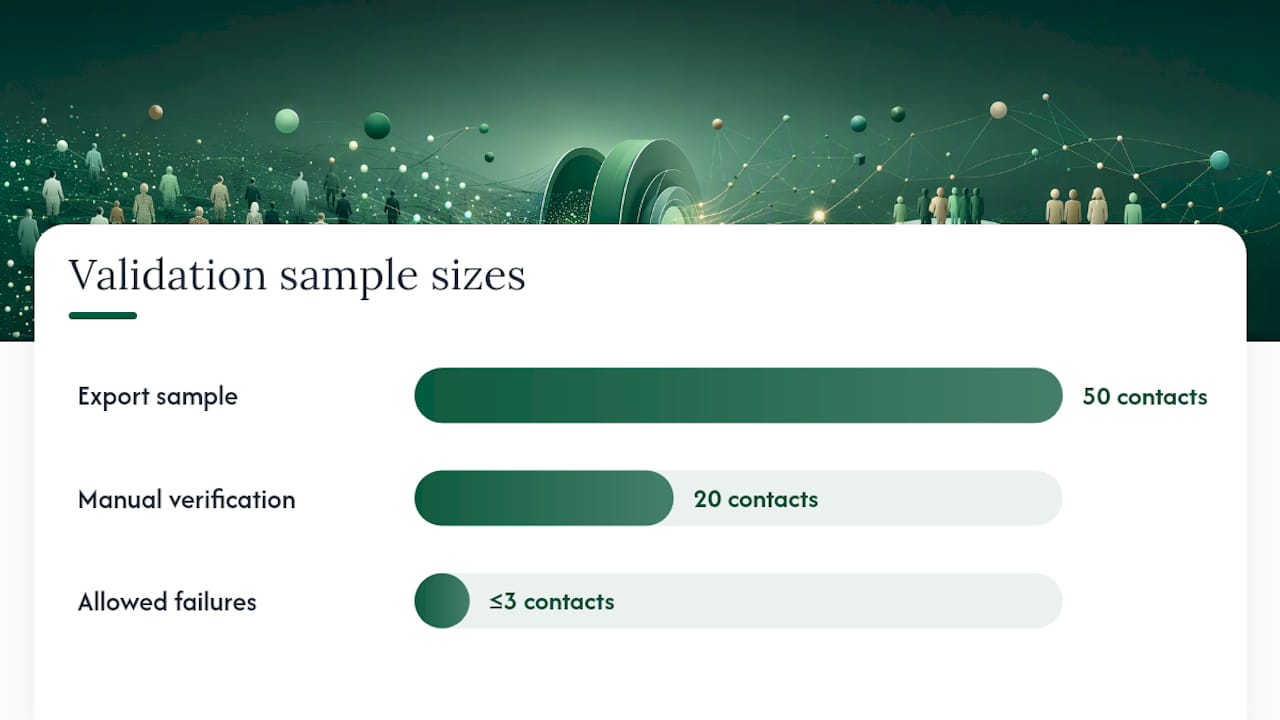
- Export a sample of 50 contacts and manually verify 20 of them using LinkedIn and a separate email verification tool. If more than 3 fail, the verification layer is weak.
- Send a small batch to a seed list (email addresses you control) before live sends to check deliverability and inbox placement.
- Ask for a sample of AI-drafted emails before you commit. Generic templates with a first name token are not personalization.
- Check whether the platform’s scoring updates when you change ICP rules, or whether it requires a manual re-run.
When should you build your own stack versus buy a managed platform?
This is the decision most teams spend too long on. Here’s a direct framing.
Buy a managed platform when:
- You need outbound running in weeks, not months
- You don’t have a RevOps engineer available to maintain integrations and scoring models
- Deliverability management isn’t a core competency on your team
- Your ICP is reasonably well-defined and stable
Build an in-house stack when:
- You have engineering resources and a dedicated RevOps function
- Your ICP is highly custom and requires proprietary data sources the managed platforms don’t cover
- You need deep integration with internal systems that no vendor supports out of the box
- You’re operating at a scale where the per-seat cost of managed platforms exceeds the cost of internal tooling
The honest trade-off: a managed platform gets you to first results in 2–4 weeks. An in-house stack built from a sequencer, an enrichment provider, a verification tool, a CRM integration layer, and a deliverability manager takes 2–4 months to configure and tune, and requires ongoing maintenance. For most teams under 100 employees, the build route costs more in engineering time than it saves in subscription fees.
A hybrid approach works for some teams: use a managed platform for the core outbound loop while maintaining internal enrichment for proprietary signals (customer data, event attendance, product usage). This keeps the operational burden low while preserving the custom signal layer.
For a deeper look at the outsourced outbound decision, the B2B founder’s guide to outsourcing outbound sales covers the build-vs-buy question in detail.
Runleadpilot’s free campaign preview: see your pipeline before you pay
Skipping the months-long stack build is the concrete advantage Runleadpilot offers teams that need pipeline now. The platform reads your website, builds your ICP model, sources and verifies matching decision-makers, and drafts personalized outreach sequences — all before you commit to a paid plan.

What the free campaign preview includes: a mapped ICP based on your website, a sample of matched accounts and verified decision-maker contacts, and a preview of the AI-drafted email sequences the system would send on your behalf. Setup takes under 30 minutes. Before you start, have your website live and a rough sense of your target vertical and company size — the system does the rest.
The managed model means Runleadpilot handles dedicated sending domains, inbox warm-up, SPF/DKIM/DMARC configuration, follow-up sequencing, and reply routing. Your team receives warm replies with full context, ready for a real conversation.
Start your B2B lead generation preview at Runleadpilot and see which accounts the system surfaces for your ICP before your first dollar is spent.
An editorial perspective on the build-vs-buy instinct
Most sales leaders I see evaluating prospecting automation spend the first month asking the wrong question. They want to know which tool has the best data. The real question is: who on your team will own the system six months from now?
A prospecting stack built from five point solutions — an enrichment provider, a sequencer, a verification tool, a deliverability monitor, and a CRM integration layer — is a legitimate architecture. It’s also a part-time job for someone who probably has a different job title. The tools don’t maintain themselves. Enrichment sources go stale. Sending domains need ongoing monitoring. Scoring models drift as your ICP evolves. Every integration is a potential failure point.
The teams I’ve seen get the most out of automated lead sourcing are the ones that started with the smallest possible scope: one ICP segment, one sequence, one human reviewing the first batch of replies. They didn’t try to automate everything at once. They proved the loop worked, then expanded it.
The managed platform versus build debate often gets framed as a cost question. It’s really a capacity question. If you have a RevOps engineer who wants to own a custom stack, build it. If you don’t, buying a managed platform isn’t a compromise — it’s the faster path to a working pipeline. The opportunity cost of a three-month build is three months of outbound that didn’t happen.
One more thing worth saying plainly: the best prospecting automation in the world won’t fix a vague ICP or weak messaging. The system surfaces the right accounts. What you say to them still matters.