One Week Deliverability Monitoring for B2B Founders and Small Teams
Practical deliverability monitoring for B2B founders and small sales teams: a one week setup, daily/weekly checks, and when to outsource to LeadPilot.

One Week Deliverability Monitoring for B2B Founders and Small Teams
Deliverability monitoring means tracking the metrics that determine whether your cold emails reach the inbox, not just whether they get “sent.” The single most important move you can make today is running a seed-list placement test alongside Google Postmaster Tools and DMARC aggregate reports. Do that first, then layer in the rest. Teams that don’t want to manage this stack manually can hand it to a service like LeadPilot, which runs continuous monitoring in the background.
TL;DR:
- Monitoring inbox placement through seed-list tests and provider dashboards is essential, as delivery rate alone does not indicate actual inbox placement.
- Consistent tracking of spam complaints, hard bounces, deferrals, and authentication pass rates helps catch reputation issues early before they cause deliverability declines.
- Combining multiple sources such as DMARC reports, blocklist checks, and provider-specific tools offers a complete view of deliverability health.
- Regular list hygiene, including ongoing revalidation and careful warmup schedules for new domains, prevents reputation damage and placement drops.
- Automated tools like LeadPilot simplify ongoing deliverability management by handling warmup, monitoring, and in-provider testing, freeing teams to focus on outreach.
Table of Contents
- What Deliverability Metrics Actually Matter?
- How Does Deliverability Monitoring Actually Work?
- What Should You Check Daily vs. Weekly vs. Monthly?
- Why Is My Deliverability Dropping (and How Do I Fix It)?
- How Do You Set Up Deliverability Monitoring From Scratch?
- LeadPilot’s Approach to Deliverability
- Where Does Deliverability Monitoring Fit Into Your CRM Stack?
- Does Email Content Actually Affect Deliverability?
- How Much Do Opens, Clicks, and Replies Affect Deliverability?
- What Does Fixing Deliverability Through Monitoring Actually Look Like?
- Why Does List Hygiene Need Ongoing Monitoring, Not a One-Time Clean?
- How Long Should Domain and IP Warmup Take?
- The Case for Treating Monitoring as Infrastructure, Not a Task
- Managed Deliverability Monitoring With LeadPilot
- Sources
What Deliverability Metrics Actually Matter?
Most outbound teams check one number, delivery rate, and call it a day. That’s the wrong metric to obsess over, because delivery rate tells you almost nothing about where your email actually landed.
Delivery rate just confirms the receiving mail server accepted your message. It says nothing about whether that message hit the inbox, got buried in Promotions, or slid straight into spam. Inbox placement is a separate outcome entirely, decided by the mailbox provider based on your sender reputation, which builds over time from engagement history and bounce patterns. A message can be “delivered” and still be invisible to the recipient.
Here’s what you actually need on your dashboard:
- Inbox placement rate: the percentage of sent messages that land in the primary inbox, measured through seed-list testing since your ESP can’t see this directly.
- Delivery rate: messages accepted by the receiving server, visible in your ESP’s own reporting.
- Spam complaint rate: recipients marking your email as junk, tracked via Google Postmaster and Microsoft SNDS.
- Hard bounce rate: permanent failures (bad addresses, blocked domains), visible in your ESP’s bounce logs.
- Deferral rate: temporary rejections where the receiving server asks you to retry later, often an early warning sign of reputation trouble.
- Authentication pass rates: the share of your mail passing SPF, DKIM, and DMARC checks, tracked through your DMARC aggregate reports.
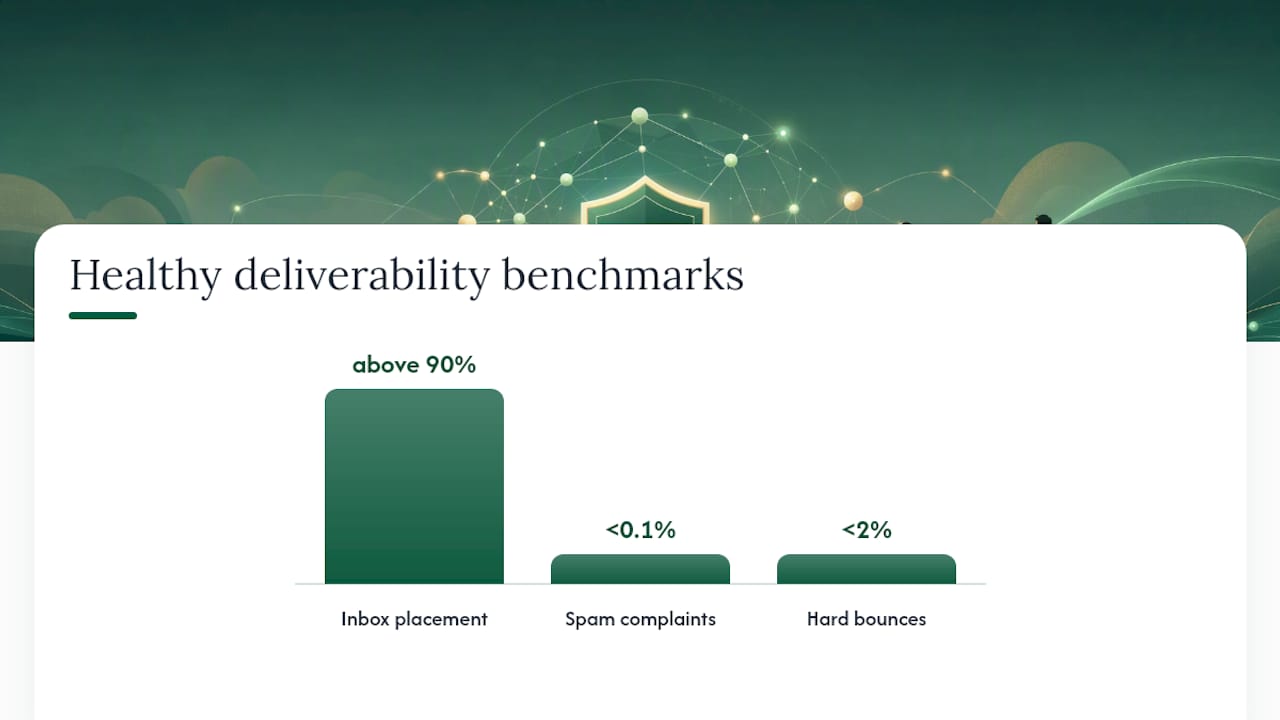
Healthy benchmarks to work from: keep spam complaints under 0.1% and hard bounces under 2%, with inbox placement above 90% for any campaign that depends on being seen. Cross either threshold and mailbox providers start throttling your sends, deferring messages, or routing you straight to spam, regardless of how good your copy is.
Engagement metrics, opens, clicks, and replies, matter here too, but not in isolation. Gmail and Microsoft both weigh how recipients interact with your mail into their reputation scoring, which is part of why domain reputation and engagement have become the dominant factors in inbox placement, with authentication acting more like a gate you have to pass through first.
How Does Deliverability Monitoring Actually Work?
No single dashboard tells you everything. That’s the uncomfortable truth about deliverability monitoring: you’re stitching together four or five partial views to get a complete picture, because monitoring requires provider dashboards, DMARC reports, and blacklist checks together since no individual tool covers every mailbox provider.
Here’s how the pieces fit together, in the order most teams should set them up:
- Seed-list inbox placement testing. Build a list of test addresses across Gmail, Outlook, Yahoo, and a couple of smaller providers, send your actual campaign copy to them, and check where each message lands. This is the only method that gives you a real cross-provider read of placement, because your own sending logs can’t tell you what happened after the message left your server.
- Google Postmaster Tools. Free, and it shows your domain reputation, spam rate, and authentication status specifically for Gmail traffic. Registration takes about ten minutes: verify your domain via a DNS TXT record and data starts populating within a day or two.
- Microsoft SNDS and JMRP. SNDS gives you IP-level reputation and complaint data for Outlook and Hotmail addresses; JMRP lets you receive junk-mail reports when Microsoft users mark you as spam. Both require manual registration and IP ownership verification.
- Yahoo Complaint Feedback Loop (CFL). Similar concept, scoped to Yahoo and AOL mailboxes. Setup requires a signed agreement with Yahoo and a dedicated sending IP or domain.
- DMARC aggregate reports (rua). These XML reports, sent daily by receiving mail servers, show you exactly who is sending mail claiming to be your domain and whether it passed authentication. They’re the fastest way to catch spoofing attempts and alignment failures you’d otherwise never see.
- Blocklist monitoring and SMTP bounce codes. Services that scan your sending IPs and domains against public blocklists, paired with parsing the actual bounce codes your ESP returns (more on reading those codes shortly).
Your ESP’s webhooks tie a lot of this together in near real time, firing events for bounces, complaints, and deferrals as they happen rather than waiting for a daily digest.
The limitation worth naming: any one of these sources, used alone, gives you a partial and sometimes misleading picture. Postmaster Tools only covers Gmail. SNDS only covers Microsoft. DMARC reports show authentication, not placement. That’s exactly why combining authentication checks, seed tests, and provider dashboards exposes the signals that actually matter, and why relying on a single tool is the most common mistake outbound teams make when they set up monitoring for the first time.
What Should You Check Daily vs. Weekly vs. Monthly?
Monitoring only works if it runs on a schedule you’ll actually keep. Here’s a cadence built around what a two-to-five-person sales team can realistically sustain without hiring a deliverability specialist.
First 48 hours (one-time setup):
- Publish SPF, DKIM, and DMARC records, starting DMARC at
p=nonewith an rua address pointed at a report parser. - Register your domain with Google Postmaster Tools and your IPs with Microsoft SNDS.
- Build your seed-list test panel and run a baseline placement test before you send a single outreach campaign.
Daily:
- Check bounce and complaint alerts from your ESP webhook feed.
- Spot-check delivery rate against the previous day’s baseline.
- Run a quick blocklist scan on your sending domains and IPs.
Weekly:
- Run a scheduled seed-list placement test across your major target providers.
- Review your DMARC aggregate reports for new unauthenticated senders or alignment failures.
- Run a list verification pass on any newly added prospect segments.
Monthly:
- Audit overall domain health: age, reputation trend, and any new blocklist entries.
- Review warmup progress on any newer sending domains.
- Analyze engagement trends over the past 30 days and decide whether DMARC policy is ready to move from
p=nonetowardp=quarantine.
Set automated thresholds so the system reacts before you have to. If hard bounces cross 2% on a given send, auto-pause that campaign. If complaints creep past 0.1%, auto-suppress the offending segment and cut sending volume by half until the trend reverses.
Pro Tip: Run your DMARC policy at p=none for two to four full weeks before tightening it. That window lets you see every legitimate sending source tied to your domain, so you don’t accidentally block your own marketing platform or CRM when you flip to enforcement.
Why Is My Deliverability Dropping (and How Do I Fix It)?
Every deliverability problem leaves a fingerprint. Learning to read that fingerprint is the difference between a two-day fix and a three-week reputation rebuild.
A hard bounce spike almost always traces back to list quality. Suspend the offending segment immediately, run it through a verification pass, and trace it back to whatever acquisition source produced it, a scraped list, an old export, a form with no validation. Hard bounces above 2% get read by mailbox providers as a sign you’re not managing your list, and that threshold is one of the clearest markers of a reputation problem worth escalating fast.
Rising spam complaints point to either opt-in quality or unsubscribe friction. Tighten how contacts enter your outreach list, make unsubscribing genuinely one click, and segment your sends by engagement so your least-engaged contacts get fewer touches, not more.
Authentication failures are usually an alignment problem, not a missing record. Your SPF and DKIM might both technically exist and still fail DMARC because the “From” domain doesn’t align with the authenticated domain. Pull your DMARC aggregate reports and look for the specific failure reason before assuming you need new records. Once your reports run clean for a few weeks, move DMARC gradually from monitoring mode to enforcement: p=none to p=quarantine, then eventually p=reject.
Provider-specific drops are the hardest to catch without seed testing. Your overall delivery rate might look fine while Gmail placement quietly craters, because your ESP dashboard blends every provider into one number. This is exactly the gap seed-list tests are built to catch: run them per-provider, isolate whether the drop is Gmail-specific or Microsoft-specific, and apply the fix to that provider’s dashboard data rather than guessing at a domain-wide cause.
If you’re launching a new sending domain, or you’ve had a reputation event severe enough to warrant a fresh start, warm it slowly and pause any high-volume send until placement tests come back clean. Sending 500 cold emails a day from a brand-new domain is the fastest way to guarantee spam placement on day one.
How Do You Set Up Deliverability Monitoring From Scratch?
Getting from zero to a fully monitored sending setup takes about a week of focused work, most of it configuration rather than ongoing effort.
- Publish your authentication records. Add SPF, DKIM, and DMARC TXT records to your DNS, with DMARC’s rua tag pointed at a report parser address. These three standards are the foundation everything else builds on, and a detailed SPF, DKIM, and DMARC setup walkthrough is worth bookmarking if you’re doing this the first time.
- Register with provider tools. Verify domain ownership in Google Postmaster Tools and add your sending IPs to Microsoft SNDS. Apply for Yahoo’s CFL if Yahoo and AOL make up a meaningful share of your target list.
- Build a seed-list panel. Create test inboxes across Gmail, Outlook, and Yahoo at minimum, and schedule recurring placement tests against them.
- Wire up ESP webhooks. Configure your sending platform to push bounce and complaint events to a central location, and set rules that auto-suppress addresses on hard bounce or complaint.
- Automate the boring parts. Blocklist checks and DMARC report parsing don’t need a human running them manually every day; a lightweight script or monitoring tool can flag anomalies and leave the judgment calls to you.
| Setup task | Tool or method | Typical time to complete |
|---|---|---|
| Authentication records | DNS provider + SPF/DKIM/DMARC guide | 1 to 2 hours |
| Gmail-specific monitoring | Google Postmaster Tools | 10 minutes to register, 1 to 2 days for data |
| Microsoft-specific monitoring | Microsoft SNDS / JMRP | 1 day for approval |
| Cross-provider placement checks | Seed-list panel, run weekly | 30 minutes per test cycle |
| Bounce and complaint handling | ESP webhooks + auto-suppression rules | 2 to 3 hours to configure |
Once these five pieces are live, you have a monitoring system that catches most problems within a day rather than after a week of silently degrading placement.
LeadPilot’s Approach to Deliverability
Running this stack manually is doable for a solo founder with a few hours a week. It gets harder fast once you’re sending from multiple domains, managing several client accounts, or scaling volume beyond a couple hundred emails a day.
LeadPilot builds deliverability monitoring into how it runs outbound by default: dedicated sending domains, inbox rotation across warmed accounts, and automated warmup schedules that ramp new domains before they ever touch a real campaign. Monitoring runs continuously in the background rather than as a weekly task someone has to remember. Internal performance data shows 8 to 15% reply rates on outbound campaigns where deliverability was prioritized from day one, a range that tracks with how much placement problems otherwise erode reply volume before a message even gets read.
The honest answer on DIY versus managed: if you’re sending under a few hundred emails a day from one domain, the checklist above is enough. Past that, across multiple domains, multiple team members, or client accounts, the monitoring overhead starts competing with actual selling time, and that’s when a managed layer earns its cost.
Where Does Deliverability Monitoring Fit Into Your CRM Stack?
Deliverability data is only useful if it reaches the people making sending decisions, and that usually means your CRM, not a separate dashboard nobody checks.
Most outreach platforms let you pipe bounce and complaint events directly into contact records, so a hard bounce automatically flags a lead as unreachable instead of sitting in a spreadsheet someone updates monthly. That single integration prevents the most common list-hygiene failure: reps re-emailing addresses that already bounced, because nothing told them not to.
Reply and engagement data should flow the other direction too. If your sales team is logging replies inside HubSpot or a similar CRM but your deliverability monitoring lives in a completely separate tool, you lose the ability to correlate placement drops with actual pipeline impact. A dip in reply rate is far more actionable when it’s tagged to the same week your Gmail placement score dropped in Postmaster Tools.
The teams that handle this well tend to centralize on one source of truth, usually the outreach platform itself, and treat the CRM as the record of what happened after the email landed, not where deliverability gets diagnosed. Platforms built around managed outbound, LeadPilot among them, handle this by keeping monitoring and reply handling in the same system so nothing falls into a gap between two disconnected tools.
Does Email Content Actually Affect Deliverability?
Yes, and more than most senders assume. Spam filters read content signals alongside authentication and reputation, which means a technically perfect setup can still get flagged over the message itself.
A few content patterns reliably hurt placement: excessive links, image-heavy HTML with little text, spam trigger words piled into a subject line, and URL shorteners that mask the actual destination. Cold outreach that reads like a templated mass blast, identical subject lines sent to hundreds of addresses with no personalization, tends to trigger the same filters as actual spam, regardless of intent.
Monitoring content issues works differently from monitoring authentication. You won’t see a “content score” in Postmaster Tools. Instead, watch for a placement drop that shows up specifically on a new campaign or template while your sending domain and authentication stay unchanged, that’s the signal pointing at content rather than infrastructure. Run the exact copy through a seed-list test before a full send; if placement is worse than your baseline with everything else held constant, the message itself is the problem.
Plain-text or lightly formatted HTML, genuine personalization pulled from real signals about the recipient, and subject lines that read like something a person actually typed all tend to perform better than heavily designed templates. This is one area where B2B cold outreach benefits from looking less like marketing email, not more.
How Much Do Opens, Clicks, and Replies Affect Deliverability?
Engagement isn’t a vanity metric here. It’s one of the strongest inputs mailbox providers use to decide whether your next message gets a fair shot at the inbox.
Gmail and Microsoft both track how recipients interact with mail from your domain: opens, clicks, replies, and just as tellingly, deletions without opening or moves to spam. A domain with consistently low engagement starts looking, to a spam filter, indistinguishable from a domain sending unwanted mail, even if every message is authenticated correctly.
Reply rate deserves special weight in a B2B outbound context specifically, because a reply is the strongest positive signal a mailbox provider can observe. It tells Gmail and Outlook that a human read the message and cared enough to respond, which is a much stronger trust signal than an open (which can also be triggered by image-loading and privacy proxies rather than a genuine read).
This creates a practical monitoring rule: track engagement trends by domain and by campaign, not just in aggregate. If reply rate on one sending domain drops while another holds steady, that’s a domain-specific reputation issue worth isolating before it drags down your other domains through association. Tools built for tracking opens, clicks, and replies at the campaign level make this kind of domain-by-domain comparison possible instead of guessing from a blended average.
What Does Fixing Deliverability Through Monitoring Actually Look Like?
The pattern shows up the same way across most outbound teams that turn a deliverability problem around: they find the issue through data they were already collecting, not through guesswork.
Nobody notices until someone finally checks Google Postmaster Tools and finds Gmail spam-rate flags climbing, while Outlook placement stays clean. The overall number hid a provider-specific collapse that only a seed-list test, split by provider, would have caught weeks earlier.
The fix in cases like this rarely requires switching platforms or rebuilding a list from scratch. It usually means: pausing sends to the affected provider for a few days, reviewing recent list additions for a bad acquisition source, tightening the opt-in step that let low-quality contacts in, and running DMARC reports to rule out an authentication drift nobody had caught. Placement typically recovers within one to two warmup cycles once the root cause, usually list quality or a content change, gets addressed rather than papered over with a new subject line.
The broader lesson holds regardless of team size: the fix is almost never dramatic once the diagnosis is right. It’s a suppression, a re-verification, or a DMARC tweak. What actually moves the needle is catching the drop within days instead of a month, which is the entire argument for building the monitoring habit before you need it.
Why Does List Hygiene Need Ongoing Monitoring, Not a One-Time Clean?
A list that was clean six months ago isn’t clean today. Email addresses decay at a steady rate, people change jobs, domains get abandoned, and spam traps get seeded into old, purchased, or scraped lists specifically to catch senders who never revalidate.
Verification needs to happen at two points: before a contact enters your sending list, and on a recurring basis for contacts already there. A syntax and domain check at entry catches obvious typos and dead domains immediately. A periodic revalidation pass, monthly for active lists, catches the slower decay: addresses that were valid at signup but have since gone dormant or been deactivated.
Bounce data itself is a monitoring signal, not just a cleanup trigger. A rising hard-bounce trend on a specific list segment usually means that segment’s source, a particular lead list, a specific scraping method, a stale CRM export, has gone stale, and the fix is upstream at acquisition, not just downstream suppression. Treat hard bounces as a diagnostic pointing at where your leads came from, and the fix compounds: better source, fewer bounces, better reputation, on every future send from that same domain.
How Long Should Domain and IP Warmup Take?
Sending volume from a brand-new domain has to ramp gradually, because mailbox providers have no reputation history to judge you by, and sudden high volume from an unknown sender is exactly what spam operations look like.
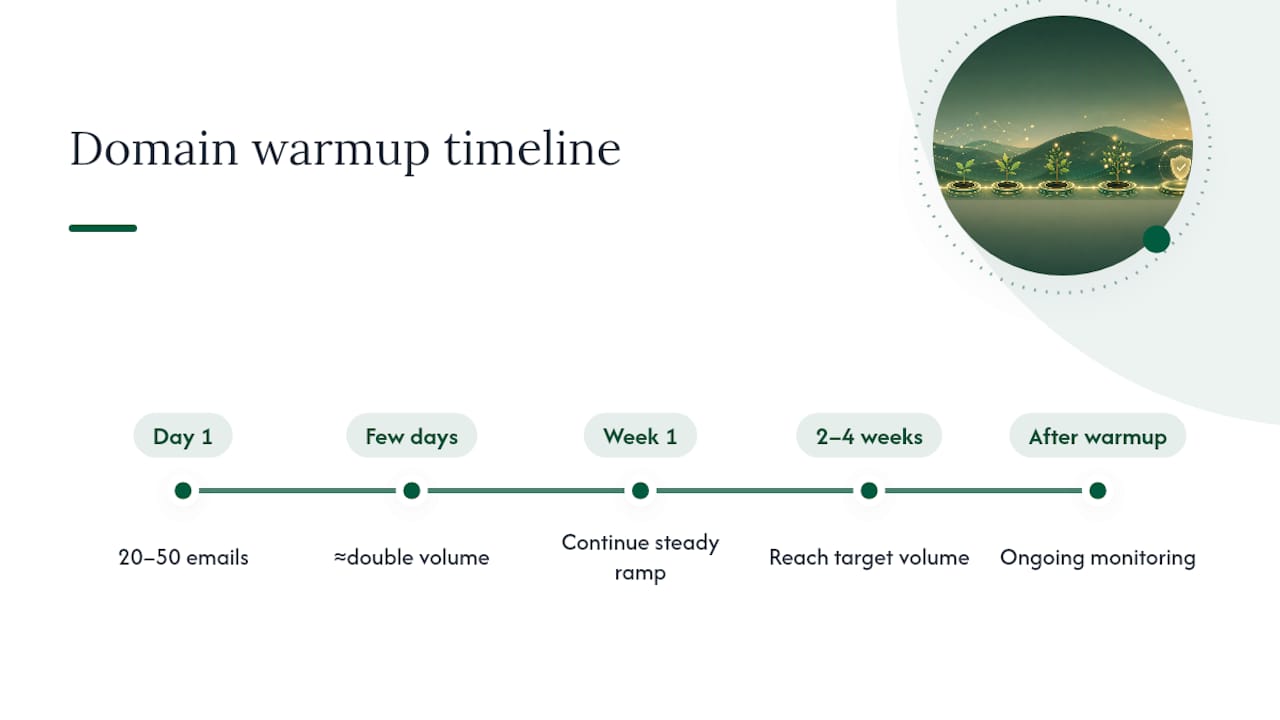
A conservative ramp starts small, often somewhere in the range of 20 to 50 emails on day one, and increases gradually over two to four weeks, roughly doubling volume every few days as engagement holds steady. Jumping straight to your target sending volume on a new domain is the single most common cause of a domain getting flagged before it ever has a chance to build reputation. Detailed ramp schedules and safe daily sending limits are worth following closely rather than improvising, since providers penalize sudden volume spikes far more than steady, predictable growth.
Warmup isn’t just about volume, either. Sending to engaged recipients early, people likely to open and reply, builds a stronger reputation signal than blasting a large cold list from day one. Many teams now use dedicated warmup tools that simulate real engagement (opens, replies, moving mail out of spam) during the ramp period, which speeds up the trust-building process compared to relying on real campaign sends alone. Once a domain hits full volume with placement holding steady, ongoing monitoring, not warmup, becomes the job.
The Case for Treating Monitoring as Infrastructure, Not a Task
Most advice on deliverability treats monitoring like a launch checklist: set it up once, check the boxes, move on. That’s backwards. Deliverability is a moving target because mailbox providers change their scoring constantly, and a setup that placed cleanly in Gmail last quarter can degrade without a single change on your end.
The bigger blind spot is that most founders monitor the metric that’s easiest to see, delivery rate, instead of the one that actually matters, inbox placement. Delivery rate flatters you. It stays high right up until the moment your reply rate has already collapsed. By the time delivery rate itself drops, you’ve usually been sitting in spam for weeks.
Prioritize seed-list testing and provider dashboards over anything your ESP shows you natively, because ESP metrics are the most incomplete view in the entire stack. If you’re a solo founder sending under a few hundred emails a day, run the checklist yourself, it’s genuinely manageable. Past that volume, or across multiple domains, the math starts favoring a managed layer over a part-time monitoring habit that competes with actual selling time.
— Harsh
Managed Deliverability Monitoring With LeadPilot
Runleadpilot is the practical alternative to building this entire monitoring stack yourself: instead of stitching together Postmaster Tools, SNDS, DMARC parsers, and seed-list tests on your own schedule, LeadPilot runs dedicated sending domains, automated inbox rotation, and continuous deliverability monitoring as a built-in part of managed outbound.

For a founder or a five-person sales team, the real cost of DIY monitoring isn’t the setup, it’s the ongoing attention it demands every week, forever. LeadPilot handles domain warmup schedules, watches placement across providers, and automatically adjusts sending behavior when a metric drifts toward risk, so your team’s time goes toward closing replies instead of reading DMARC reports. Warm replies get routed straight to your team once a prospect responds, keeping the human effort focused where it actually produces revenue.
If you want to see how this looks for your own outbound before committing to anything, build a free campaign preview and see how LeadPilot would target your ideal customers and manage the sending infrastructure behind them.
Sources
- The Complete Email Deliverability Checklist for 2026 (+Tools & Tips) | WordStream
- The Complete Guide to Email Deliverability (2026) | Clay
- Improve Email Deliverability: 15 Fixes That Work in 2026 | Warmy
- Email Deliverability Guide: How to Reach the Inbox (2026) | TinySend