Avoid the Spam Folder: 30/60/90 Recovery Plan for Founders
Fix SPF, DKIM, and DMARC first, then repair reputation, clean lists, and follow a 30/60/90 recovery plan with Postmaster monitoring to restore inbox...

Avoid the Spam Folder: 30/60/90 Recovery Plan for Founders
Most emails hit spam because of four fixable problems, in order: broken authentication, damaged sender reputation, dirty lists, and weak engagement. Fix SPF, DKIM, and DMARC first, pause sending from any domain with a spam complaint spike, scrub bounced and unengaged contacts, and warm up new domains slowly. Authentication fixes show results within days; reputation recovery takes two to six weeks of clean sending.
TL;DR:
- Fix SPF, DKIM, and DMARC records first, as authentication issues cause immediate spam classification and need days to resolve.
- Maintain a low spam complaint rate below 0.1% and bounce rate under 2% by cleaning lists and ensuring list opt-in procedures.
- Gradually warm up new domains or IPs over 3 to 6 weeks with small volumes, increasing slowly while monitoring engagement and reputation metrics.
- Prioritize engagement signals like opens and replies since they outperform content in influencing inbox placement.
- Regularly monitor reputation via tools like Google Postmaster Tools and Sender Score to catch and fix issues before they cause deliverability failures.
Table of Contents
- What Makes Filters Send Mail to the Inbox vs. Spam
- Fix DNS and Authentication First: SPF, DKIM, and DMARC
- Repair and Maintain Sender Reputation
- Content, Cadence, and Engagement That Keep Mail in the Inbox
- Warm-Up and Sending Patterns for New Domains and IPs
- Monitoring Metrics and a Recovery Playbook
- Pre-Send Tools That Catch Problems Before You Hit Send
- Your Remediation Checklist and 30/60/90 Day Plan
- What Scaling Outbound Actually Teaches You About Deliverability
- How some managed platforms keep cold outreach out of the spam folder
- Where to Verify Everything in This Article
- Sources
What Makes Filters Send Mail to the Inbox vs. Spam
Gmail, Outlook, and every other major mailbox provider run your message through four layers of checks before it ever reaches a human eye. Understanding the order matters more than most senders realize, because fixing the wrong layer first wastes weeks.
Authentication and policy enforcement comes first. If your domain fails SPF, DKIM, or DMARC checks, filters treat the message as suspicious before they even read the subject line. Microsoft has tightened verification requirements for high-volume senders, and Gmail has done the same. Neither provider negotiates on this layer.
Reputation signals come next. Every domain and IP address carries a history: how many recipients marked past messages as spam, how many addresses bounced, whether the sending pattern looks automated or human. This history follows you across campaigns and, in some cases, across domains if the underlying infrastructure is shared.
Engagement signals carry more weight than most people expect. Opens, clicks, replies, and “not spam” clicks tell filters that real people want this mail. A domain with low volume but consistently high engagement often outperforms a domain blasting thousands of messages that nobody opens.
Content and network signals matter, but they’re the smallest lever. Filters scan for:
- Mismatched or shortened links that hide the real destination
- An unusual image-to-text ratio, common in poorly-coded promotional emails
- Known spam trigger words stacked together in the subject or first paragraph
- Whether the sending IP or domain appears on a public blacklist
Industry analysis consistently finds that most cold email deliverability failures trace back to DNS or list-quality problems, not clever copywriting mistakes. If you’re rewriting subject lines while your DMARC record is missing, you’re solving the wrong problem.
Fix DNS and Authentication First: SPF, DKIM, and DMARC
Three DNS records do almost all the heavy lifting for authentication, and they need to work together, not just individually exist.
SPF (Sender Policy Framework) tells receiving servers which IP addresses are allowed to send mail on behalf of your domain. DKIM (DomainKeys Identified Mail) attaches a cryptographic signature to each message, proving it wasn’t altered in transit. DMARC (Domain-based Message Authentication, Reporting, and Conformance) sits on top of both, telling receiving servers what to do when a message fails SPF or DKIM, and where to send reports about those failures.
Order matters because DMARC is useless without a working SPF or DKIM record underneath it, and both of those are useless if the domain sending your campaigns isn’t listed in either.
Here’s how to verify each one:
- Check your SPF record with a DNS lookup tool and confirm every platform you send from (your main mail server, your outbound sales tool, your marketing platform) is included. A common failure is adding a new sending tool and forgetting to update SPF.
- Verify DKIM signing by sending a test message to a mailbox you control and checking the message headers for a valid DKIM signature tied to the correct selector. Multiple conflicting selectors from different platforms are one of the most common causes of silent DKIM failures.
- Confirm DMARC is published and check the policy tag. Start with
p=none, which only monitors and reports without blocking anything. - Read your DMARC aggregate reports (the RUA reports) weekly for the first month. They show exactly which sending sources pass and fail alignment.
- Move to
p=quarantineonce reports show consistent passes across every legitimate sending source, typically after two to four weeks of clean monitoring. - Move to
p=rejectonly after quarantine has run clean for several weeks. This is the strictest setting and blocks anything that fails.
Pro Tip: Don’t jump straight to p=reject. Skipping the monitoring stage is how legitimate marketing emails and even internal company mail start bouncing without warning.
The most common pitfalls are subtle. Third-party senders (your CRM, your outbound platform, your support desk) often get left out of the SPF record entirely. Multiple marketing tools each installing their own DKIM selector creates confusion that’s hard to debug later. And subdomain alignment gets misconfigured when a company sends transactional mail from one subdomain and marketing mail from another without matching DMARC policies across both.
Repair and Maintain Sender Reputation
Reputation is the layer most senders ignore until it’s already damaged, and by then the fix takes weeks instead of hours.
Start by checking where you actually stand. Google Postmaster Tools shows your domain’s reputation directly from Gmail’s perspective, including spam rate trends over time. Sender Score gives an IP-level reputation benchmark you can track alongside it. For blacklist status, run your sending domain and IP through a multi-list lookup tool like multirbl, which checks dozens of blocklists in one pass instead of searching each individually.
Watch these thresholds closely:
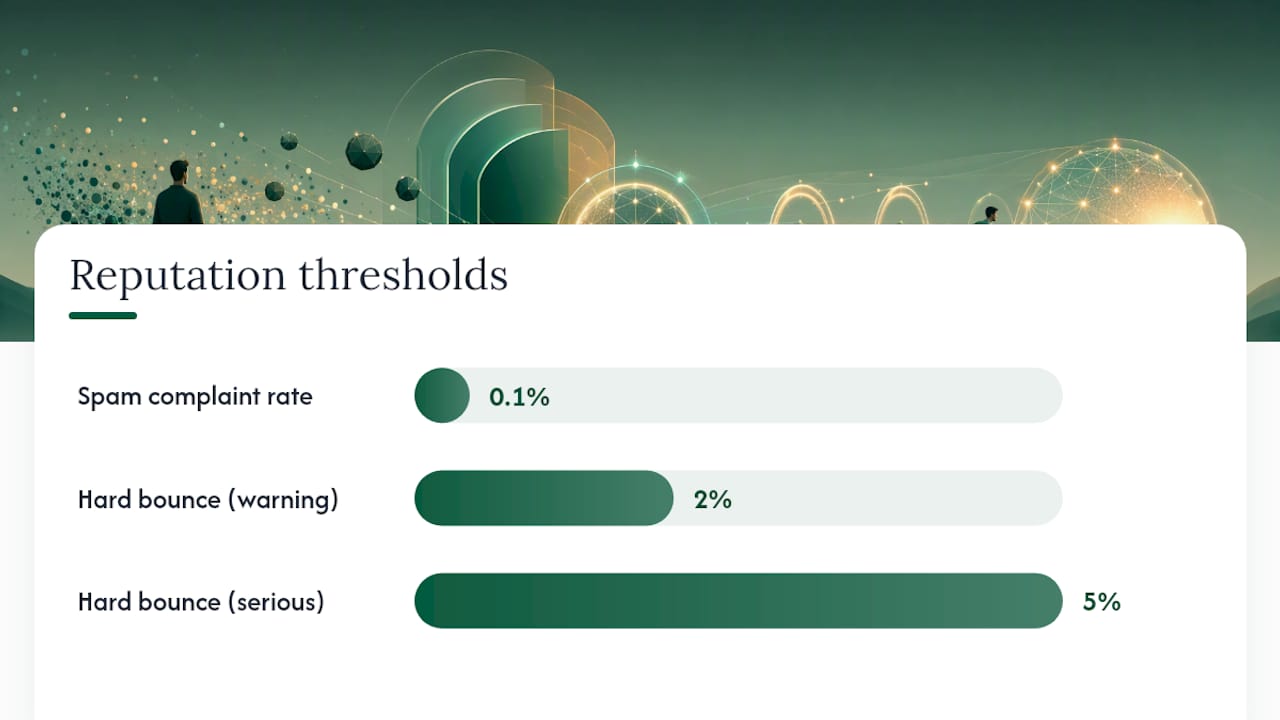
- Spam complaint rate: Gmail’s own guidance says to keep this below 0.1% as reported in Postmaster Tools. Cross that line consistently and inbox placement drops fast.
- Hard bounce rate: anything above 2% signals a list problem, and above 5% signals a serious one.
- Role and disposable address share: addresses like info@ or admin@, plus obviously disposable domains, rarely engage and often trigger spam traps.
List hygiene is the lever you control most directly. Use double opt-in for new signups so every address on your list actually wants to be there. Remove hard bounces immediately, not at the end of the month. Suppress segments that haven’t opened or clicked in 90 to 180 days rather than continuing to mail them out of habit. A tool built for validating addresses at signup can catch fake or mistyped addresses before they ever reach your sending list.
Eventually you’ll face the harder question: repair the domain or retire it. If complaint rates have been elevated for months, if the domain shows up on multiple blacklists, or if warm-up attempts keep failing, it’s often faster to stand up a new domain with clean infrastructure than to rebuild trust on a damaged one. Reputation recovery on a genuinely burned domain can take longer than starting fresh.
Content, Cadence, and Engagement That Keep Mail in the Inbox
Engagement is the strongest signal filters use, stronger than almost anything in your content itself. A message that gets opened, clicked, and replied to teaches Gmail and Outlook that your domain sends wanted mail. Measure improvement by tracking open and reply rates over rolling two-week windows, not single sends, since one campaign rarely moves reputation on its own.
That said, content still matters, especially when other signals are borderline. A few rules hold up consistently:
- Skip ALL CAPS in subject lines and avoid stacking exclamation points or dollar signs.
- Keep subject lines concise and specific to the message’s actual value, not a generic teaser.
- Limit the number of links in a single email. Three or four is plenty for most cold outreach.
- Make sure display text and destination URLs match. A link that says one thing and points somewhere else is a classic spam signal.
- Keep a reasonable text-to-image ratio. An email that’s a single large image with almost no text reads as suspicious to most filters.
Overused spam trigger words rarely tank a campaign on their own anymore, but they still tip the balance when your authentication or reputation is already shaky. Treat trigger-word cleanup as a final polish, not a primary fix.
Segmentation and personalization pull double duty here. Sending relevant content to smaller, well-matched segments consistently produces better open and reply rates than blasting one generic message to an entire list, and higher engagement feeds directly back into reputation. A preference center, where recipients can choose topics or frequency instead of unsubscribing entirely, keeps more people on your list at higher engagement levels.
Pro Tip: Make unsubscribe genuinely one click. Providers track how often recipients hunt for a hidden unsubscribe link and give up, marking the message as spam instead, which hurts your reputation far more than losing a subscriber ever would.
Warm-Up and Sending Patterns for New Domains and IPs
A brand-new domain or IP has no history, and mailbox providers treat unknown senders with suspicion by default. Warm-up exists to build that history gradually, and vendor guidance across the deliverability industry treats it as a non-negotiable step, not an optional extra.
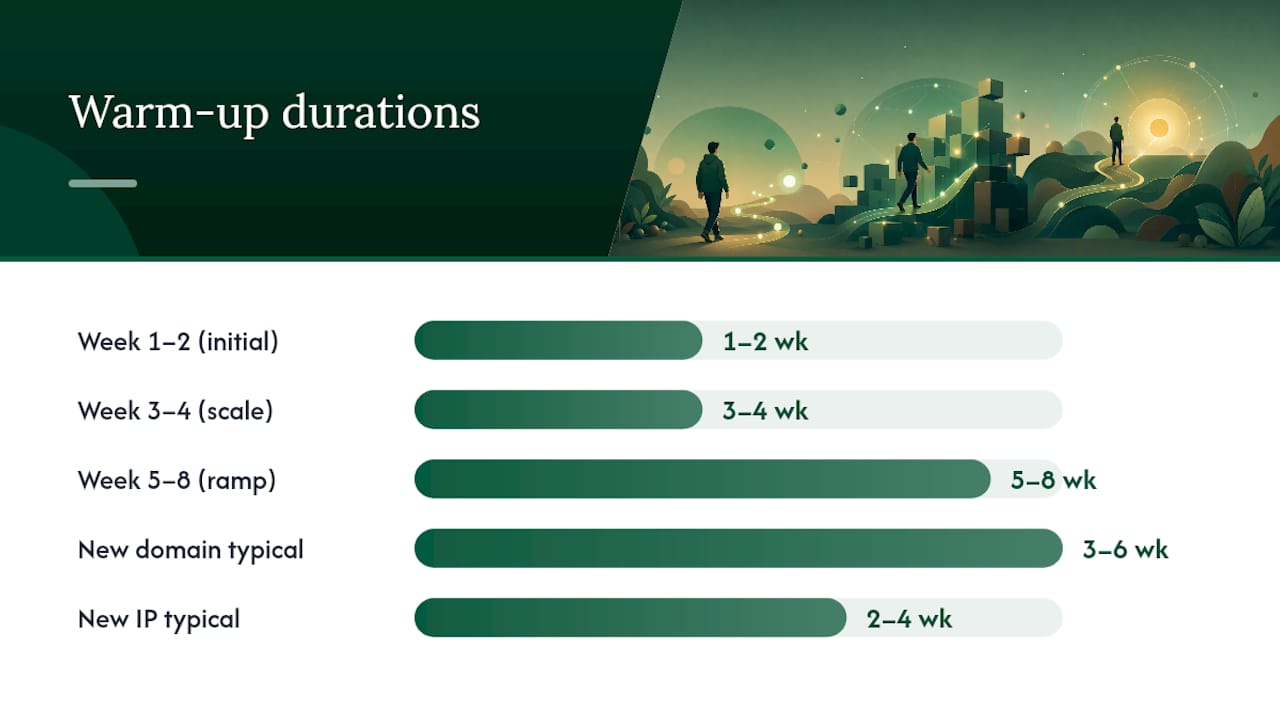
- Week 1 to 2: Send a small volume, often just a few dozen messages a day, exclusively to your most engaged contacts or a warm-up service that simulates real engagement.
- Week 3 to 4: Increase volume gradually, generally no more than 20 to 30% growth per week, while watching bounce and complaint rates daily.
- Week 5 to 8: Continue scaling toward target volume, layering in your actual cold outreach lists once engagement metrics stay stable.
- Ongoing: Keep per-inbox sending limits conservative. Many senders cap individual inboxes around 30 to 50 emails per day for cold outreach specifically, since higher volumes from a single address raise red flags faster than the same volume spread across multiple rotating inboxes.
New domains typically need three to six weeks of warm-up before reaching full sending volume. New IPs on otherwise established infrastructure can move faster, sometimes two to four weeks, since some reputation signals transfer through the domain layer.
Shared IPs make sense for lower-volume senders who want to inherit some baseline reputation from the platform’s overall sending pool. Dedicated IPs make more sense once you’re sending consistent volume and want full control over your own reputation, unaffected by other senders on the same infrastructure. Coordinate every warm-up plan with authentication setup and list cleaning happening simultaneously. Warming up a domain that still fails DKIM checks, or warming up against a dirty list full of bad addresses, wastes the entire ramp period.
Monitoring Metrics and a Recovery Playbook
Deliverability isn’t a one-time fix. It needs ongoing measurement, and the dashboards you check matter as much as the fixes you make.
Google Postmaster Tools gives Gmail-specific reputation and spam rate data. Most other mailbox providers offer similar dashboards through their own sender portals. Third-party tools like Sender Score add a cross-provider reputation view you can track weekly.
| Metric | Healthy range | Action if exceeded |
|---|---|---|
| Spam complaint rate | Below 0.1% | Pause sends, audit list and content immediately |
| Hard bounce rate | Below 2% | Clean list, verify addresses at signup |
| Blacklist presence | None | Request delisting, investigate root cause first |
| Engagement trend | Stable or rising | Segment list, reduce volume to top engagers |
When metrics slip, follow the same order every time:
- Pause risky sends immediately rather than continuing to mail while you investigate.
- Diagnose the root cause: check DNS records first, then list quality, then content.
- Warm up again on a smaller scale if the domain or IP took real reputation damage.
- Reintroduce full volume gradually once metrics hold steady for at least two weeks.
Blacklist removal usually starts with fixing the underlying issue (a compromised account, a spam trap hit, a compliant complaint spike) before submitting a delisting request. Escalating directly to an ISP without addressing root cause almost always gets the request denied.
Pre-Send Tools That Catch Problems Before You Hit Send
Testing before a send costs a few minutes and can save weeks of reputation repair. A handful of tools cover most of what you need:
- Spam checkers and inbox preview tools simulate how your message renders across different mailbox providers and flag obvious content red flags, though they can’t predict reputation-based filtering.
- Blacklist lookups like multirbl check your domain and IP against dozens of blocklists simultaneously, faster than checking each one manually.
- Sender Score gives a numeric reputation benchmark you can track over time and compare against your own historical trend.
- Real-time address validation at signup catches typos, disposable domains, and fake addresses before they ever land on your sending list.
- DMARC aggregate reports, delivered to the email address specified in your DMARC record, show pass and fail rates by sending source and are the single best diagnostic for authentication problems.
Your Remediation Checklist and 30/60/90 Day Plan
Start with these steps within the hour if you’re actively seeing deliverability problems:
- Verify SPF and DKIM are correctly published and passing for every sending source.
- Pause any campaign sending from a domain showing elevated complaints or bounces.
- Run your domain and IP through a blacklist lookup to rule out that cause.
Over the next 30 days, clean your entire list and remove hard bounces on a rolling basis. Implement double opt-in for new signups going forward. Begin or restart warm-up on any domain that took a reputation hit. Set up Postmaster Tools monitoring if it isn’t already running.
In the 60 to 90 day window, tighten your DMARC policy from monitoring toward enforcement if reports have stayed clean. Scale sending volume back up gradually, following the same ramp discipline as initial warm-up. Keep engagement programs running so reply and open rates stay ahead of volume growth, not behind it. Check spam complaint rate and hard bounce rate at each milestone: staying under 0.1% and 2% respectively is the clearest sign recovery is holding.
What Scaling Outbound Actually Teaches You About Deliverability
The teams that keep their emails out of spam folders aren’t the ones with the cleverest subject lines. They’re the ones who treat deliverability as infrastructure, not copywriting. That means dedicated sending domains instead of one shared inbox for everything, rotation across multiple inboxes so no single address carries unsustainable volume, and warm-up schedules that don’t get skipped just because a launch deadline is close.
The uncomfortable tradeoff is that growth and deliverability pull in opposite directions. Every founder wants to send more emails faster. Every mailbox provider punishes exactly that instinct when it isn’t backed by earned reputation. The senders who protect deliverability treat volume growth as something to earn in stages, not something to demand on day one.
That’s also why managed platforms increasingly build warm-up, monitoring, and inbox rotation directly into the sending process instead of leaving it to whoever remembers to check Postmaster Tools that week. Deliverability rules don’t change because a team is busy. They just get enforced whether anyone’s watching or not.
— Harsh
How some managed platforms keep cold outreach out of the spam folder
Every fix in this article, authentication, warm-up, list hygiene, monitoring, can be handled by certain outbound platforms as part of their managed service rather than a checklist you manage yourself. Some run on dedicated sending domains and inboxes tailored for accounts, with warm-up schedules and sending limits tuned to avoid reputation damage described here.

Founders running lean sales teams, and agencies managing outbound for multiple clients get personalized messaging drawn from real business signals instead of generic templates, plus ongoing deliverability monitoring so a reputation problem gets caught before it tanks an entire campaign. This setup makes the most sense once you’re past occasional one-off sends and into consistent outbound volume, where the operational overhead of managing DNS records, warm-up ramps, and list hygiene by hand starts eating real time. If that’s where you are, you can build a free campaign preview to see how the targeting and deliverability setup would work for your domain before committing to anything.
Where to Verify Everything in This Article
- CAN-SPAM Act compliance guide: the FTC’s official rules on opt-outs and honest headers.
- Gmail sender guidelines: Google’s own spam rate thresholds and authentication requirements.
- multirbl blacklist lookup: check your domain and IP against dozens of blocklists at once.
- Sender Score: benchmark your IP reputation over time.
- Outlook’s high-volume sender requirements: Microsoft’s current verification standards.
Sources
- CAN-SPAM Act: A compliance guide for business
- Top 10 Gmail sender issues / Gmail Help
- Multirbl
- Sender Score