How to Manage Multi Client Outbound Without Losing Your Mind
Learn how to effectively manage multi-client outbound without chaos. Discover essential strategies for domain separation and automation.

How to Manage Multi Client Outbound Without Losing Your Mind
The short answer: put every client on an isolated tenant or sub-account, lock down domain and DNS separation before a single email sends, and automate onboarding and monitoring so the system catches problems before your team does. That’s how to manage multi-client outbound without one bad domain torching five other clients’ inboxes.
Before you add client number two, handle these:
- Register dedicated sending domains per client and configure SPF, DKIM, and DMARC.
- Start domain warmup immediately, not after the first campaign brief.
- Verify every contact list before it touches a sending queue.
- Generate separate API keys and webhooks for each client account.
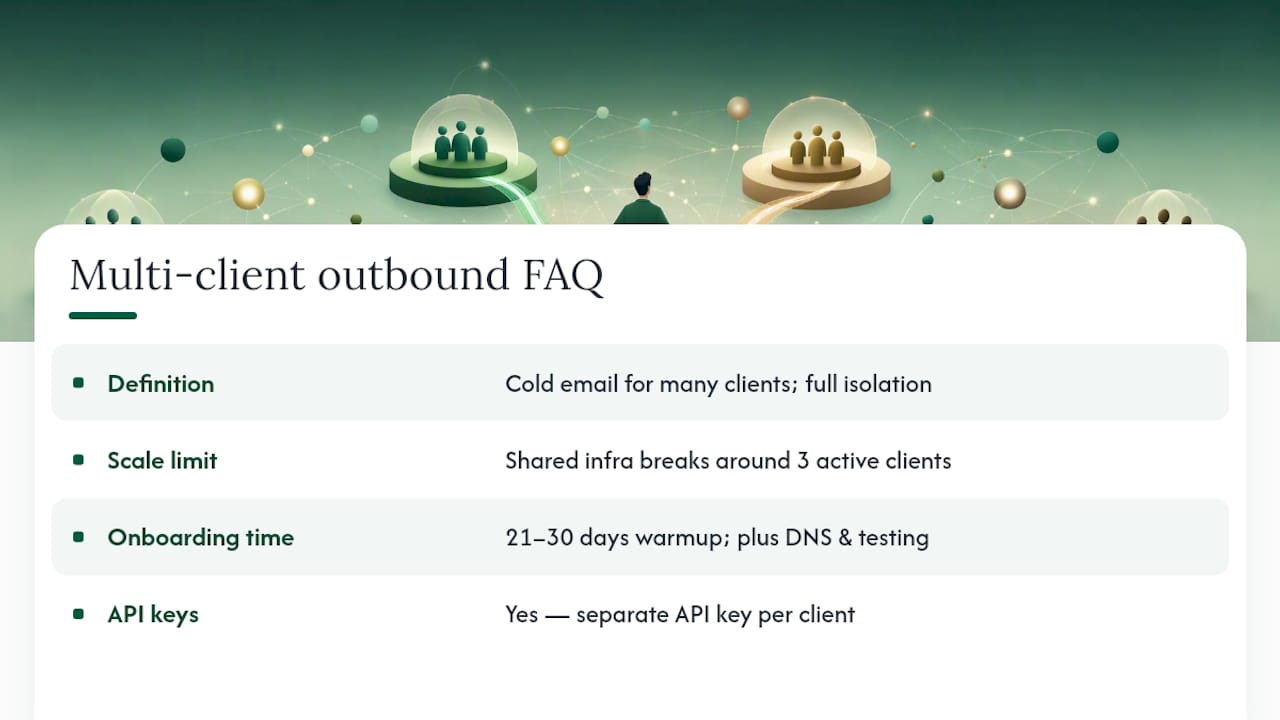
Expect roughly 21 to 30 days minimum for new-domain warmup, and once automation is running, 5 to 15 minutes of daily oversight per group of 5 to 10 clients.
Pro Tip: Build your onboarding checklist before you sign your third client. Retrofitting isolation onto accounts that are already sending is far more painful than starting clean.
Key Takeaways
Managing multi-client outbound reliably requires tenant-level isolation, a documented onboarding gate, and automated deliverability monitoring working together, not any single fix alone.
| Point | Details |
|---|---|
| Pick the right architecture | Multi-tenant setups isolate each client’s domain, API keys, and analytics while keeping onboarding fast. |
| Gate live sends on seed tests | Hold cold volume until placement tests clear 80% on Gmail and Outlook. |
| Isolate credentials per client | Never reuse API keys or SMTP credentials across accounts; rotate them on a schedule. |
| Automate onboarding steps | Chain domain verification, DNS checks, key generation, and warmup into one automated flow. |
| Consider a managed platform | LeadPilot bundles tenant isolation, warmup, DMARC monitoring, and white-label reporting into one agency workspace. |
Table of Contents
- A Repeatable Onboarding Checklist For Each New Client
- Multi-Tenant, Sub-Accounts, Or Separate Accounts: Which Fits Your Agency?
- What Deliverability Controls Does Every Client Account Need?
- How Do You Keep Client Credentials And Data Isolated?
- How Should APIs And Webhooks Track Each Client Separately?
- How Do You Scale Outbound Without Triggering Provider Throttles?
- Why Separate Transactional And Marketing Templates?
- What Should Client Reporting And SLAs Actually Cover?
- How A Managed Platform Solves These Problems At Scale
- An Editor’s Note On Automation Versus Judgment
- Get Multi-Client Outbound Running Without The Manual Overhead
- Frequently Asked Questions
- Sources
A Repeatable Onboarding Checklist For Each New Client
Outbound client management falls apart when onboarding isn’t documented. Every new client should move through the same numbered gates, with sign-off at each stage:
- Purchase 2 to 3 domains per client and complete DNS setup (SPF, DKIM, DMARC).
- Verify the contact list; reject anything with an invalid rate above 3%.
- Run a seed-inbox placement test across Gmail and Outlook.
- Begin the warmup schedule, tracked against the 21 to 30 day timeline that most agencies plan around.
- Create the client’s sub-account or tenant inside your sending platform.
- Generate dedicated API keys and connect webhooks.
- Assign role-based permissions for anyone touching the account.
- Configure the reporting cadence the client expects.
That single gate stops more deliverability disasters than any other control on this list.
Pro Tip: Log the date and result of each gate in a shared tracker. When a client asks why week one had no sends, you want a timestamped answer, not a guess.
Multi-Tenant, Sub-Accounts, Or Separate Accounts: Which Fits Your Agency?
Three models dominate multi-client outreach strategies, and the right one depends on how many clients you run and how much risk you can absorb.
A master multi-tenant setup puts one account at the center with isolated tenants underneath. Each tenant gets its own domain, API tokens, and analytics, which speeds up onboarding while keeping data separated. This is the model most lean teams should default to.
Sub-accounts or workspaces sit a notch below full multi-tenancy: shared billing, shared platform, but distinct workspaces per client. Faster to spin up, though the technical isolation is thinner.
Fully separate accounts per client give you the cleanest security boundary and the heaviest overhead. Billing, credentials, and support all multiply.
Pick based on:
- Number of active clients (shared infrastructure commonly breaks down around 3 clients without isolation).
- Privacy and security requirements from the client’s industry.
- Whether you need dedicated IPs versus reputable shared IPs.
- Your team’s headcount and appetite for managing separate logins.
What Deliverability Controls Does Every Client Account Need?
Optimizing outbound campaigns starts with domain hygiene, not copywriting. Every client needs a dedicated sending domain, with SPF, DKIM, and DMARC documented as mandatory onboarding steps, not optional extras.
Seed placement benchmark: Agencies should hold live sends until seed-inbox tests show at least 80% placement across major providers. Below that, you’re sending into spam and burning the domain before it’s earned trust.
Beyond the initial gate, ongoing monitoring needs to cover:
- Bounce rate and complaint rate per client, tracked daily.
- Blocklist checks run automatically, not manually once a week.
- DMARC aggregate reports reviewed for spoofing or unauthorized sending.
- Per-client suppression lists with immediate suppression on hard bounces.
- A warmup and IP strategy: dedicated IPs for higher-volume clients, shared IPs with strong reputations for smaller ones.
Catching it same-day beats discovering it in a weekly report after the domain’s reputation is already damaged.
How Do You Keep Client Credentials And Data Isolated?
Effective client engagement techniques mean nothing if a credential leak or cross-client data mix-up torches trust. The rule is simple: never share API keys or SMTP credentials across clients, ever, even temporarily.
- Issue distinct API keys and SMTP credentials per client account.
- Apply role-based permissions so creators, reviewers, and billing staff only see what their job requires.
- Segregate templates, suppression lists, analytics, and webhooks by client, not by campaign.
- Rotate credentials on a schedule, keep audit logs, and run a documented offboarding checklist when a client leaves, including full key revocation.
How Should APIs And Webhooks Track Each Client Separately?
Managing multiple client communications requires telemetry that never blends accounts. Give each client its own webhook endpoint or a client-specific tracking tag, so a bounce or complaint maps back to the right account within seconds, not after a manual audit.
Use webhooks for real-time alerts on bounces, complaints, and throttling, wired straight into your alerting system. Keep enrichment, CRM syncs, and reporting isolated by client workspace so one client’s data never leaks into another’s dashboard.
At minimum, each webhook payload should include: client_id, domain, campaign_id, event_type, and timestamp.
Pro Tip: If your current stack can’t pass those five fields on every event, you’ll spend hours reconstructing “which client did this happen to” by hand. Fix that before adding client six.
How Do You Scale Outbound Without Triggering Provider Throttles?
Scaling multi-client outreach strategies without controls is how one client’s aggressive send schedule gets everyone throttled. Queueing, rate-limiting, and backoff logic need to sit between your campaigns and mailbox providers at all times.
- Route all sends through a queue with per-domain rate limits, not a flat global limit.
- Automate warmup pipelines so new domains ramp in parallel without cross-contaminating reputation.
- Chain onboarding automatically: domain verification, then DNS check, then API key generation, then warmup start, then webhook connection.
- Require sign-off gates inside the automation itself, so no step gets skipped under deadline pressure.
Because AI outbound tooling at agency scale multiplies pricing per client, automating these steps also protects your margins, not just your deliverability.
Pro Tip: Test your backoff logic with a fake spike before a real client campaign forces the test on you.
Why Separate Transactional And Marketing Templates?
A clean template framework speeds up client-specific customization and keeps deliverability risk contained. Build a skeleton with subject, opener, value proposition, CTA, and P.S. sections, then customize per client from that base.
- Keep transactional sends on separate infrastructure from marketing and outbound sends, since mailbox providers treat the two differently.
- Require personalization tokens, unsubscribe handling, and suppression tags on every template before launch.
- Build A/B test controls into the framework itself, not as an afterthought per campaign.
What Should Client Reporting And SLAs Actually Cover?
Per-client dashboards need to show active campaigns, sends, open and reply rates, meetings booked, bounce and complaint rates, and domain health at a glance.
- Run daily automated health checks, send weekly summaries, and align full reports to whatever cadence the client actually wants.
- Set a monitoring response time for deliverability incidents (same-day, ideally).
- Define a report delivery window the client can rely on.
- Document an escalation path for anything that crosses a risk threshold.
A single aggregated dashboard that pulls all client health into one view cuts the manual-check time that eats lean teams alive.
How A Managed Platform Solves These Problems At Scale
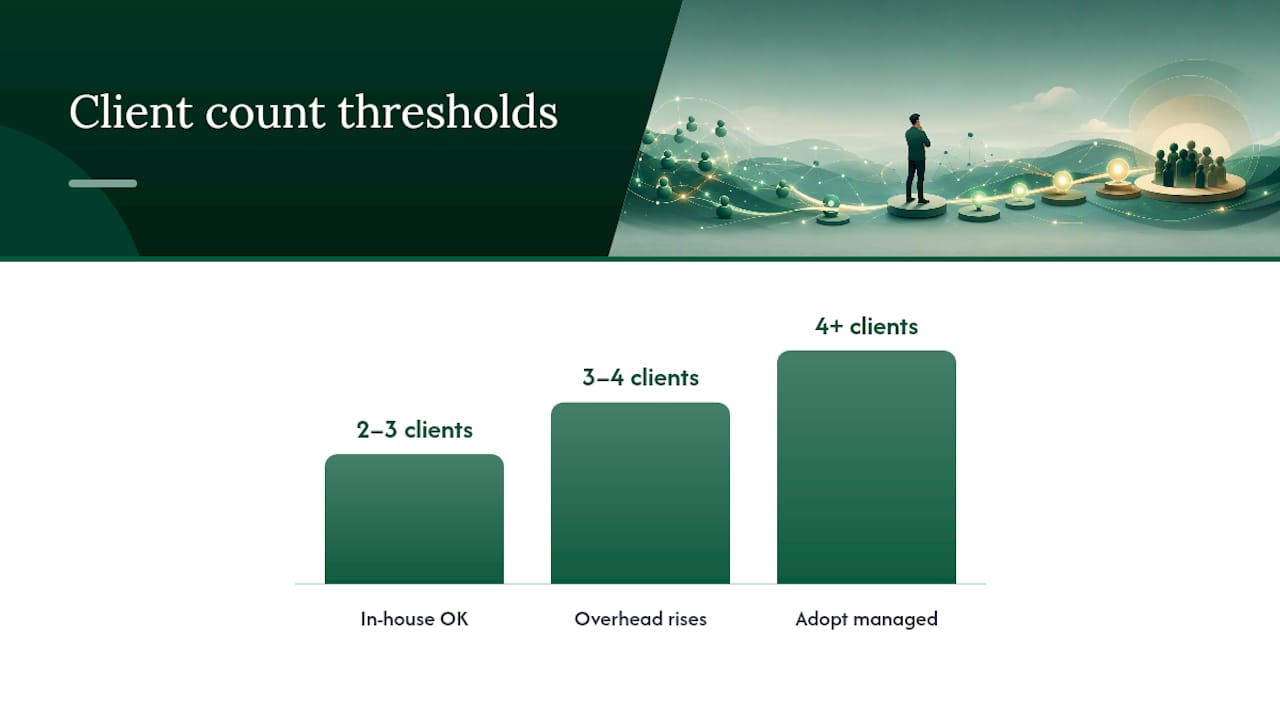
Building all of this in-house with spreadsheets and disconnected tools works for two or three clients. Past that, the operational overhead scales faster than your headcount, which is exactly the gap a managed platform closes.
- Tenant and sub-account isolation with per-client API keys, generated automatically at onboarding.
- Automated warmup and integrated verification, with DMARC monitoring running in the background.
- White-label reporting per client, pulled from one dashboard instead of five logins.
- Centralized anomaly detection, since cross-account monitoring agents catch drops in reply rate faster than manual review.
LeadPilot’s agency workspace builds these controls into the platform itself rather than leaving you to assemble them from separate tools. If you’re running more than three or four client accounts and still tracking domain health in spreadsheets, that’s the signal to adopt a managed system instead of patching another in-house automation.
Pro Tip: Count the hours your team spends each week on manual deliverability checks. If it’s more than two hours per client, the math already favors a managed platform.
An Editor’s Note On Automation Versus Judgment
Automation should own monitoring, alerting, and reporting. It should never own strategy. A tool can flag a reply-rate drop across nine client accounts before a human notices one, but deciding whether that drop means the messaging is stale or the list went cold still takes a person who understands the account.
The agencies that scale cleanly treat automation as the early-warning system and keep a human making the calls it surfaces.
Get Multi-Client Outbound Running Without The Manual Overhead
Building tenant isolation, warmup automation, and DMARC monitoring yourself means stitching together separate tools and hoping they don’t drift out of sync. LeadPilot runs the full workflow, from domain setup through reply handoff, inside one agency workspace with per-client isolation already built in.

Each client gets a separate sub-account, dedicated sending domains, automated warmup, and white-label reporting without your team configuring any of it by hand. The AI SDR platform handles targeting, outreach, and follow-ups, so your team spends time on strategy calls instead of DNS records. Build a free campaign preview on the agency plan page and see how it maps to your current client list before committing to anything.
Frequently Asked Questions
What does it mean to manage multi-client outbound effectively? It means running cold email and follow-up sequences for several client accounts from one system while keeping each client’s domains, data, and reporting fully isolated from the others.
How many client accounts can one shared sending setup handle? Shared infrastructure without isolation commonly starts breaking down around 3 active clients, which is when per-client domain separation becomes necessary.
How long does onboarding a new client take? Plan on roughly 21 to 30 days for domain warmup alone, plus the time needed for DNS setup, list verification, and seed testing before live sends begin.
Do I need separate API keys for every client? Yes. Sharing keys across clients creates data leakage risk and makes it far harder to isolate a problem when one client’s campaign misbehaves.
Is a multi-tenant platform better than separate accounts for every agency? Not always. Multi-tenant setups suit most lean teams, but agencies with strict per-client security requirements sometimes need fully separate accounts despite the added overhead.
Sources
- How to Manage Email Sending for Multiple Clients: An Agency Guide - MailerSend
- Agency Outbound Operations: Multi-Client Scaling Guide
- We Run Cold Email for 9 Clients. Here Is How We Stay Sane.