Unsubscribe Link Placement: Best Practices for Email Marketers
Discover the best practices for unsubscribe link placement in emails. Improve compliance, user experience, and engagement with effective strategies.

Unsubscribe Link Placement: Best Practices for Email Marketers
Put the unsubscribe link in your email footer. That is the legally safe baseline, the placement users expect, and the one that satisfies CAN-SPAM’s clear and conspicuous requirement. For long emails or mobile-heavy lists, add a small secondary link near the top. Layer on a List-Unsubscribe header so Gmail, Yahoo, and Outlook can show a native one-click opt-out button in their UI.
Three things to do right now:
- Confirm your footer contains visible, plain-text “Unsubscribe” link text (not an image, not a tooltip)
- Check that your ESP is sending
List-UnsubscribeandList-Unsubscribe-Postheaders - Click every opt-out path in a seed message and verify suppression fires within 10 business days
Key takeaways
The footer is the legally required baseline for unsubscribe link placement, but a three-layer approach (footer link, optional top utility link, and List-Unsubscribe headers) gives you the strongest compliance and deliverability posture.
| Point | Details |
|---|---|
| Footer is the baseline | Place a visible “Unsubscribe” link in every email footer, above the legal address block. |
| Add a top link for long or mobile sends | A small utility link near “View in browser” reduces spam complaints on high-scroll emails. |
| List-Unsubscribe headers are required for bulk senders | Add both List-Unsubscribe and List-Unsubscribe-Post headers; use an HTTPS POST endpoint, not GET. |
| CAN-SPAM timing is non-negotiable | Opt-out mechanism must stay live 30 days post-send; suppress within 10 business days, no fees or barriers. |
| Runleadpilot | Manages header injection, suppression hygiene, and campaign QA so compliance runs automatically. |
Table of Contents
- Where to place the unsubscribe link for maximum compliance and deliverability
- How the unsubscribe link should look and read
- List-Unsubscribe header: what to add and how it works
- CAN-SPAM requirements that directly affect placement and opt-out behavior
- How to add and manage unsubscribe links in your ESP
- What to measure and how to A/B test placement decisions
- Copy and HTML snippets you can drop into templates
- When to use a managed sending platform for unsubscribe flows and deliverability
- Runleadpilot handles deliverability and opt-out compliance for you
- Sources
Where to place the unsubscribe link for maximum compliance and deliverability
The footer is not just convention. It is where users look first, and it is where inbox providers expect to find the opt-out. Placing it there keeps your sender identity block, physical address, and opt-out mechanism together in one scannable area, which is exactly how CAN-SPAM’s “clear and conspicuous” standard is most cleanly satisfied.
When footer-only is enough: Single-screen emails, short newsletters, and transactional messages with a small marketing footer all work fine with one footer link. Users scroll to the bottom, find it, and leave cleanly.
When to add a top utility link: Long-form emails (anything requiring more than two or three scrolls on mobile), high-frequency sends, and promotional campaigns to cold or semi-engaged lists all benefit from a second, quiet link near the top. Think of it as a row that sits alongside “View in browser” in small, muted text. The footer-first approach is standard, but a top link reduces the friction that pushes frustrated readers toward the spam button before they reach the bottom.
When inline or content-level placement makes sense: Rarely. A transactional email that also contains a promotional section can carry an inline opt-out for that specific content type, but only if it leads to a preference center with a clear “unsubscribe from all” option. Inline links scattered through body copy create confusion about scope and are harder to audit for compliance.
Practical layout patterns:
- Footer-first (default): Unsubscribe link isolated above the legal address block, not buried after it
- Top + footer: Small utility row at the top, full opt-out block at the footer; both links point to the same suppression endpoint
- Compact mobile footer: Single line with “Unsubscribe | View in browser | [Company Address]” — keep tap targets at least 44px tall
Pro Tip: If your email template uses a multi-column footer with social icons, privacy policy, and legal text, put the unsubscribe link in its own row above that block. A user scanning the bottom of an email on a phone should not have to parse six links to find the one they want.
How the unsubscribe link should look and read
Label it “Unsubscribe.” Not “Manage preferences only,” not “Click here to stop emails,” not a winking “Had enough?” The Nielsen Norman Group’s research on unsubscribe UX is direct: plain labeling reduces confusion and reduces complaints. When users cannot immediately identify the opt-out, they reach for the spam button instead.

Font size and contrast: Keep the link at a minimum of 12px. Anything smaller fails basic legibility on mobile and starts to look like you are hiding it, which is a compliance risk as much as a UX one. The link should have enough contrast against the footer background to be readable without squinting. Light gray on white is a common mistake.
Visual separation: The unsubscribe link should not compete with four other links in a dense legal paragraph. Give it whitespace. A line break above and below, or its own table row, is enough.
Accessibility and mobile tapping: Do not put the opt-out inside an image. If images are blocked (which they often are in corporate inboxes), the link disappears entirely, and you have just failed the “functioning mechanism” test. Tappable targets on mobile should be at least 44×44px per standard touch-target guidance. An underline or other visible affordance helps users with low vision identify it as a link.
What to avoid:
- Tiny gray text that blends into the footer background
- Opt-out text that is not hyperlinked (plain text with no clickable element)
- Hiding the link inside a collapsed “legal” section that requires a click to expand
- Using an image as the only opt-out affordance
What works:
- Isolated link with surrounding whitespace
- Underlined or visually distinct from surrounding body text
- Consistent placement across every campaign template so users know where to look
List-Unsubscribe header: what to add and how it works
The List-Unsubscribe header is a line in your email’s technical header block, invisible to most readers but read by Gmail, Yahoo, and Outlook. When present, these providers surface a native “Unsubscribe” button directly in their UI, separate from your email content. Users who click it never even open your message to find the footer link.
RFC 8058 documents the two header formats you need:
| Header | Format | Purpose |
|---|---|---|
List-Unsubscribe |
<mailto:unsub@yourdomain.com>, <https://yourdomain.com/unsub> |
Declares the opt-out endpoint |
List-Unsubscribe-Post |
List-Unsubscribe=One-Click |
Signals one-click POST support per RFC 8058 |
Both headers together tell mailbox providers they can fire a silent POST request to your HTTPS endpoint when a user clicks the native button, completing the opt-out without a browser redirect.
The Internet Society’s bulk sender guidance sets the practical threshold at 5,000+ messages per day before providers actively enforce header expectations, but adding headers at any volume is low-effort and improves your sender profile.
Implementation checklist:
- Add both
List-Unsubscribe(mailto + HTTPS) andList-Unsubscribe-Postto every bulk send - The HTTPS endpoint must accept a POST and process the suppression immediately, not just log it
- Do NOT use a GET-only endpoint for the one-click flow. Some prefetch bots trigger GET requests automatically, which would unsubscribe users who never intended to opt out
- Verify headers by viewing the raw source of a received seed message (in Gmail: “Show original”; in Outlook: “View message source”)
- Click the mailbox-native unsubscribe control in your seed inbox and confirm the address lands in your suppression list within minutes
CAN-SPAM requirements that directly affect placement and opt-out behavior
CAN-SPAM is not complicated, but the timing rules catch teams off guard. Here is what the law actually requires, translated into placement decisions.
| Requirement | What it means for your campaign |
|---|---|
| Clear and conspicuous opt-out | Link must be in the HTML body, visible without loading images, and not hidden in collapsed or tiny elements |
| Mechanism available 30 days post-send | Your unsubscribe endpoint must stay live for 30 days after each send, even if you retire the campaign |
| Honor opt-outs within 10 business days | Suppression must fire within 10 business days of the request; no manual-only workflows that can slip |
| No fees or extra barriers | One web page or one reply email is the maximum friction allowed; no login walls, no CAPTCHA before suppression |
The CFR Part 316 implementing rules are specific: senders cannot require recipients to provide any information beyond an email address to process an opt-out, and they cannot charge a fee. A preference center is fine as long as it includes a clear “unsubscribe from all” option that requires no more than one click after landing.
The CAN-SPAM Act itself prohibits sending commercial email to someone more than 10 business days after they have submitted an opt-out request.
Pre-send compliance checklist:
- [ ] Unsubscribe link is in HTML, not an image
- [ ] Link is visible without scrolling past dense legal text
- [ ] Opt-out endpoint will remain live for at least 30 days
- [ ] Suppression is automated, not manual-only
- [ ] No login, fee, or multi-step barrier before suppression fires
- [ ] Physical postal address of sender is present in the footer
How to add and manage unsubscribe links in your ESP
Most ESPs handle the visible footer link through a merge tag or a system-generated footer block. The implementation pattern is consistent across platforms.
- Create a reusable footer partial or template block. This block contains your merge tag, physical address, and any preference-center link. Lock it so individual campaign editors cannot accidentally delete it.
- Use your ESP’s native unsubscribe merge tag. In Mailchimp it is
*|UNSUB|*; in HubSpot,{{ unsubscribe_link }}; in Klaviyo,{% unsubscribe_link %}. These tags resolve to a tracked, suppression-linked URL specific to each recipient. Never hardcode a static URL as your opt-out link. - Point the link to a one-click endpoint or a preference center. If you use a preference center, the landing page must include a visible “unsubscribe from all” option that requires no additional form fields beyond confirmation.
- For List-Unsubscribe headers: Most major ESPs (Mailchimp, Klaviyo, HubSpot, SendGrid, Postmark) add these automatically for bulk sends. Check your account settings or sending domain configuration to confirm. If you send via SMTP or API directly, add the headers in your message construction code before the message is handed to the MTA.
- Avoid mailto-only List-Unsubscribe. The mailto form is a fallback; the HTTPS POST endpoint is what enables true one-click behavior in Gmail and Yahoo’s native UI.
End-to-end test plan before any campaign goes live:
- Send to at least two seed addresses (one Gmail, one Outlook or Yahoo)
- View raw message source and confirm both
List-UnsubscribeandList-Unsubscribe-Postheaders are present - Click the visible footer link and confirm you land on the correct opt-out or preference page
- Click the mailbox-native unsubscribe button (Gmail’s “Unsubscribe” next to the sender name) and confirm suppression fires
- Check your suppression list within 24 hours to verify all paths recorded the opt-out
Pro Tip: Template editors in ESPs often show a preview that does not reflect the actual rendered HTML. Always test from a real received message, not the preview pane, before drawing conclusions about link visibility or header presence.
What to measure and how to A/B test placement decisions
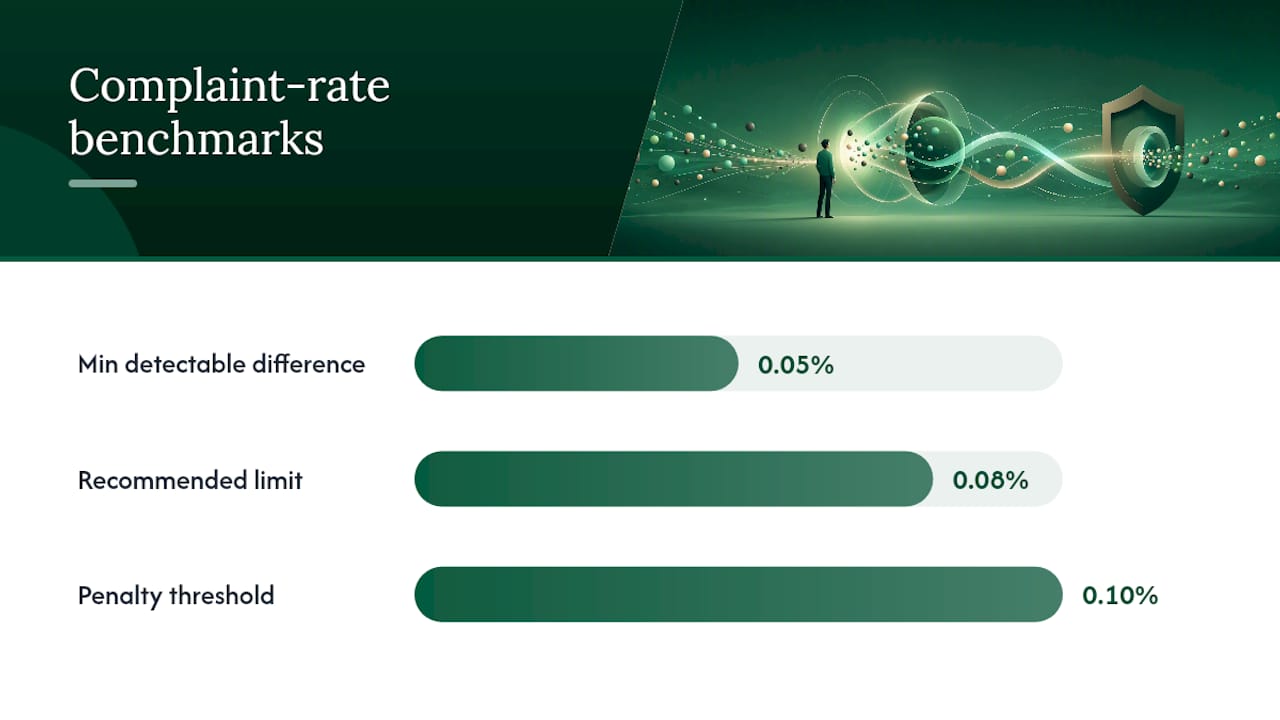
Unsubscribe rate alone is a misleading signal. A slightly higher unsubscribe rate paired with a lower spam-complaint rate is almost always a better outcome for long-term deliverability. Spam complaints are weighted far more heavily by inbox providers than opt-outs.
Primary metrics to track:
- Spam-complaint rate: Keep below 0.08% per send. Above 0.1% triggers deliverability penalties at Gmail and Yahoo.
- Unsubscribe rate: Benchmark varies by industry, but a sudden spike after a placement change tells you something about audience expectations.
- Inbox placement rate: Use a seed-list tool to monitor whether messages land in the primary inbox, promotions tab, or spam folder.
- Open and click rates: Declining engagement on a stable list often precedes a complaint spike.
A/B test recipe for placement:
- Split your list 50/50 with a statistically meaningful sample (at minimum a few thousand recipients per variant, enough to detect a 0.05% difference in complaint rate).
- Run the test for at least two sends, not one, to account for day-of-week and subject-line variance.
- Variant A: footer-only link. Variant B: top utility link plus footer link.
- Measure complaint rate, unsubscribe rate, and inbox placement for both variants over the test window.
- Declare a winner only when complaint rate differences are consistent across both sends. A one-send anomaly is noise.
Higher unsubscribes in Variant B with lower complaints means the top link is doing its job: giving frustrated readers a clean exit before they hit “Report Spam.” That trade is worth it every time. For more on tracking engagement signals, the email tracking tools guide covers the metrics stack in detail.
Copy and HTML snippets you can drop into templates
These are ready-to-adapt examples. Replace bracketed placeholders with your actual values.
Minimal footer snippet:
<p style="font-size:13px; color:#555555; text-align:center; margin-top:24px;">
<a href="{{unsubscribe_link}}" style="color:#555555; text-decoration:underline;">Unsubscribe</a>
|
<a href="{{preference_center_url}}" style="color:#555555; text-decoration:underline;">Manage preferences</a>
</p>
<p style="font-size:12px; color:#888888; text-align:center;">
[Company Name] · [Street Address] · [City, State ZIP]
</p>
Top utility row (sits above the hero image):
<p style="font-size:11px; color:#999999; text-align:right; padding:8px 16px 0;">
<a href="{{view_in_browser_url}}" style="color:#999999;">View in browser</a>
·
<a href="{{unsubscribe_link}}" style="color:#999999;">Unsubscribe</a>
</p>
Keep the top link visually quiet. It should not compete with your headline or hero image. Small, muted, right-aligned works well.
Preference center vs. direct unsubscribe copy:
- Direct: “Unsubscribe from all emails” (one click, no form)
- Preference center landing: “You’re unsubscribed. We’ve removed [email] from our list. Changes take effect within 10 business days.” (Confirmation page copy should state the processing window explicitly.)
If you offer a preference center, the confirmation page for “unsubscribe from all” should not ask users to re-enter their email address. The link already carries their identifier. Requiring re-entry is an extra barrier that the CFR Part 316 rules do not permit.
When to use a managed sending platform for unsubscribe flows and deliverability
For most teams running a single list with a standard ESP, in-house implementation is straightforward. The calculus changes in a few specific situations.
Use cases where a managed platform pays off:
- Multi-domain sending: Managing
List-Unsubscribeheaders, DKIM alignment, and suppression lists across five or more sending domains is operationally expensive to do correctly in-house - Deliverability recovery: If your domain has accumulated complaint history, a managed provider can isolate sending infrastructure and rebuild reputation while maintaining compliant opt-out flows
- High-volume cold outbound: Bulk cold email at scale requires dedicated infrastructure, automated suppression hygiene, and header management that most standard ESPs do not configure by default
- Agency multi-client work: Running suppression lists and compliance checks across dozens of client accounts without a unified system creates audit risk
What a managed platform should guarantee:
- Automatic
List-UnsubscribeandList-Unsubscribe-Postheader injection on every send - Suppression processing within the 10-business-day window, ideally within minutes
- Seed-pool testing before campaigns launch
- Consolidated suppression lists that prevent re-mailing opted-out contacts across campaigns
For outbound agencies managing multiple clients, the suppression hygiene problem is particularly acute. A contact who opted out of one client’s campaign must not receive another client’s email from the same infrastructure.
Pro Tip: Before signing with any managed sending provider, ask specifically how they handle List-Unsubscribe-Post endpoints and what their suppression SLA is. “We support one-click unsubscribe” sometimes means mailto-only, which is not the same thing.
The case for easy opt-outs over clever friction
The instinct to make unsubscribing slightly harder, a preference center with no “unsubscribe all” option, a link that is technically present but visually buried, is understandable. Fewer opt-outs look better in a weekly report. But the metric that actually matters to your sending reputation is spam complaints, and those go up when opt-outs go down.
A reader who cannot find the unsubscribe link does not stay subscribed and engaged. They hit “Report Spam,” which costs you far more than a clean opt-out would have. Placement is one lever, but it works in concert with send frequency, content relevance, and the quality of your original consent. A well-placed unsubscribe link on a list with poor consent hygiene still generates complaints. The follow-up cadence guide covers frequency as a complaint driver in more depth.
The test-and-measure mindset matters here. Do not assume a top link will hurt your list size without running the experiment. In most cases, the complaint reduction more than compensates for the marginal increase in opt-outs.
Runleadpilot handles deliverability and opt-out compliance for you
Cold email compliance gets complicated fast when you are managing dedicated sending domains, suppression lists across multiple campaigns, and header configuration that most ESPs leave to you. Runleadpilot’s managed cold email platform handles all of it: List-Unsubscribe header injection, automated suppression processing, dedicated domain management, and pre-launch campaign QA so you are not discovering a broken opt-out link after 10,000 sends.

The platform identifies your ideal customer profile from your website, sources matching decision-makers, and writes personalized sequences from real business signals. Warm replies come to your team; everything else, including deliverability infrastructure and opt-out hygiene, runs in the background. You can preview a free campaign before committing to a paid plan.
Sources
Primary references for legal text, technical implementation, and UX guidance:
- CAN-SPAM Act: A compliance guide for business | FTC
- Marketing unsubscribe best practices | Internet Society
- RFC 8058 — Use of the ‘List-Unsubscribe’ Header Field in Internet Mail Messages
- Code of Federal Regulations, Part 316 — Commercial electronic mail (CFR excerpt)