Email Blacklist Recovery: A Rapid Playbook for B2B Teams
Struggling with email blacklist issues? Discover a rapid playbook for B2B teams to recover your sending reputation and restore campaigns.

Email Blacklist Recovery: A Rapid Playbook for B2B Teams
If you suspect you’re blacklisted, stop all outbound campaigns right now and confirm the listed asset, whether it’s your sending IP, your domain, or a URL embedded in your emails, using a multi-blacklist check. Everything else waits until you know exactly what triggered the block.
Here’s the fastest path back to the inbox: stop sending, confirm the listing, secure whatever got compromised, fix the root cause, request delisting with evidence in hand, then monitor closely as you ramp back up. Skipping steps, especially the “fix before you request” step, is why so many teams get relisted within days of a successful delist.
In the first hour, work through this:
- Pause every active campaign and sequence, including automated follow-ups.
- Pull the full bounce headers and non-delivery reports (NDRs) from recent sends.
- Run a scan across multiple blacklists at once rather than checking one at a time.
- Loop in whoever owns your sending domain or IT infrastructure immediately.
Expect this over the next 24 to 72 hours: bounce rates will spike, some inboxes will silently drop your mail with no bounce at all, and you’ll likely see delivery fail differently across providers. Gmail may throttle you quietly while Microsoft rejects outright. That inconsistency is normal and it’s actually useful diagnostic information.
Key Takeaways
Email blacklist recovery works only when the underlying cause gets fixed before you request delisting, because skipping that step almost always leads to rapid relisting.
| Point | Details |
|---|---|
| Confirm before you act | Run MXToolbox, MultiRBL, and a Spamhaus lookup to identify whether the IP, domain, or a URL is listed. |
| Fix the cause first | Repair SPF, DKIM, DMARC, or secure compromised accounts before submitting any delisting request. |
| Build an evidence packet | Include specific remediation steps, before-and-after auth screenshots, and log samples with every request. |
| Ramp up slowly post-delist | Resume at 10 to 20% volume and increase gradually over one to two weeks while watching bounce rates daily. |
| Reduce risk with managed infrastructure | Runleadpilot manages sending domains, warm-up, and deliverability monitoring to prevent the authentication and volume issues that cause most listings. |
Table of Contents
- How to Confirm Whether You’re On an Email Blacklist
- Is It Your IP, Your Domain, or a URL That’s Listed?
- What Actually Causes B2B Senders to Get Blacklisted
- The Step-by-Step Recovery Checklist
- How to Request Delisting from the Major Blacklists
- Preventing the Next Blacklist Incident
- Tools and Signals to Watch After You’re Back
- How Runleadpilot Reduces Your Blacklist Risk
- Frequently Asked Questions
- Sources
How to Confirm Whether You’re On an Email Blacklist
Don’t guess. A single lookup tool can miss a listing another one catches, so run more than one before you conclude anything.
Start with MXToolbox’s blacklist check, which scans over 100 major blacklists in one pass and remains the fastest way to see if your IP shows up anywhere significant. Follow it with MultiRBL, which checks dozens of public DNSBLs in parallel and often surfaces smaller or regional lists that MXToolbox skips. Then run a direct Spamhaus lookup, since Spamhaus listings tend to cause the widest and most immediate delivery damage. Round it out with a scan from MailGenius, which tests actual inbox placement and spam-scoring rather than just blacklist membership, and check your own mail server logs alongside Google Postmaster Tools and Microsoft SNDS for provider-specific reputation data that public blacklists never show you.
Bounce codes tell you what actually happened. A few you’ll see constantly:
- 550 5.7.1 — message rejected outright, often tied to a blacklist match.
- 421 4.7.0 — temporary block, frequently a rate-limit or reputation throttle, not a hard delist.
- 5.7.509 or 5.7.511 — Microsoft-specific codes signaling your sender is blocked at the tenant or org level.
- 554 5.7.9 — content or reputation-based rejection, often SPF/DKIM related.
Capture everything before it disappears. Save full bounce headers verbatim, export the raw SMTP logs, and screenshot NDRs as they arrive. You’ll need this evidence later for delisting requests, and most operators reject vague submissions that lack it.
Pro Tip: Run your checks at two different times, a few hours apart. Some DNSBLs update on delayed cycles, so a clean scan in the morning can miss a listing that shows up by afternoon.
Is It Your IP, Your Domain, or a URL That’s Listed?
This distinction changes everything about how you fix it. An IP listing usually points to a server problem: a compromised machine, an open relay, or a shared IP where a neighbor’s spam dragged your reputation down with it. A domain listing points to content, sending practices, or authentication gaps tied to your brand specifically, regardless of which server sends the mail. A URL listing, which is what SURBL and URIBL specialize in, means a link inside your emails, not your sending infrastructure at all, has been flagged as malicious or abused.
Run this quick test to figure out which one you’re dealing with:
- Check the IP shown in the bounce header against Spamhaus and MXToolbox directly.
- Search your sending domain name separately on the same tools.
- Pull every link used in recent campaigns and check them individually against SURBL.
- Send a test email from a different IP but the same domain, and vice versa, to isolate the variable.
Get this wrong and you’ll waste days. Fixing a server issue does nothing if the actual problem is a shortened link your team used in a call-to-action that a spammer had previously abused. Fixing your domain’s SPF record does nothing if the real issue is a shared IP another tenant poisoned.
What Actually Causes B2B Senders to Get Blacklisted
Most B2B teams assume they got blacklisted because they “sent too many emails.” Volume alone rarely triggers it. The real causes tend to cluster around a handful of patterns.
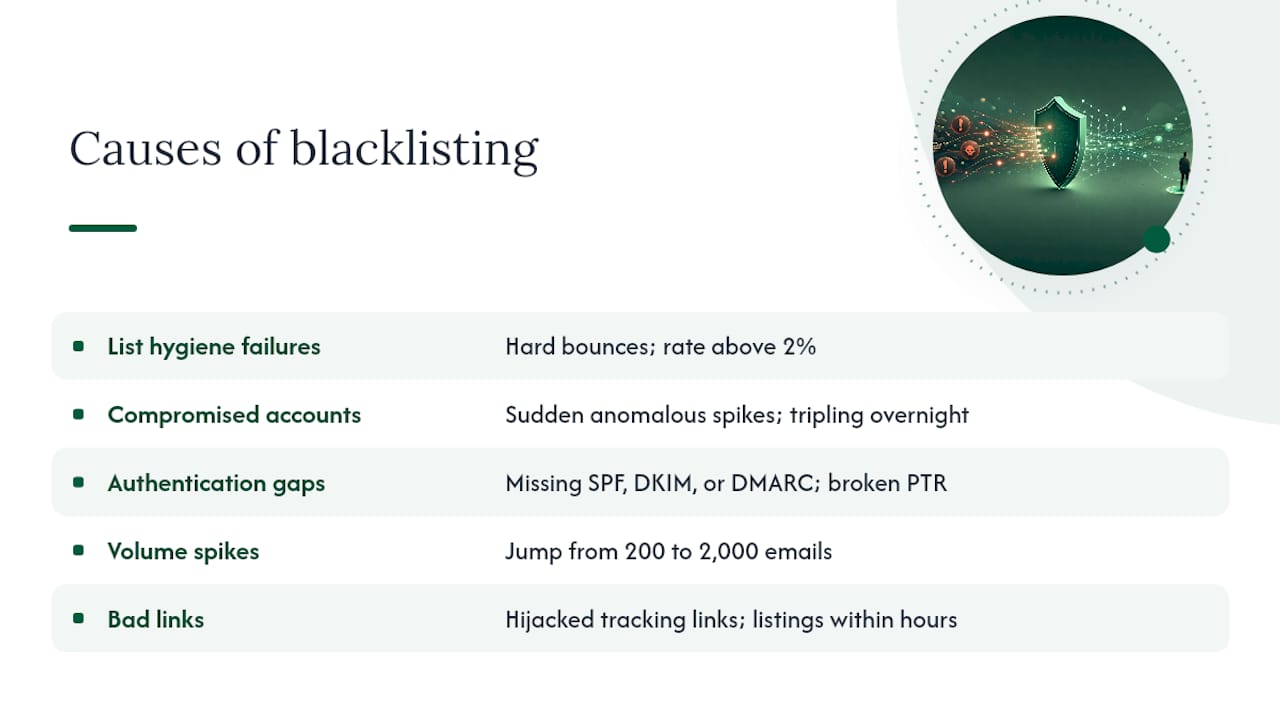
List hygiene failures top the list. Sending to stale or purchased contacts produces hard bounces and, worse, hits spam traps, addresses that exist solely to catch senders who never verify their lists. Check your bounce logs for a hard bounce rate climbing above 2%, and treat any spike as an immediate red flag.
Compromised accounts or infected relays cause sudden, anomalous sending spikes that look nothing like normal team behavior. If your logs show outbound volume tripling overnight, or emails going out at 3 AM from an account that’s normally quiet, assume compromise until proven otherwise.
Authentication gaps are the quiet killer. Missing or misconfigured SPF, DKIM, or DMARC records let receivers treat your mail as unverifiable, and a broken PTR (reverse DNS) record on your sending IP does the same thing. Pull your DMARC aggregate reports; if alignment failures are climbing, that’s your answer.
Volume spikes and bad links round it out. A sudden jump from 200 emails a day to 2,000, a newly purchased or scraped contact list, or a tracking link that got hijacked by a bad actor can each trigger a listing within hours. Practitioners consistently point to list hygiene as the single highest-leverage fix here, ahead of almost anything else you can do.
The Step-by-Step Recovery Checklist
This is the order that works. Skip a step and you risk relisting within days of getting delisted.
- Triage. Pause every campaign. Collect NDRs, bounce headers, and SMTP logs. Run the multi-blacklist scans described earlier and confirm whether the listed asset is your IP, domain, or a URL.
- Fix the root cause. If it’s a compromised account, reset credentials and enable two-factor authentication immediately. If it’s an open relay or malware, get IT or your hosting provider involved to lock down the server. If it’s list hygiene, scrub every contact that hard-bounced or shows no engagement in the last 90 days.
- Repair authentication. Verify SPF includes all sending sources, confirm DKIM signs correctly, and check that DMARC is set to at least
p=quarantine. Fix any broken PTR record with your hosting or DNS provider. - Build your evidence packet. This is what separates a fast delisting from a rejected one. Include the specific remediation steps you took (not a generic “we fixed it” statement), before-and-after screenshots of your SPF/DKIM/DMARC records, a summary of your list-cleaning process, and sample headers showing the original problem.
- Submit delisting requests, starting with whichever list is causing the widest damage, usually Spamhaus or Barracuda first.
- Resume sending slowly. Start at 10 to 20% of your normal volume, prioritize contacts with recent engagement, and increase gradually over one to two weeks while watching bounce and complaint rates daily.
A few things matter enough to repeat as standalone rules. Authoritative recovery guides are consistent on this point: delisting without fixing the underlying cause leads to rapid relisting, sometimes within hours. Don’t treat a successful delist as a finish line. If the spam source that caused the listing is still active anywhere in your infrastructure, you’re just buying time before the next block.
Never try to outrun a listing by switching to a new sending domain or rotating IPs. Receivers actively watch for this pattern, and it reads as evasion, not recovery, which tends to make your reputation problem worse rather than better.
Pro Tip: When you write a delisting request, skip the pleading tone entirely. List operators respond to specifics: “We removed 3,200 unverified contacts from our list, implemented double opt-in, and corrected our DMARC record to p=quarantine on [date]” gets approved faster than “please remove us, we didn’t mean to spam anyone.”
How to Request Delisting from the Major Blacklists
Each operator has its own process, its own patience level, and its own idea of what counts as proof.
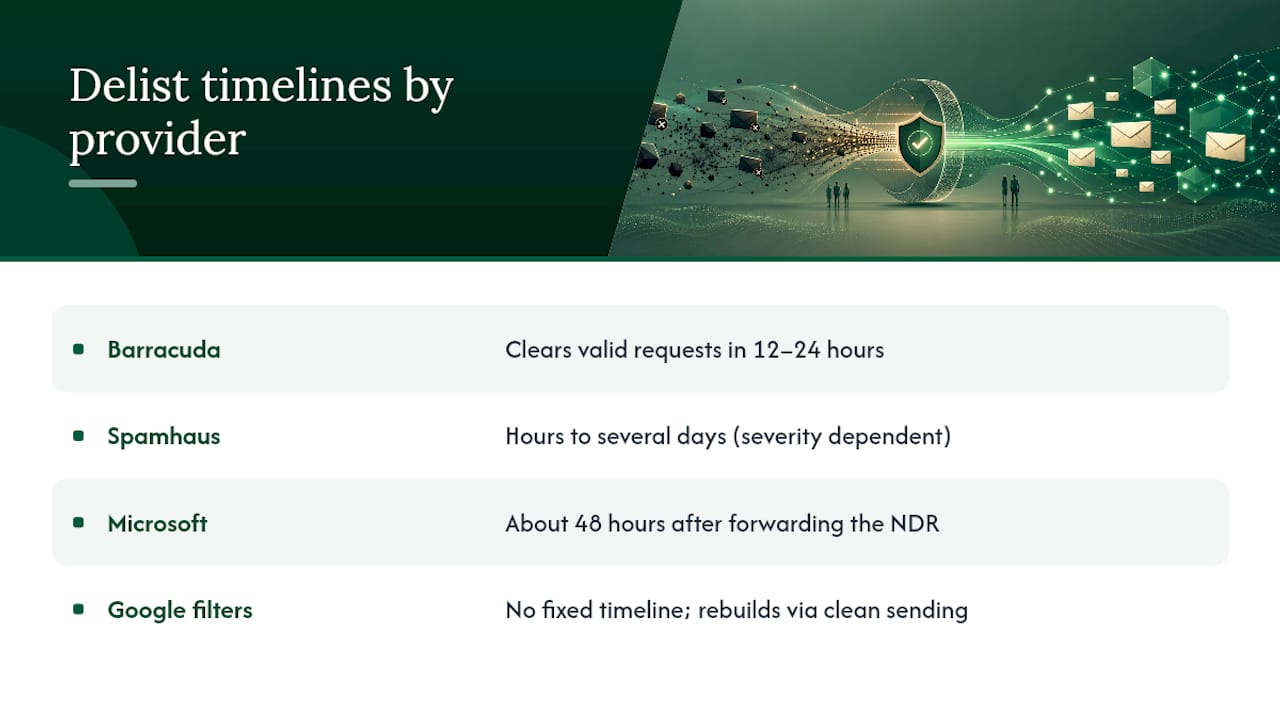
Spamhaus requires that you actually fix the root cause before it will even consider a manual removal. Some of its lists (XBL, DBL) can auto-clear once the underlying issue is resolved, while SBL listings go through manual review that can take anywhere from a few hours to several days depending on severity. Don’t submit a request here without your evidence packet ready.
Barracuda runs a self-service process through Barracuda Central. Submit your removal request through their portal, and many valid requests process within 12 to 24 hours, making it one of the faster major lists to clear once you’ve actually fixed the problem.
SORBS tends to be slower and more manual than Barracuda, and it’s known for stricter reoffense policies, so don’t submit until you’re confident the fix is durable.
SURBL and URIBL don’t care about your sending IP at all. If a link in your email got flagged, you need to remove or replace that specific URL and demonstrate the abuse source is gone before requesting review.
Microsoft and Google don’t run public delist portals in the traditional sense. If you’re hit with Microsoft’s 5.7.511 error, forward the NDR to delist@microsoft.com, and expect a response within about 48 hours. Google offers no equivalent fast-track. You rebuild trust there through Postmaster Tools data and clean sending behavior over time, not a support ticket.
Prioritize your effort where it matters most. Guides consistently recommend tackling Spamhaus and Barracuda first since they cause the broadest delivery loss across the most mail servers.
Preventing the Next Blacklist Incident
Recovery is expensive in time and lost pipeline. Prevention is cheap by comparison.
Deploy SPF, DKIM, and DMARC correctly, not just technically present. Set DMARC to p=quarantine or p=reject once you’ve confirmed alignment is clean, rather than leaving it at p=none indefinitely, which gives you visibility but zero protection.
On list hygiene: verify contacts before every campaign, sunset anyone with no engagement after a defined window, and never buy or scrape a list. Purchased lists are the single most common cause of a first-time blacklist incident among B2B teams new to cold outreach.
Warm up any new domain or IP gradually. Start small, grow volume over two to three weeks, and avoid the sudden spikes that make legitimate outreach look identical to a compromised account blasting spam. A managed warm-up tool can automate this pacing so you’re not guessing at safe daily limits.
Lock down access with two-factor authentication on every account with sending rights, audit who has SMTP credentials regularly, and rate-limit access so one compromised login can’t blast thousands of emails before anyone notices.
Finally, a short do-not-do list: don’t hop domains to escape a listing, don’t rotate IPs to evade detection, and don’t blast your full list the moment a delist clears. Each of these reads as evasion to receivers and tends to trigger stricter, longer-lasting blocks than the original incident.
Tools and Signals to Watch After You’re Back
Recovery isn’t done when the delist confirms. It’s done when your metrics stay clean for a sustained stretch.
Keep MXToolbox, MultiRBL, and a direct Spamhaus lookup in a weekly rotation. Add Google Postmaster Tools and Microsoft SNDS to your regular check, since these show provider-side reputation data that public blacklists never surface, and internal filter problems are often the hardest to catch early.
Watch these thresholds closely:
- Complaint rate above 0.1% is a warning sign; above 0.3% invites new listings.
- Hard bounce rate climbing past 2% signals list hygiene decay.
- Spam-trap hits, even one or two, indicate a stale or purchased contact somewhere in your funnel.
- Sudden volume anomalies, any jump that doesn’t match your actual campaign calendar.
Set automated alerts on DMARC aggregate reports and check your blacklist status at minimum weekly for the first month post-recovery, then monthly after that.
When to Escalate to a Deliverability Specialist
If Google or Microsoft’s internal filters keep blocking you with no public delist path, or you’re relisted repeatedly after fixing the obvious causes, that’s your signal to stop troubleshooting alone. A specialist brings forensic log analysis and reputation-rebuilding experience; a managed sending platform brings dedicated infrastructure and built-in monitoring so the problem doesn’t recur. Either costs money, but persistent blocks cost more in lost pipeline. Weigh speed and control against your team’s actual bandwidth to fix this in-house.
How Runleadpilot Reduces Your Blacklist Risk
Most of the recovery playbook above exists because sending infrastructure was left unmanaged until something broke. Runleadpilot handles the parts B2B teams usually get wrong: dedicated sending domains and inboxes, built-in warm-up sequencing, and ongoing deliverability monitoring, so the authentication gaps, volume spikes, and shared-IP reputation problems that trigger most listings never get the chance to start.

Instead of running your own SPF, DKIM, and DMARC setup and hoping it holds under scale, Runleadpilot’s cold email automation manages that infrastructure as part of the platform, with monitoring that flags reputation drift before it becomes a blacklist incident. For agencies juggling deliverability across multiple client domains, that same managed layer scales without multiplying the operational risk. If you’re rebuilding after an incident or just want to avoid becoming the next case study, build a free campaign preview to see how your targeting and sending setup would run before committing to anything.
Frequently Asked Questions
How long does email blacklist recovery usually take? It depends entirely on which list and how fast you fix the root cause. Barracuda often clears valid requests within 12 to 24 hours, Spamhaus can take hours to several days depending on the severity of the listing, and Microsoft typically responds within about 48 hours after you forward the NDR. Internal filters at Google have no fixed timeline and rebuild through sustained clean sending, not a single request.
Can I get delisted for free, or do blacklists charge removal fees? Spamhaus, Barracuda, SURBL, and Microsoft’s delist process are all free to use directly through their own portals. Be cautious of third-party services that promise expedited or “guaranteed” removal for a fee; legitimate operators don’t require payment to process a valid, evidence-backed request.
Will fixing SPF, DKIM, and DMARC alone get me delisted? Authentication fixes solve authentication-caused listings, but they won’t resolve a list hygiene problem, a compromised account, or a flagged URL. Match your fix to the actual cause you confirmed during triage, not just the easiest technical box to check.
What’s the difference between a blacklist and a spam filter? A blacklist is a public or semi-public list, like Spamhaus or Barracuda’s BRBL, that many mail servers consult before accepting mail. A spam filter, like Gmail or Microsoft’s internal filtering, is a private reputation system with no public lookup and no formal delist portal, which is why those cases usually take longer and require sustained behavior change instead of a single fix.
How do I stop this from happening again after I recover? Keep list verification as an ongoing process rather than a one-time cleanup, monitor Google Postmaster Tools and Microsoft SNDS weekly, and avoid sudden sending spikes even when a campaign feels urgent. A managed platform with built-in warm-up and monitoring removes most of the manual tracking this requires.