Cold Email Deliverability: B2B Playbook for 2026
Boost your cold email deliverability in 2026! Learn key steps to fix authentication, warm your domain, and verify your email list.

Cold Email Deliverability: B2B Playbook for 2026
Fix authentication, warm your sending domain, and verify your list before you send a single message. Those three steps, done in that order, prevent the majority of deliverability failures B2B teams hit. If you’re mid-campaign and seeing spam placements or bounce spikes, pause sends immediately, run a seed-list test to confirm the problem, and check your DMARC aggregate reports before touching anything else. Provider enforcement tightened significantly between 2024 and 2025, and the window between “something feels off” and “domain reputation is damaged” is shorter than it used to be.
Quick actions to run in the next 60–120 minutes:
- SPF/DKIM/DMARC check (Owner: IT or Founder) — Use MXToolbox or Google Admin Toolbox to confirm all three records exist, are syntactically valid, and that DMARC is at minimum p=none with an RUA reporting address.
- Pause high-risk sends (Owner: Sales Lead) — Any sequence sending to a list older than 90 days, a purchased list, or a list with no prior verification should stop until hygiene is confirmed.
- Verify your next send list (Owner: Sales or Ops) — Run the list through a verification tool before the next campaign goes live. Remove hard bounces and any address flagged as risky or spam-trap-adjacent.
Key Takeaways
Cold email deliverability requires authentication, clean lists, and consistent sending discipline working together — no single fix covers all three.
| Point | Details |
|---|---|
| Authentication comes first | SPF, DKIM, and DMARC alignment fixes often produce measurable improvements within 48 hours. |
| Spam rate threshold | Keep your spam complaint rate below 0.10%; Google enforces at 0.30%, but damage accumulates before that. |
| Warmup before every campaign | New domains need at least 4 weeks of warmup; keep baseline sends running between campaigns to avoid dormant-domain spikes. |
| Verify every list | Run verification before every send; suppress hard bounces immediately and never use purchased or scraped lists. |
| Runleadpilot manages the infrastructure | Runleadpilot handles dedicated sending domains, continuous warmup, list verification, and personalized sequences so teams focus on replies, not DNS records. |
Table of Contents
- What is cold email deliverability, and why does inbox placement define your pipeline?
- Pre-send deliverability checklist: what to verify before every campaign
- How to configure SPF, DKIM, DMARC, and domain alignment correctly
- How to warm up a new sending domain without damaging your reputation
- List hygiene and permission practices that protect your sender reputation
- Content and formatting rules that improve inbox placement for cold B2B emails
- Sending cadence, sequences, and engagement-first practices to protect sender reputation
- How to test inbox placement and monitor sender health
- If deliverability drops: how to diagnose and recover
- What tooling does a U.S. B2B team actually need, and what does it cost?
- Copyable pre-send diagnostic template and a 6-week warm-up schedule
- The part of deliverability most guides won’t tell you
- Runleadpilot handles the deliverability infrastructure so your team can focus on replies
- Authoritative references and tools to bookmark
What is cold email deliverability, and why does inbox placement define your pipeline?
Most teams track “delivered” as their baseline metric. That number is almost always misleading. A message is “delivered” the moment a receiving server accepts it. Whether it lands in the primary inbox, the Promotions tab, or the spam folder is a separate question entirely, and that distinction is what cold email deliverability actually measures.
For B2B outreach, the gap between delivered and inbox-placed is where pipeline disappears. A prospect who never sees your message can’t reply. A sequence routed to spam for 500 targets doesn’t generate zero replies — it generates zero and damages your domain’s reputation for every future send.
The signals that determine inbox placement fall into five categories: domain and IP history, authentication alignment, list quality, recipient engagement, and content signals. A single spam-trap hit can take months to recover from, and a domain that accumulates complaint rates above 0.3% can face bulk deferrals or outright blocking from major providers.
Three tools give you visibility into what providers actually see:
- Microsoft SNDS (Smart Network Data Services) — reports IP-level sending data and complaint signals for Outlook/Hotmail recipients. Microsoft has also published updated requirements for high-volume senders that go beyond basic authentication.
- Spamhaus — the most widely referenced DNS blocklist operator. Being listed on Spamhaus’s SBL or DBL affects acceptance rates across dozens of providers simultaneously.
None of these tools fix problems. They tell you where you stand so you can fix them yourself.
Pre-send deliverability checklist: what to verify before every campaign
Running this checklist before every campaign launch takes under 30 minutes and prevents the most common causes of spam placement. Think of it as the pre-flight check your sending domain can’t do without.
Authentication checks
- SPF record exists, includes all authorized sending services, and has no more than 10 DNS lookups (the RFC limit).
- DKIM is configured with a 2048-bit key; the signing domain aligns with the From: domain.
- DMARC record is present with at minimum p=none and a valid RUA address receiving aggregate reports.
- DMARC alignment mode is confirmed: SPF or DKIM (preferably both) must align with the visible From: domain.
List checks
- Every address on the send list has been verified within the last 30 days using a verification tool.
- Hard bounces from previous campaigns are suppressed before import.
- No purchased, scraped, or brokered lists are included.
- Unsubscribe requests from prior sends are removed.
Content checks
- First-touch message contains no more than one link.
- No attachments on cold outreach.
- Plain text format (or minimal HTML) for first touch.
- Unsubscribe link is present and functional; List-Unsubscribe header is set for commercial sends.
- Subject line has no ALL CAPS, excessive punctuation, or known spam-trigger phrases.
Sending checks
- Sending domain or subdomain has been warmed up for at least four weeks.
- Daily send volume stays within the warmed capacity of the sending inbox.
- A seed-list test has been run on the message template within the past 48 hours.
- Sending cadence plan is documented and consistent with prior days’ volume.
Pre-send template (pass/fail format):
| Check | Owner | Pass Criteria | Fail Action |
|---|---|---|---|
| SPF/DKIM/DMARC valid | IT / Founder | All three records present and aligned | Fix DNS before sending |
| List verified | Sales / Ops | <2% risky addresses flagged | Re-verify or remove flagged addresses |
| Hard bounces suppressed | Sales / Ops | Zero known hard bounces on list | Suppress and re-import |
| Warmup status confirmed | Sales / Founder | Domain warmed ≥4 weeks | Delay send or reduce volume |
| Seed test passed | Sales | >85% inbox placement on seed test | Revise content or sending setup |
| Unsubscribe link present | Sales | Link visible and functional | Add before sending |
A practical deliverability checklist covering authentication, list quality, and engagement consistently improves inbox placement for teams that run it before every send rather than treating it as a one-time setup task.
How to configure SPF, DKIM, DMARC, and domain alignment correctly
Authentication is the fastest lever in deliverability. SPF, DKIM, and DMARC alignment fixes often produce measurable improvements within 48 hours, while list hygiene and warmup take weeks. Start here.
SPF
SPF declares which mail servers are authorized to send on behalf of your domain. The record lives in DNS as a TXT entry. Common misconfigurations:
- Exceeding 10 DNS lookups (the RFC 7208 limit). Each
include:statement counts toward that limit; chains of nested includes can push you over without you noticing. - Missing the return-path alignment. Your envelope sender (the MAIL FROM address) must match the domain in your SPF record for SPF alignment to pass under DMARC.
- Using
+allor?allinstead of~allor-all. Anything permissive undermines the record’s value.
DKIM
DKIM attaches a cryptographic signature to outgoing messages. The receiving server checks that signature against a public key published in your DNS.
- Use a 2048-bit key. A 1024-bit key is technically valid but considered weak by current standards.
- The signing domain (the
d=value in the DKIM header) must match or be a subdomain of your From: domain for DKIM alignment to satisfy DMARC. - Rotate selectors periodically. If a key is compromised, you can publish a new selector and retire the old one without downtime.
DMARC
DMARC ties SPF and DKIM to the visible From: domain and tells receiving servers what to do when authentication fails. The policy options are p=none (monitor only), p=quarantine (send to spam), and p=reject (block).
Start at p=none. Collect aggregate reports (RUA) for at least two to four weeks before moving to a stricter policy. Reading DMARC reports before enforcing policy is the step most teams skip, and it’s exactly where they discover that a third-party ESP or CRM is sending on their domain without proper alignment.
- Publish
v=DMARC1; p=none; rua=mailto:reports@yourdomain.com - Review aggregate reports weekly using a DMARC report reader (Dmarcian, Valimail, or similar).
- Identify any unauthorized senders appearing in the reports.
- Once all legitimate senders are aligned, move to p=quarantine.
- After 30 days of clean quarantine data, move to p=reject.
Domain alignment
DMARC passes when either SPF or DKIM aligns with the From: domain. Subdomain sends and third-party ESPs often break alignment because the envelope sender or DKIM signature uses the ESP’s domain rather than yours. Confirm alignment explicitly for every sending service you use.
BIMI and additional signals
BIMI (Brand Indicators for Message Identification) displays your logo in supported inboxes when DMARC is at p=quarantine or p=reject. It’s not a deliverability factor directly, but it signals a mature authentication setup and improves brand recognition in Gmail and Apple Mail.
PTR records (reverse DNS) should resolve to a hostname that matches your sending IP. Missing PTR records are a soft negative signal for some providers. TLS encryption on the sending connection and RFC-compliant headers (a unique Message-ID per message, no duplicate headers) round out the technical baseline.
Pro Tip: Use a dedicated sending subdomain like mail.yourdomain.com or outreach.yourdomain.com for cold campaigns. This keeps your main corporate domain’s reputation insulated. If the sending subdomain takes a reputation hit, your transactional and marketing email on the root domain stays clean.
How to warm up a new sending domain without damaging your reputation
A brand-new domain or inbox has no sending history. Mailbox providers treat unknown senders with suspicion, and a sudden spike from zero to hundreds of sends per day is one of the clearest spam signals they watch for.
Warmup works by building a positive sending history gradually: start with small volumes to engaged recipients, generate replies and positive engagement signals, and increase volume incrementally over several weeks.
Recommended 6-week warmup schedule
| Week | Daily Send Volume | Key Actions |
|---|---|---|
| 1 | 10–20 | Send to known contacts only; aim for replies |
| 2 | 20–40 | Expand to warm prospects; monitor bounce rate |
| 3 | 40–75 | Begin cold outreach at low volume; run seed tests |
| 4 | 75–125 | Increase cold volume; check Postmaster domain reputation |
| 5 | 125–200 | Full cold cadence begins; monitor complaint rate daily |
| 6 | 200–300+ | Scale to campaign volume; maintain monitoring cadence |
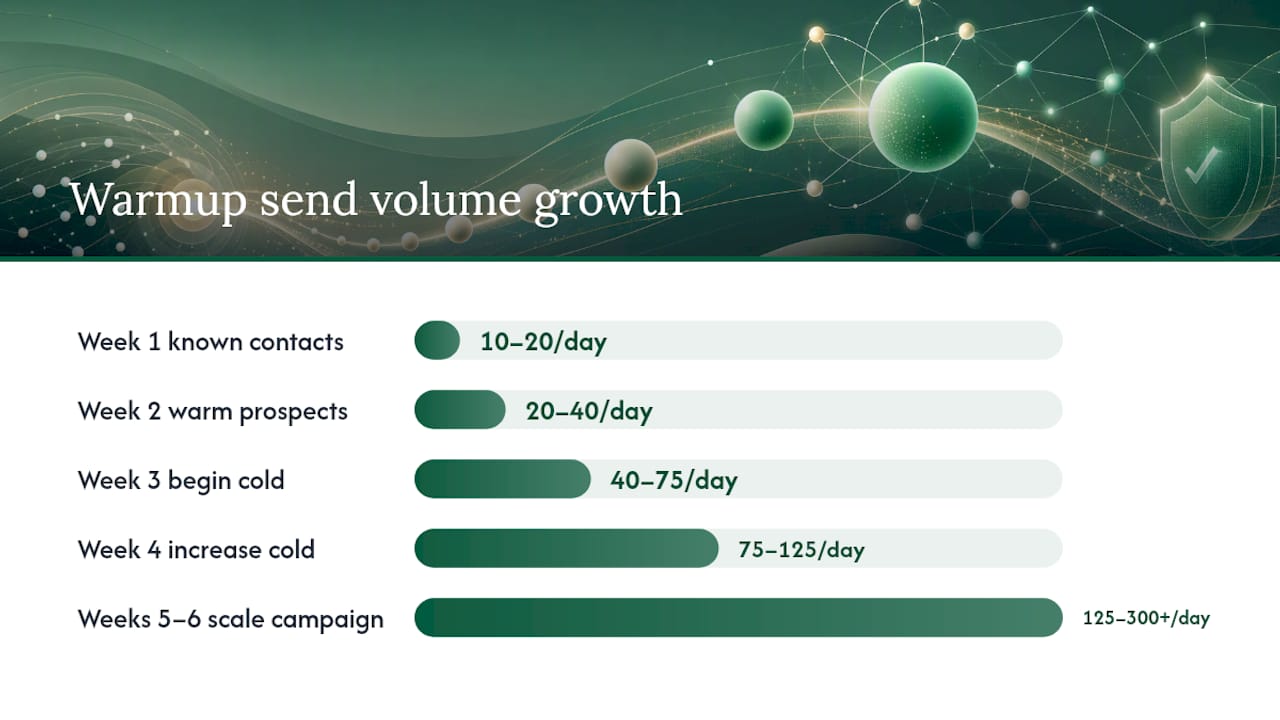
These are conservative baselines. If your domain reputation in Google Postmaster shows “High” by week 4, you can accelerate. If it shows “Low” or “Bad,” pull back and investigate before continuing.
Shared vs. dedicated IPs
For most early-stage teams sending under 10,000 emails per month, a shared IP through a reputable ESP is the right choice. Shared IPs benefit from the collective reputation of all senders on that pool, and the ESP manages the IP’s warmup and maintenance.
A dedicated IP makes sense when you’re sending consistently above roughly 50,000 emails per month and have the discipline to maintain volume. A dedicated IP that goes dormant for weeks drops in reputation quickly. Inconsistent volume on a dedicated IP is often worse than a shared IP.
Pro Tip: Keep a small baseline of warmup sends running between campaigns, even when you’re not actively prospecting. Sending 10–15 messages per day to engaged contacts during quiet periods prevents the dormant-domain spike that kills deliverability when you restart a campaign after a two-week pause.
Managed warm-up tools designed for B2B teams can automate this baseline activity so it runs in the background without manual effort.
List hygiene and permission practices that protect your sender reputation
The quality of your prospect list is a direct input to your domain’s reputation. Bad addresses generate bounces. Spam traps generate blacklist listings. Disengaged contacts generate complaints. All three damage deliverability, and the damage from spam traps in particular can take many months to undo.
Bounce handling
Hard bounces must be suppressed immediately after the first occurrence. A hard bounce means the address doesn’t exist or the domain is unreachable. Continuing to send to hard-bounced addresses is one of the fastest ways to damage your sending reputation.
Soft bounces (temporary failures: full mailbox, server timeout) should be retried automatically by your ESP. After three to five consecutive soft bounces on the same address, treat it as a hard bounce and suppress it.
Never buy lists
Purchased, scraped, and brokered lists are the single most reliable way to hit spam traps. Spam traps are addresses that exist specifically to catch senders who don’t practice proper list hygiene. They never opt in, they never engage, and hitting one signals to providers that you’re sending to people who didn’t ask to hear from you. The long-term damage from spam-trap hits is severe, and recovery is measured in months, not days.
Sunset inactive prospects
Any prospect who has received four or more touches with no open, click, or reply should move to a suppression list or a re-engagement segment. Continuing to send to chronically unengaged addresses drags down your engagement signals, which providers use as a proxy for whether recipients want your mail.
CAN-SPAM compliance basics
For U.S. sends, the CAN-SPAM Act requires that every commercial email includes a valid physical mailing address, a clear and functional unsubscribe mechanism, and a subject line that accurately reflects the message content. Unsubscribe requests must be honored within 10 business days. Cold B2B email is generally covered by CAN-SPAM rather than opt-in laws like GDPR (for EU recipients), but the unsubscribe and physical address requirements apply regardless of whether the recipient opted in.
Content and formatting rules that improve inbox placement for cold B2B emails
Spam filters evaluate content alongside authentication and list quality. A technically perfect setup can still land in spam if the message looks like bulk promotional mail. The goal for cold B2B outreach is to look like a personal email from one professional to another.
Subject lines
Keep subject lines short, specific, and lowercase. “Quick question about your onboarding flow” outperforms “INCREASE YOUR REVENUE WITH OUR PLATFORM!!!” not just because of spam filters but because it reads like something a real person would write. Avoid excessive punctuation, emoji in B2B contexts, and phrases like “free,” “guaranteed,” or “act now” that trigger spam scoring.
Body length and structure
First-touch cold emails should stay in the 50–80 word range. One clear ask, one CTA. Longer messages signal bulk mail and give spam filters more surface area to evaluate. Save case studies and detailed value propositions for follow-up touches after you’ve established a thread.
Plain text vs. HTML
Plain text is the right format for first-touch cold outreach. HTML templates with images, logos, and multiple links look like marketing email, because they are marketing email. Spam filters treat them accordingly. If you use HTML, keep it minimal: no images, no more than one link, no tracking pixels on the first message.
Links and tracking
One link maximum on a first-touch cold email. Preferably none if you can make the ask without one. Multiple links are a strong spam signal. For tracking, prioritize reply rate over open rate. Open tracking requires a tracking pixel (a tiny image), which adds an HTML element and can trigger image-blocking or spam scoring. A reply is a stronger engagement signal anyway.
Formatting signals
- From name should be consistent across all sends (first name + last name, not a company name for cold outreach).
- Physical address in the footer for any message that qualifies as commercial under CAN-SPAM.
- Unsubscribe link present and functional on every message.
- Providers now expect one-click unsubscribe headers (RFC 8058) for commercial sends, and missing these increases complaint risk.
Quick do/don’t pairs:
| Risky | Safer |
|---|---|
| “Congratulations! You’ve been selected…” | “Had a question about [specific thing]” |
| Three links to product pages | One link to a calendar or relevant resource |
| HTML template with logo and banner | Plain text, signature only |
| “Free trial — limited time offer!” | “Worth a 15-minute call?” |
| Sending from noreply@company.com | Sending from firstname@mail.company.com |
Sending cadence, sequences, and engagement-first practices to protect sender reputation
How you send matters as much as what you send. Volume spikes, identical message patterns, and ignoring engagement signals all generate negative reputation signals even when your authentication is perfect.
Volume consistency
Consistent daily volume matters more than the exact hour you send. Providers build expectations around your sending patterns. A domain that sends 50 messages every weekday looks predictable and legitimate. A domain that sends zero for two weeks and then fires 500 in a day looks like a compromised account or a spam operation.
Segment by engagement first
Start every new campaign by sending to your most engaged segment first. Prospects who’ve opened or clicked in prior campaigns, replied to anything, or visited your website recently are more likely to engage positively. Positive engagement signals (opens, replies, moves to primary inbox) build reputation before you reach the colder segments.
Vary follow-up content
Mailbox providers increasingly penalize pattern-matched copy. If every message in your sequence uses the same sentence structure, the same opening phrase, or the same call to action, providers can identify it as templated bulk mail. Vary the angle, the length, and the structure of each touch. Signal-based personalization (referencing something specific about the prospect’s company, role, or recent activity) improves both reply rates and deliverability.
How to test inbox placement and monitor sender health
Testing and monitoring are what separate teams that catch problems early from teams that discover a deliverability issue after three weeks of wasted sends.
Seed-list inbox placement tests
A seed-list test sends your message to a set of real mailboxes across providers (Gmail, Outlook, Yahoo, and others) and reports where each copy landed: primary inbox, Promotions, spam, or missing. Run a seed test on every new message template before the full campaign send. Tools like GlockApps, Litmus, or MailReach provide seed-list testing with provider-level breakdowns.
Interpret results this way: inbox placement above 85% is acceptable; above 90% is strong. Any message landing in spam at more than one provider warrants investigation before sending at scale.
Provider monitoring dashboards
| Tool | What It Reports | Where to Check | Threshold to Watch |
|---|---|---|---|
| Google Postmaster Tools | Domain reputation, IP reputation, spam rate, delivery errors | postmaster.google.com | Spam rate <0.10% ideal; <0.30% enforcement |
| Microsoft SNDS | IP-level complaint data, trap hits, sending volume | sendersupport.olc.protection.outlook.com | Red status = immediate action |
| Yahoo CFL (Complaint Feedback Loop) | Complaint reports from Yahoo/AOL recipients | Register at senders.yahooinc.com | Any complaint spike warrants list review |
| Spamhaus DNSBL | Domain and IP blacklist status | check.spamhaus.org | Any listing = pause and investigate |
DNS blocklists like Spamhaus are a core operator-level defense, and a listing there affects acceptance across dozens of providers simultaneously, not just Spamhaus-connected ones.
Monitoring cadence
Check Google Postmaster Tools weekly at minimum. Run a seed test on every new message template before the campaign goes live. Set up email alerts for any Spamhaus listing using a monitoring service or a simple cron job against the DNSBL lookup API. Tracking tools built for B2B outbound teams can consolidate some of this monitoring into a single dashboard.
If deliverability drops: how to diagnose and recover
A deliverability drop rarely has a single cause. The triage process matters as much as the fix.
Triage checklist
Run these checks in order before touching any campaign settings:
- Run a seed-list test immediately to confirm the problem and identify which providers are affected.
- Check Google Postmaster Tools for domain reputation status and spam rate trend.
- Check Microsoft SNDS for IP-level complaint data.
- Pull DMARC aggregate reports for the past 7 days and look for unauthorized senders or alignment failures.
- Check Spamhaus and MXToolbox blacklist lookup for any active listings.
- Review bounce rate data from the past two campaigns for sudden spikes.
- Identify which list segment or message template correlates with the timing of the drop.
Recovery timelines
Moderate damage (elevated spam rates for less than two weeks, no blacklist listings): expect 4–8 weeks to restore reputation with consistent clean sending.
Severe damage (blacklist listings, sustained complaint rates above 0.30%, or spam-trap hits): recovery takes 30–90 days or longer. In some cases, starting a new sending subdomain with a fresh warmup is faster than rehabilitating a severely damaged domain.
Blacklist delisting process
- Identify the specific list you’re on (Spamhaus SBL, DBL, XBL, or others) using a DNSBL lookup tool.
- Investigate and fix the root cause (spam trap hits, compromised account, authentication failures).
- Collect evidence of the fix (DNS records, suppression logs, authentication validation screenshots).
- Submit a delisting request through the blacklist operator’s official form. Spamhaus’s DNSBL documentation explains the listing mechanics and what operators expect in a delisting request.
Symptom-to-action escalation map:
| Symptom | First Action | Second Action |
|---|---|---|
| Sudden bounce spike | Check list verifier results; suppress flagged addresses | Reduce send volume 50% until bounce rate drops below 2% |
| Persistent spam placement | Run seed test; audit content for spam triggers | Check DMARC reports for alignment failures |
| Complaint rate above 0.10% | Pause sends to lowest-engagement segments | Review list source and suppression hygiene |
| Blacklist listing | Pause all sends; identify root cause | Fix cause, then submit delisting request |
| Postmaster domain reputation drops to “Low” | Reduce volume; increase engagement-first sends | Review recent list quality and bounce data |
What tooling does a U.S. B2B team actually need, and what does it cost?
The core stack for cold email deliverability has four components: an ESP with authentication support, a list verifier, a warm-up service, and monitoring dashboards. Most teams overbuy on features and underbuy on list verification.
Ballpark cost ranges (U.S. market, 2026)
| Team Stage | Monthly Send Volume | Approximate Monthly Tool Cost |
|---|---|---|
| Early-stage / founder | — | $50 (ESP + basic verifier) |
| Growth team | — | $200–$500 (ESP + verifier + warmup) |
| Agency / high-volume | — | $500 (full stack + seed testing) |
These ranges cover tooling only. They don’t include the time cost of managing authentication, warmup, list hygiene, and monitoring manually.
Copyable pre-send diagnostic template and a 6-week warm-up schedule
Pre-send diagnostic checklist (paste into your SOP)
| # | Check | Owner | Timestamp | Pass / Fail | Remediation Notes |
|---|---|---|---|---|---|
| 1 | SPF record valid and under 10 lookups | IT / Founder | |||
| 2 | DKIM 2048-bit key, signing domain aligned | IT / Founder | |||
| 3 | DMARC p=none or stricter, RUA address active | IT / Founder | |||
| 4 | List verified within 30 days | Sales / Ops | |||
| 5 | Hard bounces suppressed from prior campaigns | Sales / Ops | |||
| 6 | No purchased or scraped addresses on list | Sales Lead | |||
| 7 | Unsubscribe link present and functional | Sales | |||
| 8 | Physical address in footer (CAN-SPAM) | Sales | |||
| 9 | First-touch message: plain text, one link max | Sales | |||
| 10 | Seed test run within 48 hours, >85% inbox | Sales / Ops | |||
| 11 | Daily send volume within warmed capacity | Sales Lead | |||
| 12 | Postmaster domain reputation checked | Sales Lead |
Copyable 6-week warm-up schedule
Week 1: 10–20 sends/day. Send only to known contacts (colleagues, partners, past customers). Goal: generate replies. Monitor: confirm DKIM and SPF are signing correctly on outbound messages.
Week 2: 20–40 sends/day. Expand to warm prospects. Monitor: check Postmaster for domain reputation status. Bounce rate should be near zero.
Week 3: 40–75 sends/day. Begin cold outreach at low volume. Run first seed test on your cold email template. Target: >85% inbox placement.
Week 4: 75–125 sends/day. Increase cold volume. Check Postmaster domain reputation — aim for “Medium” or “High.” Run a second seed test if you changed the template.
Week 5: 125–200 sends/day. Full cold cadence begins. Monitor spam complaint rate daily in Postmaster. Keep below 0.10%.
Week 6: 200–300+ sends/day. Scale to full campaign volume. Maintain weekly Postmaster checks and per-campaign seed tests going forward.
The part of deliverability most guides won’t tell you
The conventional wisdom on cold email deliverability focuses almost entirely on technical setup: get your SPF right, warm up your domain, verify your list. That advice is correct. It’s also incomplete in a way that costs teams real pipeline.
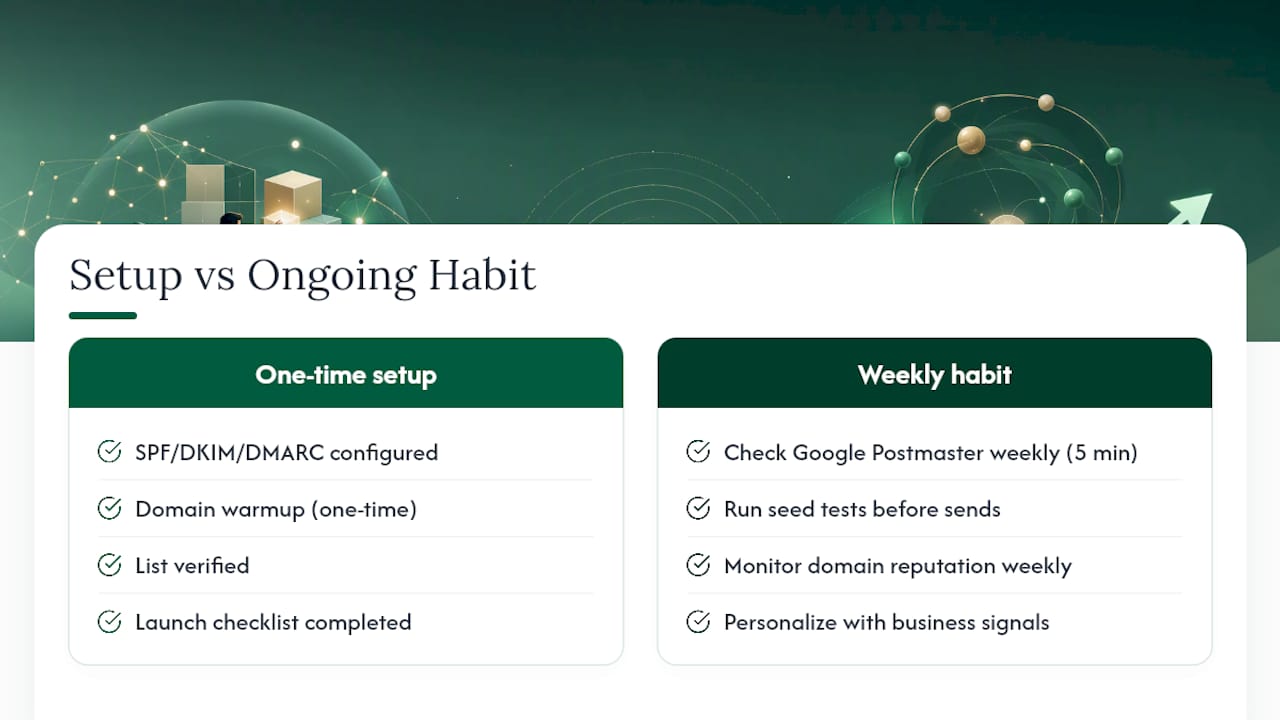
The part that gets skipped is the ongoing discipline. Authentication is a one-time setup. Warmup is a one-time process. But the teams that consistently land in the primary inbox are the ones treating deliverability as a weekly operational habit, not a launch checklist they ran six months ago.
The most common failure pattern isn’t a misconfigured DMARC record. It’s a team that set everything up correctly, ran a successful campaign, paused for three weeks, and then resumed sending at full volume without re-checking their domain reputation or running a seed test. The domain cooled off. The list aged. The first batch of the new campaign hit spam at a rate that triggered provider-level filtering. By the time they noticed, two weeks of sends were wasted.
There’s also a subtler problem: the balance between personalization and pattern detection. Mailbox providers have gotten good at identifying templated copy, even when it’s technically “personalized” with a first name and company name. The teams that avoid this are the ones using real business signals — a prospect’s recent funding round, a specific product they launched, a job posting that signals a pain point — rather than mail-merge tokens. That kind of personalization is harder to produce at scale, but it’s what separates a 12% reply rate from a 3% one, and it generates the engagement signals that protect your domain reputation over time.
The monitoring cadence matters more than the monitoring tools. Google Postmaster Tools is free and takes five minutes per week to check. Most teams that have deliverability problems haven’t looked at it in months. Schedule a recurring calendar block. Make it someone’s job. The signal is there; the discipline to act on it early is what’s usually missing.
Runleadpilot handles the deliverability infrastructure so your team can focus on replies
Managing cold email deliverability manually means owning DNS records, warmup schedules, list verification runs, seed tests, and weekly monitoring checks across every sending domain you operate. For a founder or a two-person sales team, that’s a significant time tax on work that doesn’t directly generate pipeline.

Runleadpilot is built for exactly this situation. It provisions dedicated sending domains and inboxes, runs continuous warmup in the background, verifies prospect lists before every send, and writes personalized cold email sequences from real business signals rather than generic templates. The platform monitors deliverability across your sending infrastructure and routes warm replies directly to your team for human follow-up. Agencies managing outbound for multiple clients get consolidated billing and multi-client workspaces through LeadPilot for agencies, without managing separate domain setups per client.
If you’re spending more time on deliverability infrastructure than on actual prospect conversations, see how Runleadpilot’s cold email automation handles the technical layer end to end. You can build a free campaign preview before committing to a paid plan, so you see exactly what the outreach looks like before it goes live.
Authoritative references and tools to bookmark
The sources below are the primary standards, provider tools, and blacklist monitors referenced throughout this guide. Schedule weekly checks on the monitoring tools and revisit the standards documents whenever a provider announces new requirements.
- CAN-SPAM Act (FCC) — The foundational U.S. law governing commercial email. Review the unsubscribe and physical address requirements before any campaign send.
- Google Postmaster Tools — Free dashboard for domain reputation, IP reputation, spam rate, and delivery errors for Gmail. Check weekly.
- Microsoft SNDS — IP-level complaint and trap data for Outlook recipients. Microsoft’s updated high-volume sender requirements are published on the Microsoft Tech Community blog.
- Spamhaus DNSBL — Check your sending domain and IP against the most widely used DNS blocklists. Spamhaus’s whitepaper on DNSBL function explains how listings work and what operators expect in delisting requests.
- DMARC standard (Wikipedia overview) — Accessible explanation of DMARC mechanics, alignment, and policy options for teams setting up authentication for the first time.
- Proofpoint: Email Deliverability — Practical guidance on authentication-first remediation and the sequence for reading DMARC reports before enforcing policy.
- WordStream: Email Deliverability Checklist — Checklist-style reference covering authentication, list quality, and engagement signals.
- Warmy: How to Improve Email Deliverability — Covers authentication fixes, PTR records, TLS compliance, and one-click unsubscribe header requirements.
- Clay: Complete Guide to Email Deliverability — Comprehensive overview of the inputs that determine inbox placement and the long-term risks of spam-trap hits.