Domain Reputation Management: How to Protect Inbox Placement
Master domain reputation management to ensure your emails land in inboxes, not spam folders. Learn key steps to protect your sender score.

Domain Reputation Management: How to Protect Inbox Placement
Domain reputation management is the practice of monitoring and controlling the trust signals that mailbox providers assign to your sending domain, because that score decides whether your email lands in the inbox or the spam folder. For B2B senders, engagement and list quality typically outweigh IP-level factors, since most major providers now judge domains, not IPs. If you do nothing else today, do this: authenticate your domain with SPF, DKIM, and DMARC, then pull up Google Postmaster Tools and check your Sender Score.
- Confirm SPF, DKIM, and DMARC all show “pass” in a recent header trace.
- Check your Google Postmaster Tools domain reputation panel (high, medium, low, or bad).
- Pull your Sender Score, where 80 or above is a reasonable target.
Pro Tip: If your Postmaster Tools reputation reads “bad” or “low,” stop your next scheduled send until you’ve isolated which list segment triggered it. Sending through a known problem doesn’t just fail to fix it, it compounds the damage.
Key Takeaways
Domain reputation management works when authentication, engagement monitoring, and staged sending volume operate together as a continuous cycle rather than a one-time fix.
| Point | Details |
|---|---|
| Authenticate first | Confirm SPF, DKIM, and DMARC all pass before troubleshooting anything else. |
| Watch engagement, not just IP | Domain-level engagement and list quality now outweigh IP reputation for most B2B senders. |
| Set numeric thresholds ahead of time | Target under 0.1% complaints and under 2% hard bounces; alert well before those numbers double. |
| Recover in stages | Restrict sending to your most engaged 20 to 30% first, then widen slowly over 30 to 90 days. |
| Managed monitoring reduces manual load | Runleadpilot handles dedicated domains, warmup, and continuous monitoring for teams without dedicated deliverability staff. |
Table of Contents
- What Domain Reputation Actually Means to Mailbox Providers
- What Signals Actually Move Your Domain Reputation
- How to Check Your Domain Reputation Right Now
- The KPIs Worth Tracking and When to Pull the Alarm
- The 30/60/90 Day Repair Plan for a Damaged Domain
- Building an Architecture That Prevents the Next Crisis
- What the Deliverability Data Actually Tells You
- Sources
What Domain Reputation Actually Means to Mailbox Providers
Mailbox providers track two separate trust scores: one for the sending IP address, one for the domain itself. Domain reputation has become the dominant signal because IPs rotate through shared pools, migrate between email service providers, and get reassigned constantly, while a domain persists across all of that. Gmail, Microsoft, and Yahoo all build a history tied to your domain’s authenticated sending patterns, and that history is what actually determines inbox placement over the long run.
This matters more for B2B senders than almost anyone else. A sales team sending from the same domain for years accumulates a reputation that a shared ESP IP simply can’t offer. It’s also why switching IPs to escape a bad run rarely helps.
You can see this data directly, not guess at it:
- Google Postmaster Tools shows domain reputation, IP reputation, spam rate, and authentication success for any domain sending meaningful volume to Gmail addresses.
- Microsoft SNDS (Smart Network Data Services) gives the equivalent view for Outlook.com and Microsoft 365 recipients, including complaint rates and trap hits.
Both are free, and both require verifying domain ownership through DNS before they start populating data, so set them up before you need them, not after a delivery crisis.
What Signals Actually Move Your Domain Reputation
Not every metric carries equal weight. Mailbox providers react fastest to signals that suggest you’re sending unwanted mail, and they react slowest to signals that merely suggest average performance. Here’s the order that matters, from most damaging to least:
- Hard bounces. A hard bounce means the address doesn’t exist. Providers read a high hard bounce rate as evidence you’re mailing a stale or purchased list, and it’s one of the fastest ways to tank a domain’s standing.
- Spam complaints. Even a small percentage of recipients clicking “report spam” carries outsized weight. Valimail recommends monitoring complaint rates alongside authentication status because providers treat complaints as a direct expression of unwanted mail, unlike bounces, which can sometimes be data hygiene issues.
- Engagement metrics. Opens, clicks, replies, and how quickly recipients act on a message all feed provider algorithms. Low engagement over time reads as low relevance, even without a single complaint.
- Authentication failures. Missing or broken SPF, DKIM, or DMARC doesn’t just risk spoofing, it actively signals unreliability to filtering systems.
- Spam traps and blocklist hits. A single spam trap hit, often from a purchased or scraped list, can do more damage than months of average sending. Common triggers include purchased lists, sudden volume spikes, and missing authentication after platform migrations.
Sudden volume spikes deserve their own mention. Ramping from 500 sends a day to 5,000 overnight looks identical, to a filtering algorithm, to a compromised account blasting spam.
How to Check Your Domain Reputation Right Now
Run these checks in order, starting with the tools that carry the most authority with the providers you actually send to.
- Google Postmaster Tools. Look at the domain reputation graph first (it buckets into high, medium, low, or bad), then check the spam rate chart. Anything trending above 0.3% spam rate deserves investigation before your next campaign.
- Microsoft SNDS. Register your sending IP ranges and review the complaint and trap-hit data specific to Outlook and Hotmail delivery.
- Sender Score. This independent score gives you a single number to track over time, and it’s useful precisely because it’s not tied to one mailbox provider’s internal logic.
- Spamhaus lookup. Search your domain and IP against Spamhaus’s databases directly, since this is one of the few blocklists that major ISPs actually consult when making filtering decisions.
- DMARC aggregate (RUA) reports. These XML reports show you exactly which sending sources are passing or failing authentication on your domain’s behalf, including anyone spoofing you.
Google’s own guidance treats Postmaster Tools and Microsoft SNDS as more authoritative for diagnosing delivery problems to those specific providers than generic third-party blocklist alerts, so weight your remediation priorities accordingly.
Pro Tip: Run an inbox placement (seedlist) test before and after any major sending change. It’s the only way to confirm whether your fix actually moved mail out of the spam folder rather than just improving a dashboard number that lags real placement by days.
The KPIs Worth Tracking and When to Pull the Alarm
A reputation monitoring routine only works if you’ve set numeric thresholds ahead of time, not after a crisis. AWS frames reputation management around four pillars: prevention, monitoring, analysis, and response, and the monitoring layer is where most teams fall short because they check metrics reactively instead of on a schedule.
| KPI | Target / Alert Threshold |
|---|---|
| Hard bounce rate | Target low; investigate immediately if rates rise significantly |
| Spam complaint rate | Target low; alert at a moderate threshold, pause sending if rates become elevated |
| Engagement rate (opens/clicks) | Target high engagement for cold B2B; investigate if engagement drops notably |
| Authentication pass rate | Target 100% SPF/DKIM/DMARC pass; alert on any failure spike |
- Log these four numbers weekly at minimum, daily during any active campaign ramp or after a domain or IP change.
- Assign one owner who receives automated alerts when complaint rate or bounce rate crosses the threshold, so nobody’s relying on someone remembering to check a dashboard.
- Treat a complaint rate above 0.5% or a sustained bounce rate above 5% as a hard stop: pause sending on that segment until you’ve identified the cause.
- Authentication failures should trigger investigation the same day, since they often indicate a DNS misconfiguration or an unauthorized sender using your domain.
Root-cause analysis matters more than reflexive volume cuts. A team that pauses sends without figuring out which list segment triggered the complaint spike will likely repeat the same mistake once sending resumes.
The 30/60/90 Day Repair Plan for a Damaged Domain
Recovering a damaged domain reputation is a staged process, not a switch you flip. Practitioner guidance is consistent on this point: repair typically takes weeks to months, and buying a new domain to escape the problem usually just imports suspicion into a fresh domain with zero sending history.
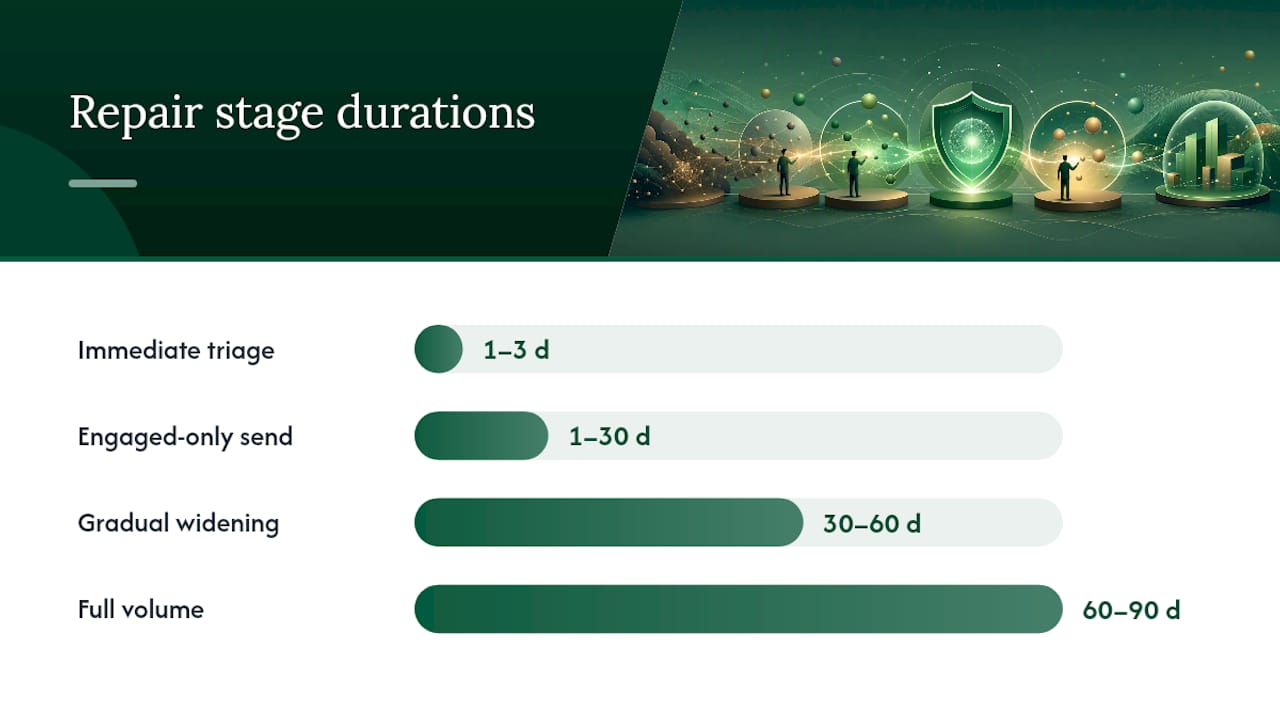
Immediate triage (days 1 to 3):
- Stop all sends to the segment or campaign associated with the reputation drop, but don’t stop sending entirely if other segments show clean metrics.
- Verify SPF, DKIM, and DMARC are correctly configured and passing, since a broken authentication record is a common, fixable root cause.
- Pull your last 30 days of send data and isolate which list, campaign, or integration correlates with the spike in bounces or complaints.
- Remove hard bounces and unengaged contacts (no opens or clicks in 90+ days) from active sending lists.
Days 1 to 30: engaged-only sending. Restrict sending to a narrow segment of your most engaged recipients, typically people who’ve opened or replied recently. A staged ramp that starts narrow and slowly widens is the standard pattern for retraining provider algorithms, because a sudden return to full volume reads the same as a compromised account resuming an attack.
Days 30 to 60: gradual widening. If bounce and complaint rates hold steady at target thresholds for two consecutive weeks, expand sending to moderately engaged contacts. Monitor Postmaster Tools reputation daily during this phase.
Days 60 to 90: full volume with monitoring. Return to normal sending cadence only once your domain reputation graph shows a sustained “high” or “medium” rating and complaint rates sit under 0.1% for three consecutive weeks.
For blocklist delisting, prioritize lists that major ISPs actually consult. Spamhaus carries far more operational weight than obscure or low-traffic blocklists, so confirm you’re listed there before spending effort on delisting requests elsewhere. Collect evidence of remediation (list cleaning, authentication fixes, volume reduction) before submitting any delisting request, since most reviewers want proof the underlying cause has been addressed.
A dedicated IP or new subdomain makes sense only after you’ve fixed the root cause, not as a substitute for fixing it. Isolating a clean transactional stream onto its own subdomain while you rebuild your marketing domain’s reputation is a legitimate move; abandoning a damaged domain entirely just starts the trust clock over at zero.
Building an Architecture That Prevents the Next Crisis
The technical setup underneath your sending domain determines how much manual firefighting you’ll do later. Get this right once and most reputation problems never happen.
SPF records have a hard limit of 10 DNS lookups, and exceeding it causes SPF to fail silently for some receivers. Consolidate third-party senders under one SPF include chain rather than stacking redundant entries. DKIM keys should never be shared across multiple sending services. If one vendor’s key gets compromised or misused, you don’t want that damage bleeding into every other platform using the same domain. DMARC policy should progress deliberately: start at p=none while you collect RUA reports, confirm every legitimate sender is passing authentication, then move to p=quarantine and eventually p=reject once you’re confident nothing legitimate will be blocked.
Subdomain isolation is one of the most underused defenses available. Rackspace’s guidance on domain reputation recommends separating mail by class, marketing on one subdomain, transactional on another, sales outreach on a third, so a problem in one stream doesn’t drag down the others.
A reputation crash on your marketing subdomain shouldn’t touch your billing receipts or your sales team’s cold outreach. Isolation is the difference between a contained incident and a company-wide deliverability outage.
- Warm up any new domain or IP gradually: start at low daily volume (dozens, not thousands) and increase only as engagement holds steady.
- Verify list hygiene on a recurring cadence, removing hard bounces immediately and unengaged contacts after a defined sunset window.
- Make unsubscribing genuinely one click. Every friction point pushes a recipient toward the spam button instead.
- Consider BIMI once DMARC enforcement is stable. It displays your verified logo in supporting inboxes and reinforces legitimacy, though it depends on DMARC being enforced first.
Turning This Into a Weekly Operating Rhythm
None of this works as a one-time audit. It works as a routine, and the routine should be boring enough that it survives a busy quarter.
- Daily: Automate a check on complaint rate, bounce rate, and authentication pass rate. Route any threshold breach to whoever owns email operations, not a shared inbox nobody watches.
- Weekly: Review Google Postmaster Tools and Microsoft SNDS trend lines, and run a seedlist test if you’ve made any sending change that week.
- Monthly: Audit list hygiene, remove unengaged contacts past your sunset window, and review whether any domain or IP is due for warmup adjustment.
- Runbook trigger: Any complaint rate above 0.5%, sustained bounce rate above 5%, or a Postmaster Tools reputation drop to “low” or “bad” pauses sending on that segment automatically and escalates to whoever owns deliverability, no exceptions, no waiting for the next scheduled review.
How a Managed Platform Handles This Without a Dedicated Ops Team
Most lean sales teams don’t have a full-time deliverability specialist, and that’s exactly where a managed platform earns its keep. Runleadpilot manages dedicated sending domains, runs automated warmup on new domains before they carry real campaign volume, and continuously monitors the metrics covered above so a founder or small sales team isn’t manually checking Postmaster Tools every morning.
- Dedicated sending domains isolated from other tenants, reducing shared-reputation risk.
- Automated warmup sequencing rather than a manual, error-prone ramp schedule.
- Continuous monitoring with built-in escalation, instead of relying on someone to remember the runbook.
If you’re sending under a few hundred emails a week with one domain, DIY monitoring is manageable. Past that volume, or across multiple client domains, the operational overhead usually justifies a managed approach.
What the Deliverability Data Actually Tells You
Most advice on domain reputation treats it like a checklist you complete once. It isn’t. The providers grading your domain update that grade continuously, and the teams that recover fastest from a reputation hit are the ones who already had daily monitoring in place before things went wrong, not the ones scrambling to set up Postmaster Tools during a crisis.

The conventional wisdom oversells authentication and undersells engagement. SPF, DKIM, and DMARC are table stakes. They stop you from failing outright, but they don’t make Gmail or Outlook want to put your mail in front of someone. Engagement does that. A perfectly authenticated domain sending to a disengaged list will still lose the inbox over time.
If you take one thing from this playbook, prioritize list hygiene and engagement segmentation before you touch anything technical. Most reputation crises trace back to who you’re mailing, not how you’re authenticating. Fix the audience problem first, and the technical layer becomes much easier to keep clean.
A Practical Next Step With Runleadpilot
If the operational load in this playbook, daily monitoring, staged warmups, subdomain isolation, sounds like more than your team has bandwidth for, that’s a fair read. Most lean sales teams don’t have a dedicated deliverability hire, and manually running Postmaster Tools checks every morning isn’t why anyone joined a sales team.

Runleadpilot manages dedicated sending domains for every campaign, runs automated warmup before any domain carries real volume, and monitors the same KPIs covered here (bounce, complaint, engagement, authentication) continuously in the background. You don’t build the monitoring dashboard yourself or write the alert thresholds; the platform already runs them. If you want to see how this maps to your own outbound plans before committing to anything, you can build a free campaign preview and see how the targeting and sending setup would look for your business.
Sources
- Postmaster Tools dashboards - Gmail Help
- The Four Pillars of Managing Email Reputation | AWS Messaging Blog
- Domain reputation check: how to check and improve your score
- Check your domain’s reputation and learn about the data
- Senderscore